

 My Top 10G Tuning Tools


We've spent a lot of time discussing SQL statement tuning. We started off this 15 blog series with a discussion on system triage and finished with Oracle access path identification and tuning. I also dedicated a dozen blogs or so to 10G Grid Control performance monitoring and analysis tools. With the abundance of long-winded information I have made available on this blog, I thought it might be beneficial to condense some of it into a review of some of my favorite tuning toolsets.
My Number One
Tuning Tool of All Time - 10G Grid Control
If we are administering a 10G database, our administration tool of choice is
either 10G Database Control (non-grid, standalone version), or 10G Grid Control
to administer it. The advanced alerting, monitoring and administration features
make this tool our preferred method of administration. The advanced performance
monitoring and analysis features make it my number one tool for performance
problem determination.
The future of Oracle database tuning will be administrators interpreting and
implementing the recommendations generated by the intelligent advisors and ADDM.
It is a foregone conclusion that Oracle will continue to improve upon its performance
monitoring and analysis toolsets. Self tuning features are no longer options
that are "nice to have", they are requirements for Oracle's competitive
survival. SQL Server is continuing to scale, moving into areas that were once
dominated by UNIX big-iron machines running Oracle databases. Oracle must compete
with SQL Server's ease of use or it will undoubtedly lose market share.
As the intelligence of the advisors and ADDM increases, the need to possess an in-depth knowledge of Oracle and the usage of detailed diagnostics to improve database performance will decrease. And you heard it here first folks, I also think that reading SQL traces and statistics dumps will be a thing of the past. My crystal ball tells me that its just a matter of time until Oracle's SQL advisors make SQL traces and statistics dumps less and less important until they become totally unnecessary.
The new breed of top tuners will be the administrators who focus on how to use the toolsets and interpret their output. Not the tuners who spend the majority of time digging down into the dark, inner workings of the Oracle software. I'm not saying that knowing how the database works is immaterial. I am stating that this intimate knowledge will become less and less important as the tools mature. It's only a matter of time until tuning is relegated to a minor sub-task that can be scheduled between other activities.
Here's a listing of my favorite 10G Grid Control tools.
Host Performance
Home Page
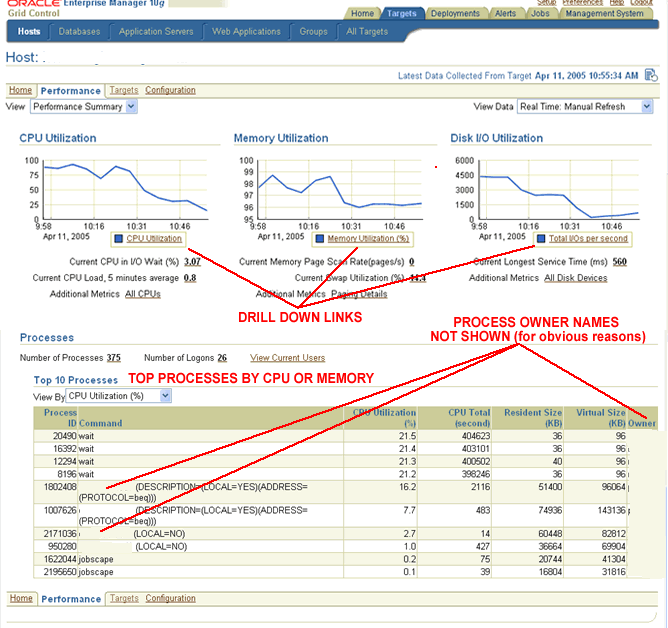
If someone tells me "the whole system is slow", the first thing I'm
going to do is review the host platform's key performance indicators. 10G Grid
Control's Host
Performance panel provides me with exactly the information I'm looking for
- current CPU, memory and disk resource utilization.
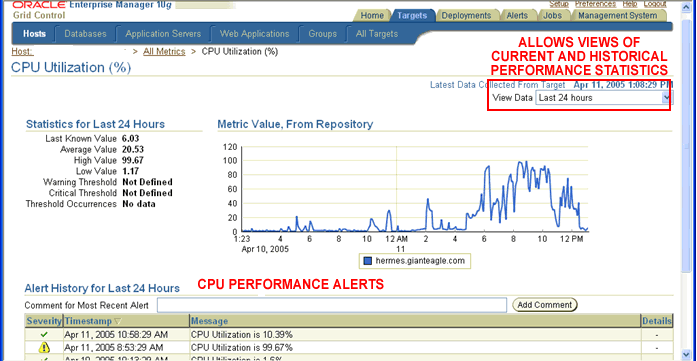
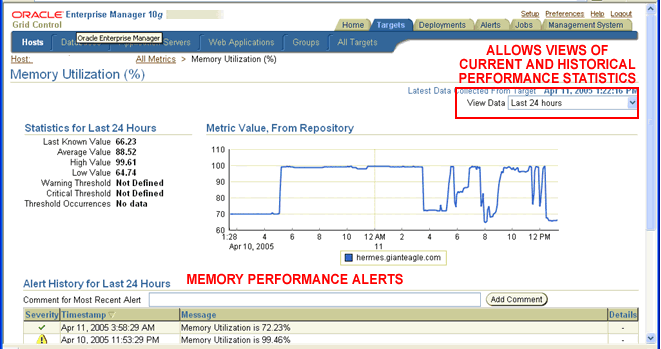
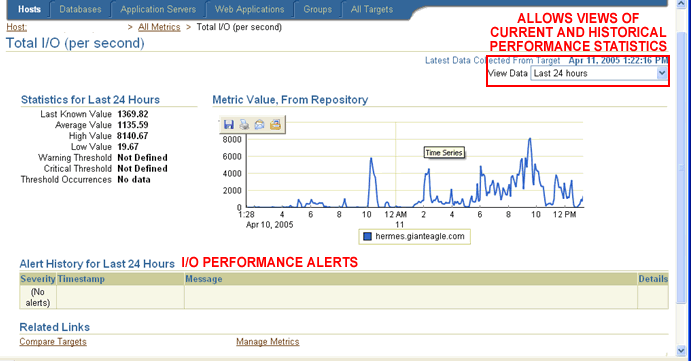
Each resource's graphical display contains links that allow me to view more detailed statistical information. Each of the drill down panels for CPU, Memory and Disk contains a drop down menu list that I can use to view current as well as historical performance statistics for the last 24 hours, 7 days and 31 days. The main performance panel also displays information on the top resource consuming processes that are currently running on the host. Once again, a drop down menu lets me switch between top CPU and top memory consumption reports.
For a more in-depth discussion on host performance tuning, please refer to my blog titled "Host Performance Monitoring Using 10G Enterprise Manager Grid Control".
10G Grid Control
Database Performance Home Page
If I want to review database performance, I will access the 10G
Grid Control Database Performance Home Page, which is available in both
10G Database Control and Grid Control.
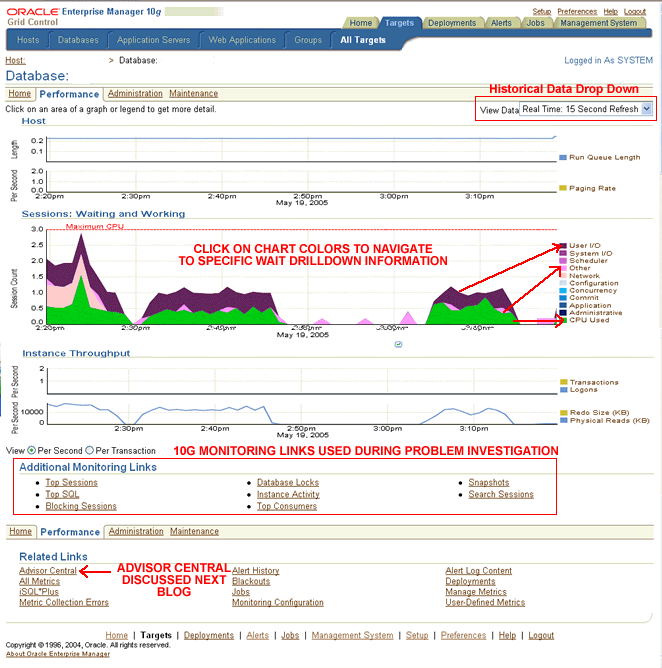
The database performance home page allows me to review performance historically, identify what sessions are dominating "finite system resources", activate advisors and drill down into the top resource consumers. I can then quickly review the SQL they are executing. Does it get any better than that?
I challenge anyone to tell me that they would be able to monitor database performance more efficiently using archaic command line toolsets. By the time you have identified the problem, I'll have already contacted the user running the SQL and created a profile to improve its performance. If I have Grid Control's alerting system configured (which I always do), Grid Control's database performance threshold alert would have already notified me that a problem was occurring. By the time you got that call from an irate user, I would have had it solved. If you want to learn how to configure 10G Grid Control's performance alerting feature, please turn to my blog titled "Configuring 10G OEM Grid Control's Automatic Alert Notification System".
To learn more about 10G Grid Control's database performance monitoring and analysis features, please turn to my blog titled "Database Performance Monitoring Using 10G OEM Grid Control".
10G Grid Control
Advisors
OK, I'll admit it. I'm hooked on the advisors. At first I was very wary of their
recommendations, but the longer I worked with them, the better I liked them.
I have lots of experience tuning Oracle, but if an advisor is going to make
my job easier (and let me spend less time debugging a performance problem),
I'm all for it.
For an overview of 10G Grid Control's advisory features, please refer to my blog that is aptly titled "An Overview of 10G Advisors".
Here's a listing of blogs that provide more specific information on the individual advisors. Please note that each title below also links to a blog on that advisor.
- 10G
SQL Access Advisor - The SQL Access Advisor recommends a set of materialized
views and indexes based on a supplied workload input. The tool can also help
administrators optimize materialized views to take advantage of fast refresh
and query rewrite capabilities. In addition, the SQL Access Advisor may recommend
dropping indexes and materialized views that aren't being used. The SQL Advisor
ranks and groups the recommendations based on the positive impact they will
have if implemented.
- SQL
Tuning Advisor - The SQL Tuning Advisor, as its name implies, provides
SQL tuning recommendations and includes information justifying why it generated
those recommendations. The recommendations may include collecting statistics
on objects, new index creation, restructuring the SQL statement or the creation
of a SQL profile to create a more optimal access path. I have a more detailed
blog the SQL Tuning Advisor titled "SQL
Access Advisor Revisited".
- Segment Advisor - Although I don't use this advisor as much as the SQL Tuning and SQL Access advisors, I do use it on a regular basis. The 10G segment advisor identifies segments that have become fragmented as a result of update and delete operations. The 10G R2 Segment Advisor has been enhanced to identify tables that suffer from excessive row chaining and row migrations. Oracle describes these objects as being sparsely populated. Not only do sparsely populated objects waste space but they can also contribute to SQL performance problems.
Automatic Database
Diagnostic Monitor (ADDM)
ADDM is a "recommendation engine" that uses performance information
stored in the Automatic Workload Repository (AWR) as input. Here's a
blog that provides a detailed description of the Automatic Database Diagnostic
Monitor. By default, AWR snapshots occur every 60 minutes. For more
information on the AWR snapshots, please turn to my blog titled "Working
with Automatic Workload Repository Performance Snapshots".
To learn how to tailor the 10G AWR snapshot environment to meet your specific needs, please refer to my blog titled "Configuring and Administering Automatic Workload Repository Performance Snapshots".
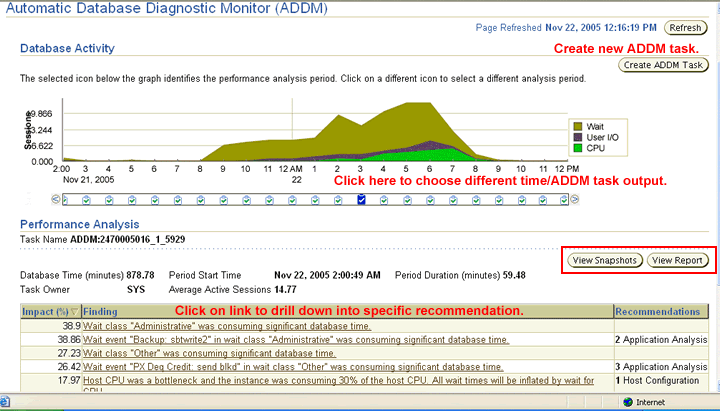
After the AWR information snapshot is executed, the Automatic Database Diagnostic Monitor is triggered to analyze the information contained in the AWR for the period pertaining to the last two Snapshots. ADDM's output includes a plethora of reports, charts, graphs, heartbeats and related visual aids. In general, ADDM provides users with a top-down analysis of performance bottlenecks and their associated resolutions. But you can also execute ADDM manually to generate recommendations for current, as well as historical, time periods.
Statistical information, by itself, is often useless. If you have nothing to compare a measurement to, how will you know if its good or not so good? 10G Grid Control allows two sets of snapshots to be compared to one another. The results of the comparison are displayed graphically using horizontal bars to indicate differences between the two measurements. To learn how to perform snapshot comparison, please refer to my blog titled "You Can't Improve What You Can't Compare".
Conclusion
Take some advice from your friendly ex-Oracle instructor. LEARN HOW TO USE THESE
TOOLS. I can't emphasis that statement strongly enough. As I stated, ADDM and
the intelligent advisors may not currently be a total replacement for DBA experience
and expertise, but sooner or later, they most definitely will be. Don't get
left behind - because its only a matter of time.



Sometimes I found inconsistence between grid control and vmstat, DO u have this experience?
nico