
 Host Performance Monitoring Using 10G Enterprise Manager Grid Control


No matter how expertly you tune an Oracle database, if the server it runs on is overloaded, underpowered or configured incorrectly, you will never obtain "maximus database performis".
So, let's start our discussion on 10G Enterprise Manager's performance monitoring features by investigating the tool's new host monitoring capabilities. This first blog will provide you with a quick tour of EM's hot new host monitoring component. In my next blog, I'll show you how you use the information it generates to monitor operating system and hardware performance.
10G Enterprise Manager calls objects that it monitors and administers "targets." Target types include but are not limited to hosts, databases, application servers, listeners, and third-party applications. 10G EM's home page allows administrators to easily navigate to the different target types. This blog will focus on the host target type.So, let's start our discussion on 10G Enterprise Manager's performance monitoring features by investigating the tool's new host monitoring capabilities. This first blog will provide you with a quick tour of EM's hot new host monitoring component. In my next blog, I'll show you how you use the information it generates to monitor operating system and hardware performance.
Host Home Page
If you take a look at the host's home page you'll notice a configuration section on the right hand side of the page. This section contains navigation links that allow administrators to view hardware and operating system configuration parameters. This system-related information, often only available to O/S administrators, allows DBAs to quickly view parameters that affect server and database performance. The drill-down panels also include information on O/S packages, and patches, disk configuration and file system freespace.
At the bottom of the host's home page is a section that display's information on alerts that are currently active. Alerts are generated when a metric's threshold is exceeded. Metrics are units of measurement that are set at predefined values to assess the health of the target being monitored. These predefined values are called metric thresholds. Thresholds are one or more values against which current statistical values are compared.
10G EM divides the threshold settings into warning and critical categories and allows administrators to configure a specific set of actions that will occur when that threshold category is reached. For example, the DBA may want to be e-mailed if a particular host's CPU utilization exceeds the warning threshold of 70% and paged if the host's CPU utilization exceeds the critical threshold of 90%.
Each target (host, database, listener, application server) has its own set of predefined metrics that can be customized to address each application's unique performance monitoring requirements. In addition, administrators are able to create their own set of user-defined metrics to provide a truly customized monitoring strategy for each monitored target. We'll discuss how administrators define and administer metrics and thresholds in another series of blogs.
Each host's home page contains tabs that allow users to navigate to Performance, Targets and Configuration panels. Let's take a look at each one.
Performance Tab
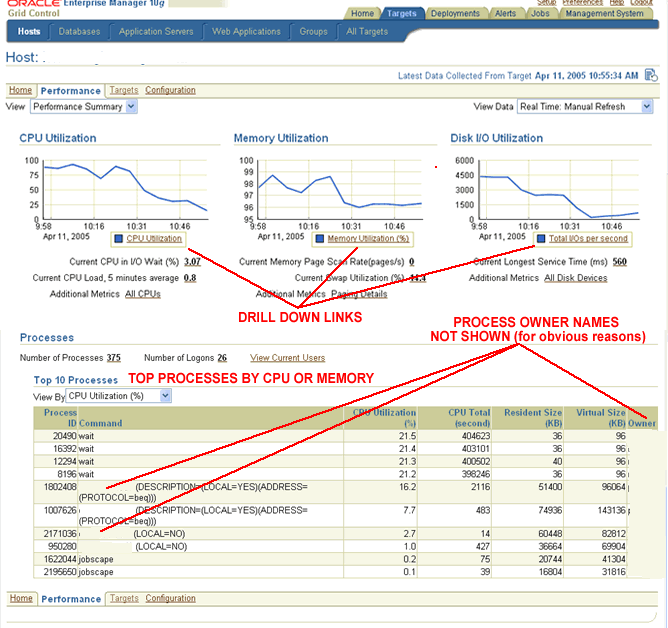
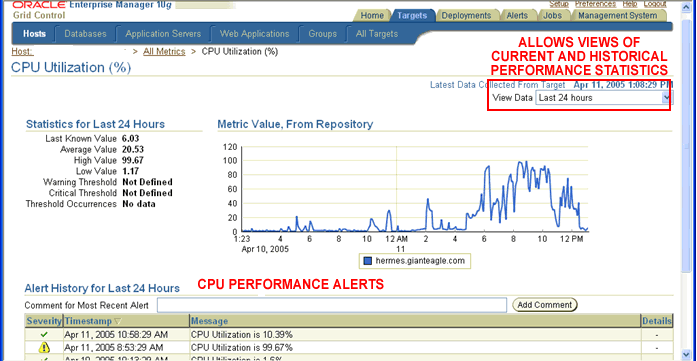
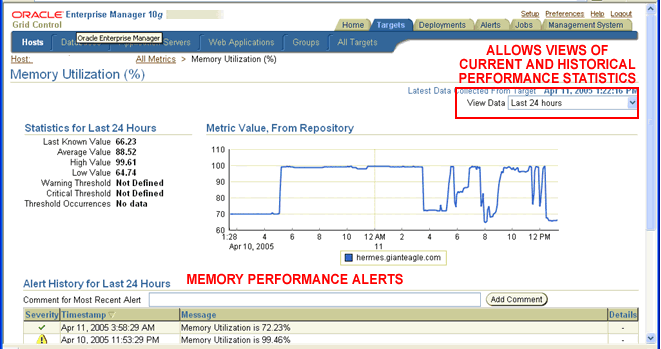
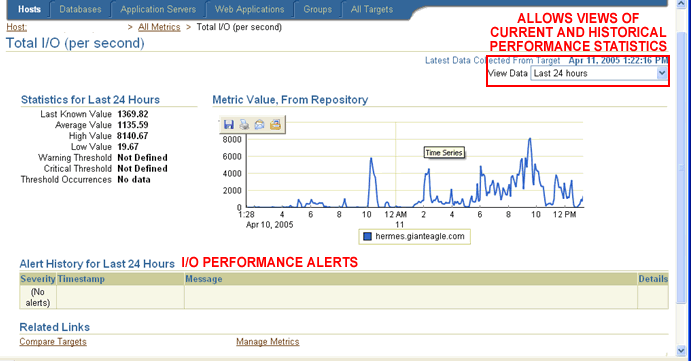
The host's performance panel provides information on current CPU, Memory and Disk resource utilization. Each resource's graphical display contains links that allow users to view more detailed statistical information. Each of the drill down panels for CPU, Memoryand Disk contains a drop down menu list that allows users to view current as well as historical performance statistics for the last 24 hours, 7 days and 31 days.
The main performance panel also displays information on the top resource consuming processes currently running on the host. Once again, a drop down menu allows administrators to switch between top CPU and top memory consumption reports. We'll learn how to use this report to speed the performance problem resolution process in the next blog.
Target Tab
If you click on the Targets tab on the host's main panel, a listing of the dependent or sub-targets (listeners, application servers, databases, etc) running on that host is provided. The links allow administrators to easily navigate to the desired target.
Configuration Tab
Clicking on the configuration tab on the host's main panel sends users to the main configuration display screen. The configuration panel displays information about the hosts' hardware and software configuration.
The information includes:
- Hardware Configuration - memory, CPU, I/O and network interface configuration information
- Operating System Configuration - release levels, kernel parameters and patches
- Third-party package software installations - (i.e. Veritas data storage management system packages, EMC drivers, etc.)
- Oracle software installations - products, components and patch sets
- Two host configurations
- Two host configuration files
- Host configuration and configuration file
- One host configuration compared to multiple hosts
Next Up
Now that we have a better understanding of some of the host information that 10G EM provides , I'll provide you with a few helpful hints on using this information to determine if the hardware platform and operating combination are helping (or hurting) database performance. Thanks for reading..
Wednesday, April 20, 2005
|
Permalink |
Comments (0)
trackback URL:
http://www.dbazine.com/blogs/blog-cf/chrisfoot/blogentry.2005-04-19.3743394432/sbtrackback