<?xml version="1.0" encoding="utf-8"?>
<rdf:RDF xmlns:rdf="http://www.w3.org/1999/02/22-rdf-syntax-ns#"
         xmlns:dc="http://purl.org/dc/elements/1.1/"
         xmlns:sy="http://purl.org/rss/1.0/modules/syndication/"
         xmlns:content="http://purl.org/rss/1.0/modules/content/"
         xmlns="http://purl.org/rss/1.0/">


<channel rdf:about="/blogs/blog_cf/chrisfoot/index.html">

    <title>DBAzine.com - Chris Foot's Oracle10g Blog</title>
  <link>http://www.dbazine.com</link>
  <description></description>
  <image rdf:resource="logo.jpg"/>
  <sy:updatePeriod>daily</sy:updatePeriod>
  <sy:updateFrequency>1</sy:updateFrequency>
  <sy:updateBase>2005-01-27T09:49:01Z</sy:updateBase>
  <items>
    <rdf:Seq>
          
              <rdf:li rdf:resource="http://www.dbazine.com/blogs/blog-cf/chrisfoot/blogentry.2007-05-31.6959101573"/>
          
          
              <rdf:li rdf:resource="http://www.dbazine.com/blogs/blog-cf/chrisfoot/blogentry.2007-04-28.5119185797"/>
          
          
              <rdf:li rdf:resource="http://www.dbazine.com/blogs/blog-cf/chrisfoot/blogentry.2007-04-15.6658230898"/>
          
          
              <rdf:li rdf:resource="http://www.dbazine.com/blogs/blog-cf/chrisfoot/blogentry.2007-04-06.2643727574"/>
          
          
              <rdf:li rdf:resource="http://www.dbazine.com/blogs/blog-cf/chrisfoot/blogentry.2007-03-31.3616747160"/>
          
          
              <rdf:li rdf:resource="http://www.dbazine.com/blogs/blog-cf/chrisfoot/blogentry.2007-03-17.4269055673"/>
          
          
              <rdf:li rdf:resource="/blogs/blog_cf/chrisfoot/blogentry.2007_03_11.8660796218"/>
          
          
              <rdf:li rdf:resource="http://www.dbazine.com/blogs/blog-cf/chrisfoot/blogentry.2007-03-04.1596857853"/>
          
          
              <rdf:li rdf:resource="http://www.dbazine.com/blogs/blog-cf/chrisfoot/blogentry.2007-02-24.7493837565"/>
          
          
              <rdf:li rdf:resource="http://www.dbazine.com/blogs/blog-cf/chrisfoot/blogentry.2007-02-14.3900730733"/>
          
          
              <rdf:li rdf:resource="http://www.dbazine.com/blogs/blog-cf/chrisfoot/blogentry.2007-02-15.4209681965"/>
          
          
              <rdf:li rdf:resource="http://www.dbazine.com/blogs/blog-cf/chrisfoot/blogentry.2007-02-03.3876734950"/>
          
          
              <rdf:li rdf:resource="http://www.dbazine.com/blogs/blog-cf/chrisfoot/blogentry.2007-01-27.8134820403"/>
          
          
              <rdf:li rdf:resource="http://www.dbazine.com/blogs/blog-cf/chrisfoot/blogentry.2007-01-19.1078911078"/>
          
          
              <rdf:li rdf:resource="http://www.dbazine.com/blogs/blog-cf/chrisfoot/blogentry.2007-01-13.9166686138"/>
          
   </rdf:Seq>
  </items>
</channel>

<item rdf:about="http://www.dbazine.com/blogs/blog-cf/chrisfoot/blogentry.2007-05-31.6959101573">
<title>Oracle9I and 10G Virtual Indexes</title>
<link>http://www.dbazine.com/blogs/blog-cf/chrisfoot/blogentry.2007-05-31.6959101573</link>
<description>Let’s take a look at an Oracle feature that I used quite regularly in 9i OEM to perform “what if” index scenarios during optimization testing. Although 10G Grid Control doesn’t provide the same graphical interface as 9i OEM, we can still utilize this hidden feature in 10G to simplify and accelerate the SQL tuning process</description>
<content:encoded><![CDATA[<font face="Verdana, Arial, Helvetica, sans-serif" size="2"> </font>
<p><font face="Verdana, Arial, Helvetica, sans-serif" size="2"><b>Introduction</b><br>
  I would describe myself as a fairly good tuner. Not because tuning ever 
  came easy to me, I have just spent a lot of time working with the optimizer. 
  I still have troubles rewriting complex SQL statements from time to time but 
  I will admit that 20 years of experience makes it easier on me than it used 
  to be.</font></p>
<p><font face="Verdana, Arial, Helvetica, sans-serif" size="2">One of the areas 
  I am strong at is using the proper indexes to influence SQL statement access 
  paths. We know that an index can influence the optimizer to change an access 
  path from a tablescan to a table lookup using an index ROWID. But indexes can 
  also influence the type of join used as well as the order of the tables being 
  joined. </font></p>
<p><font face="Verdana, Arial, Helvetica, sans-serif" size="2">Let's take a look 
  at the benefits virtual indexes have and we'll finish this blog by reviewing 
  how indexes can affect simple access paths, join methods and join orders.</font></p>
<p><font face="Verdana, Arial, Helvetica, sans-serif" size="2"><b>Virtual Indexes</b><br>
  I use virtual indexes in both 9i and 10G. I like them because I can quickly 
  do &quot;what if&quot; scenarios. I can create the index and present it to the 
  optimizer without waiting for the index to become populated and stored on disk. 
  This feature allows me to reduce the amount of time I spend tuning, which is 
  always a good thing. </font></p>
<p><font face="Verdana, Arial, Helvetica, sans-serif" size="2">I also use virtual 
  indexes when I am training myself and others. Most production environments do 
  have test counterparts, but there are times when I need to teach many different 
  indexing concepts and waiting for indexes to build often becomes a detriment 
  to the learning process.</font></p>
<p><font face="Verdana, Arial, Helvetica, sans-serif" size="2"><b>9I OEM Virtual 
  Index Wizard</b><br>
  The Virtual Index Wizard feature is provided in the Tuning Pack option of 9I 
  OEM. Although there are a couple of ways to activate the wizard, let's take 
  a look at the one that I most often use. Since we are going to be naviating 
  through the SQL Analyze tool, we might as well review some of the other features 
  it provides.</font></p>
<p><font face="Verdana, Arial, Helvetica, sans-serif" size="2"><b>SQL Analyze</b><br>
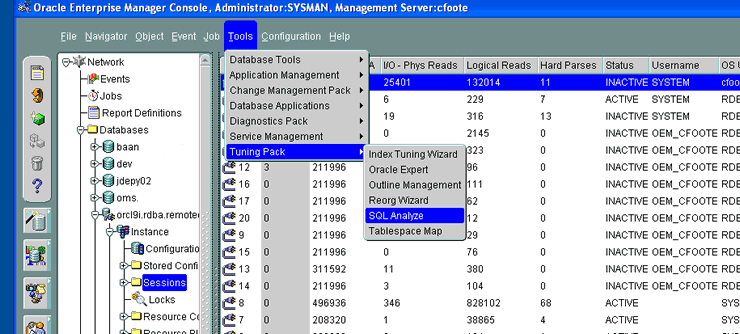
  9I OEM provides the SQL Analyze tool to view access path information. SQL Analyze 
  is only available if you have purchased the tuning pack option for 9I OEM. This 
  <a href="/blogs/blog_cf/chrisfoot/blogentry2007_01_061280259716/5_sql_analyze2.gif">screenshot</a> 
  shows me navigating through 9I OEM's menus to activate SQL Analyze.</font></p>
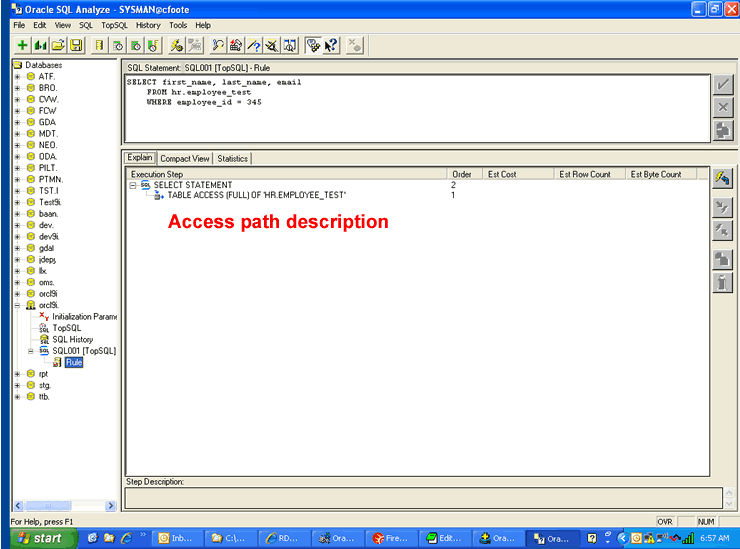
<p><font face="Verdana, Arial, Helvetica, sans-serif" size="2">When you activate 
  SQL Analyze, the first step the utility performs is to <a href="/blogs/blog_cf/chrisfoot/blogentry2007_01_061280259716/6_sql_analyze.gif">display 
  a listing</a> of all of the top resource consuming SQL statements that are contained 
  in the library cache. If the statement has been flushed from cache, you won't 
  find it in this display. </font></p>
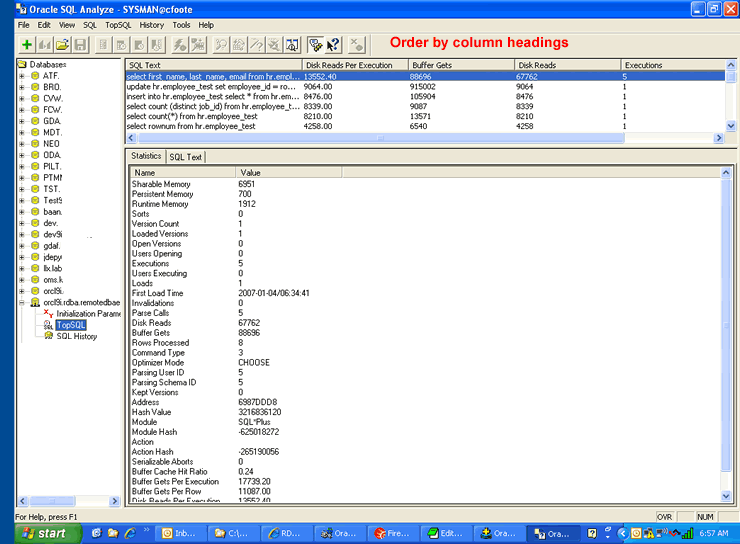
<p><font face="Verdana, Arial, Helvetica, sans-serif" size="2">The tool lists 
  all of the databases on the left side of the panel that you worked with in the 
  past. As you can see, I am a pretty active user of SQL Analyze. I can double-click 
  on any statement in the top SQL listing to view its access path information. 
  I can also use the menu system at the top of the screen to create a blank worksheet 
  for new queries that I can enter manually. I found the statement I wanted from 
  the listing and double-clicked on it to <a href="/blogs/blog_cf/chrisfoot/blogentry2007_01_061280259716/7_sql_analyze.gif">activate 
  the SQL tuning panel</a>. </font></p>
<p><font face="Verdana, Arial, Helvetica, sans-serif" size="2">The panel displays 
  the SQL statement, and like our other utilities, allows us to step through the 
  access path the query is taking. I can click on the <a href="/blogs/blog_cf/chrisfoot/blogentry2007_01_061280259716/7_sql_analyze.gif">SQL 
  drop down menu</a> at the top of the screen to ask Oracle to explain the statement 
  using the various optimizer modes that are available.</font></p>
<p><font face="Verdana, Arial, Helvetica, sans-serif" size="2"><b>SQL Analyze 
  Tuning Tools</b><br>
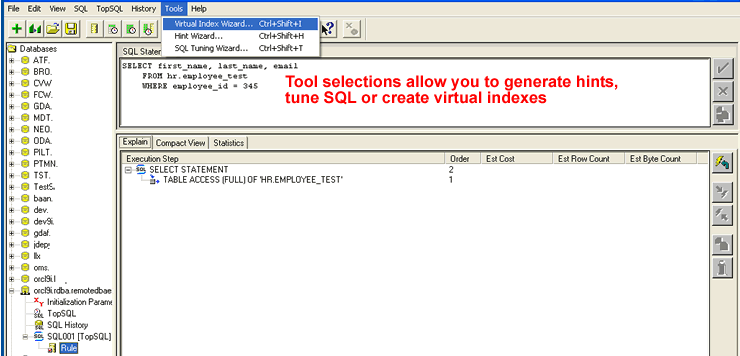
  SQL Analyze provide us with tools that facilitate the SQL tuning process. The 
  <a href="/blogs/blog_cf/chrisfoot/blogentry2007_01_061280259716/9_tools.gif">tools 
  menu</a> at the top of the screen allows me to choose from three different wizards. 
  We'll review the Virtual Index Wizard in just a moment.</font></p>
<p><font face="Verdana, Arial, Helvetica, sans-serif" size="2"> The Hint Wizard 
  allows us to choose hints from a drop-down menu system, while the SQL Tuning 
  Wizard activates an intelligent advisor that provides us with SQL tuning recommendations. 
  Once you have run the SQL Tuning Wizard a few times, it's pretty easy to see 
  that it was the precursor to some of the more advanced utilities that are now 
  available in Oracle 10G.</font></p>
<p><font face="Verdana, Arial, Helvetica, sans-serif" size="2"><b>Virtual Index 
  Wizard</b><br>
  The Virtual Index Wizard allows me to create virtual indexes on tables that 
  my query is accessing. The key word in that last sentence is &quot;virtual&quot;. 
  Oracle does not permanently create the index. The intent of the wizard is to 
  allow users to determine the potential performance impact a new index would 
  have on the statement being analyzed. It is then up to the user to permanently 
  create the index.</font></p>
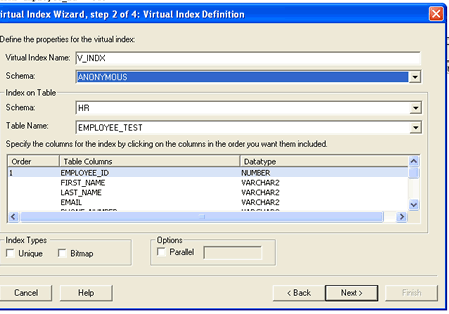
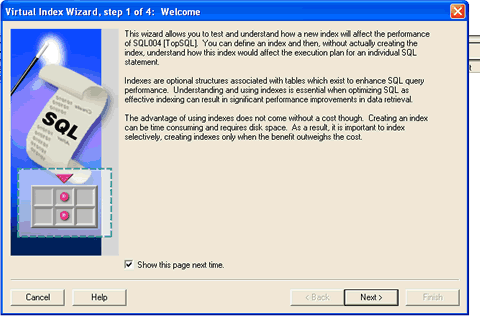
<p><font face="Verdana, Arial, Helvetica, sans-serif" size="2">If I click on the 
  Virtual Index Wizard menu selection, 9I OEM responds by displaying the <a href="/blogs/blog_cf/chrisfoot/blogentry2007_01_061280259716/10_tuning_wizard.gif">Virtual 
  Index Wizard introduction panel</a>. When I click on next, the wizard displays 
  a panel that allows me to <a href="/blogs/blog_cf/chrisfoot/blogentry2007_01_061280259716/11_tuning_wizard.gif">select 
  the columns for my virtual index</a>. Clicking next again <a href="/blogs/blog_cf/chrisfoot/blogentry2007_01_061280259716/12_tuning_wizard.gif">displays 
  a panel</a> that allows me to attempt to force Oracle to use the new index or 
  allow it to choose the new index on its own. My personal preference is to allow 
  Oracle to choose the index on its own without providing any additional prodding. 
  </font></p>
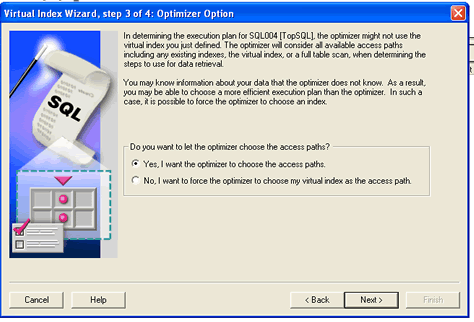
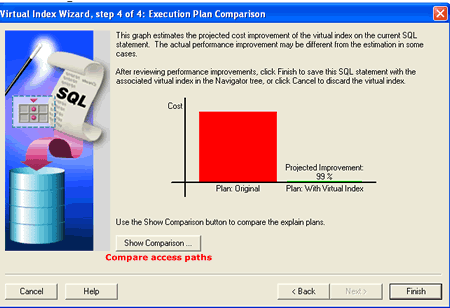
<p><font face="Verdana, Arial, Helvetica, sans-serif" size="2">Clicking Next again 
  displays the <a href="/blogs/blog_cf/chrisfoot/blogentry2007_01_061280259716/13_tuning_wizard.gif">projected 
  cost improvement</a> the new index will have on the statement being analyzed. 
  I used a full table scan on a rather large table as an example. Based on the 
  display, we can be pretty sure that the new index will have a positive affect 
  on our statement's performance. The last panel also displays a button that allows 
  us to view the before and after access paths.</font></p>
<p><font face="Verdana, Arial, Helvetica, sans-serif" size="2">The Virtual Index 
  Wizard does a fairly good job of estimating the impact that new indexes will 
  have on a SQL statement. It is an excellent tool to use when you are starting 
  your tuning education as well as evaluating access paths in Oracle 9I databases. 
  </font></p>
<p><font face="Verdana, Arial, Helvetica, sans-serif" size="2">I was surprised 
  when I found that this feature was not contained in 10G Grid Control. I continue 
  to firmly believe that using a tool to quickly build a virtual index, determine 
  if the optimizer will use it and then display a prediction of the index's performance 
  boost (or degradation) is very beneficial to the tuning process. I used the 
  virtual index wizard dozens of times and will continue to use it when I tune 
  9I (and earlier) databases. </font></p>
<p><font face="Verdana, Arial, Helvetica, sans-serif" size="2"><b>Virtual Indexes 
  in Oracle10G</b><br>
  Although Grid Control doesn't provide the same graphical interface to create 
  virtual indexes as it did in 9I OEM, all is not lost. We can revert to the tried-and-true 
  SQL*PLUS command line to build virtual indexes using the &quot;NOSEGMENT&quot; 
  option. The only feature it won't provide us is the forecast of the statement's 
  performance.</font></p>
<p><font face="Verdana, Arial, Helvetica, sans-serif" size="2">The format of this 
  blog page doesn't provide me with enough space to show you the output from my 
  SQL*PLUS demo. Not without a whole lot of editing anyway. So, I decided that 
  the best option would be to create a separate HTML page for the 10G virtual 
  index demo output. </font></p>
<p><font face="Verdana, Arial, Helvetica, sans-serif" size="2">The demo will show 
  you:</font></p>
<ul>
  <li><font face="Verdana, Arial, Helvetica, sans-serif" size="2">How to create 
    virtual indexes in 10G</font></li>
  <li><font face="Verdana, Arial, Helvetica, sans-serif" size="2">How to configure 
    your session to allow the optimizer to choose a virtual index as an access 
    path</font></li>
  <li><font face="Verdana, Arial, Helvetica, sans-serif" size="2">The affect the 
    &quot;_use_nosegment_indexes&quot; parameter has on access path selection</font></li>
  <li><font face="Verdana, Arial, Helvetica, sans-serif" size="2">The error messages 
    returned if you attempt to manipulate virtual indexes</font></li>
  <li><font face="Verdana, Arial, Helvetica, sans-serif" size="2">Information 
    stored in the data dictionary pertaining to virtual indexes</font></li>
</ul>
<p><font face="Verdana, Arial, Helvetica, sans-serif" size="2">Here's a <a href="/blogs/blog_cf/chrisfoot/blogentry2007_05_316959101573/10g_virtual_index_demo2.html">link 
  to the 10G SQL*PLUS Virtual Index demo</a>!</font></p>
<p><font face="Verdana, Arial, Helvetica, sans-serif" size="2">Now that we understand 
  how to create virtual indexes, lets' take a look at how any index can influence 
  simple access paths, join methods and join orders.</font></p>
<p><font face="Verdana, Arial, Helvetica, sans-serif" size="2"><b>Index Affects 
  on Access Paths</b><br>
  Let's use a nested loop join as a quick and somewhat easy example. In a nested 
  loop join, one of the tables in the join is known as the outer table while the other table (the table being probed) is known as the inner table. 
  Oracle reads a row from the outer table and uses the columns in the join condition 
  to probe the inner table. </font></p>
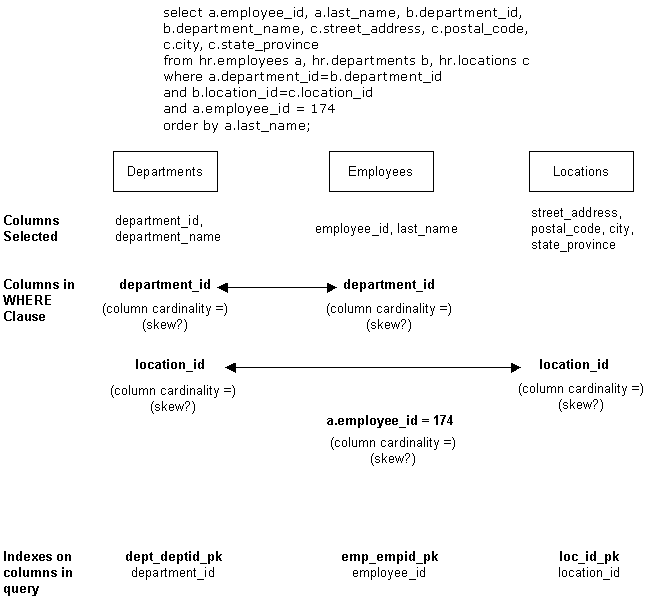
<p><font face="Verdana, Arial, Helvetica, sans-serif" size="2">Take a look at 
  the SQL statement and graphical access path display below:</font></p>
<blockquote>
  <p><font face="Verdana, Arial, Helvetica, sans-serif" size="2">select a.employee_id, 
    a.last_name, b.department_id, b.department_name,<br>
    c.street_address, c.postal_code, c.city, c.state_province<br>
    from hr.employees a, hr.departments b, hr.locations c<br>
    where a.department_id=b.department_id <br>
    and b.location_id=c.location_id<br>
    and a.employee_id = 174<br>
    order by a.last_name;</font></p>
</blockquote>
<p align="left"> <font face="Verdana, Arial, Helvetica, sans-serif" size="2"><img src="/blogs/blog_cf/chrisfoot/blogentry2007_05_316959101573/pic.gif"><br>
  </font></p>
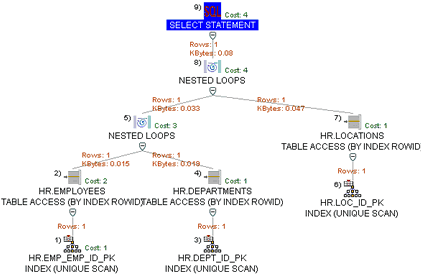
<p><font face="Verdana, Arial, Helvetica, sans-serif" size="2">We are joining 
  three tables together HR.EMPLOYEES, HR.DEPARTMENTS and HR.LOCATIONS. Notice 
  that we have two different nested loop join operations. Oracle only joins two 
  tables together at a time. It then creates an intermediate result set and uses 
  that result set to join to the next table. It can use any type of join method 
  available for any of the join operations.</font></p>
<p><font face="Verdana, Arial, Helvetica, sans-serif" size="2"><br>
  The indexes we have available to us are:</font></p>
<ul>
  <li><font face="Verdana, Arial, Helvetica, sans-serif" size="2">EMP_EMP_ID_PK 
    - index on the EMPLOYEE_ID column of the HR.EMPLOYEES table</font></li>
  <li><font face="Verdana, Arial, Helvetica, sans-serif" size="2">DEPT_ID_PK - 
    index on the DEPARTMENT_ID column of the HR.DEPARTMENTS table</font></li>
  <li><font face="Verdana, Arial, Helvetica, sans-serif" size="2">LOC_ID_PK - 
    index on the LOCATION_ID of the HR. LOCATIONS table</font></li>
</ul>
<p><font face="Verdana, Arial, Helvetica, sans-serif" size="2">The optimizer has 
  chosen to join the HR.EMPLOYEES AND HR.DEPARTMENTS tables first using the nested 
  loop join method. It is on this join condition - A.DEPARTMENT_ID = B.DEPARTMENT_ID. 
  HR.EMPLOYEES is known as the outer table and HR.DEPARTMENTS is classified as 
  the inner table of the join</font><font face="Verdana, Arial, Helvetica, sans-serif" size="2">.</font></p>
<p><font face="Verdana, Arial, Helvetica, sans-serif" size="2">The optimizer looked 
  at the local predicate &quot;A.EMPLOYEE_ID=174&quot; and checked to see if there 
  was an index that it could use to improve data access performance. It found 
  the EMP_EMP_ID_PK index that is defined on the EMPLOYEE_ID column. It will access 
  the index first and retrieve the ROWID for the row that has an EMPLOYEE_ID of 
  174. It will use the ROWID to probe the HR.EMPLOYEES table.</font></p>
<p><font face="Verdana, Arial, Helvetica, sans-serif" size="2">As stated previously, 
  the optimizer has chosen the nested loop join operation. It will access the 
  HR.EMPLOYEES table using the EMP_EMPID_PK index, retrieve the value for DEPARTMENT_ID 
  and use it to probe the HR.DEPARTMENTS table looking for a match (A.DEPARTMENT_ID 
  = B.DEPARTMENT_ID). If it finds a DEPARTMENT_ID value in the HR.DEPARTMENTS table 
  that matches, Oracle will use that row in future operations. If it does not 
  match, Oracle will discard it.</font></p>
<p><font face="Verdana, Arial, Helvetica, sans-serif" size="2">Notice that the 
  optimizer has chosen to use the DEPT_ID_PK index that is built on the HR.DEPARTMENTS' 
  DEPARTMENT_ID column. Since we are probing this table using the values we found 
  for DEPARTMENT_ID from the HR.EMPLOYEES table, Oracle will use the index on the 
  HR.DEPARTMENTS' DEPARTMENT_ID column. </font></p>
<p><font face="Verdana, Arial, Helvetica, sans-serif" size="2">The B.LOCATION_ID 
  = C.LOCATION_ID is the join condition that is used in the second join operation. 
  The intermediate result set is used as the outer table and the HR.LOCATIONS 
  table is used as the inner table. The same type of probe occurs. Since we are 
  looking for matches using the LOCATION_ID contained in the intermediate result 
  set, the optimizer will choose the LOC_ID_PK index.</font></p>
<p><font face="Verdana, Arial, Helvetica, sans-serif" size="2">Here's how indexes 
  can influence the type of join used and the order of the tables being joined:</font></p>
<ul>
  <li><font face="Verdana, Arial, Helvetica, sans-serif" size="2">If we didn't 
    have indexes on either of the first two tables being joined, the optimizer 
    would most likely have used a hash operation instead of a nested loop join 
    to join the tables together. The optimizer knows that the hash join operation 
    is best used for joins that return larger result sets. It could also have 
    influenced the join order of the tables. In the example, the optimizer could 
    have chosen to join the HR.DEPARTMENTS table to the HR.LOCATIONS table first. 
    It would have then used the intermediate result set created to probe the HR.EMPLOYEES 
    table.</font></li>
  <li><font face="Verdana, Arial, Helvetica, sans-serif" size="2">The more indexed 
    columns we have on a table, the greater the chance that the optimizer will 
    use it as the outer table of the nested loop join. It can filter out more 
    rows before it sends it to the join operation. The earlier it can filter rows 
    out, the better.</font></li>
  <li><font face="Verdana, Arial, Helvetica, sans-serif" size="2">If we have an 
    index on both join columns (i.e. indexes on the DEPARTMENT_ID columns for 
    both the HR.DEPARTMENTS and HR.EMPLOYEES tables), Oracle will use the DEPARTMENT_ID 
    index on the inner table but not the outer. Why is that? Oracle doesn't know 
    if it has a DEPARTMENT_ID VALUE in the inner table that matches a DEPARTMENT_ID 
    value in the outer table unless it reads each and every row of the outer table 
    to do the match. Think about it. It knows that since it has to read every 
    row from the outer table to perform the match, the only indexes it can use 
    are the indexes built on local predicates (i.e. &quot;A.EMPLOYEE_ID=174&quot;).</font></li>
  <li><font face="Verdana, Arial, Helvetica, sans-serif" size="2">If we have an 
    index on the join column for one table and not the other, the optimizer will 
    often favor the table that has the index on the join column as the inner table 
    of the join. It knows it can't use an index on the join column if it is the 
    outer table but it can use the index if it is the inner.</font></li>
</ul>
<p><font face="Verdana, Arial, Helvetica, sans-serif" size="2">This is just one 
  quick example to show you the impact that indexes have on access path selection. 
  The key to success is to continuously experiment with the optimizer. One of 
  the features that can speed up your experimentation is to use virtual indexes. 
  Remember, this feature uses an &quot;undocumented&quot; parameter in 10G.<br><BR>
  I would like to thank super-DBA Mark Shore for re-igniting my interest in both 
  9I and 10G virtual indexes. Marks has a natural talent for this profession which I often wish I had.</font></p>
<p><font face="Verdana, Arial, Helvetica, sans-serif" size="2">Thanks for Reading,</font></p>
<p><font face="Verdana, Arial, Helvetica, sans-serif" size="2">Chris Foot <br>
  Director of Operations<br>
  <a href="http://www.remotedbaexperts.com">Remote DBA Experts</a><br>
  Oracle Ace <img src="http://www.remotedbaexperts.com/ace_2.gif"></font></p>
<p><font face="Verdana, Arial, Helvetica, sans-serif" size="2"><br>
  </font></p> ]]>
</content:encoded>
<dc:publisher>No publisher</dc:publisher>
<dc:creator>cfoot</dc:creator>
<dc:rights></dc:rights>
<dc:date>2007-05-31T20:18+00:00</dc:date>
</item>


<item rdf:about="http://www.dbazine.com/blogs/blog-cf/chrisfoot/blogentry.2007-04-28.5119185797">
<title>10 Things I Like About 10G - Part 3</title>
<link>http://www.dbazine.com/blogs/blog-cf/chrisfoot/blogentry.2007-04-28.5119185797</link>
<description>This series covers a few of the features that you may often overlook when using 10G. There are so many features in each new release of Oracle's flagship database that the challenge is to leverage as many features as possible to make your day-to-day life easier. </description>
<content:encoded><![CDATA[<font face="Verdana, Arial, Helvetica, sans-serif" size="2"> </font>
<p><font face="Verdana, Arial, Helvetica, sans-serif" size="2">The key to being 
  a successful Oracle DBA is that you must be willing to accept the fact that 
  with each new database release, you will have to adjust the way you administer 
  your environments. In my profession, I work with many DBAs from companies across 
  the globe. The most successful administrators I have met are the ones that intelligently 
  leverage the new features that are available in the releases of the database 
  they are administering. </font></p>
<p><font face="Verdana, Arial, Helvetica, sans-serif" size="2"><b>Running Commands 
  and Scripts Against Multiple Targets</b><br>
  Being involved in an IT audit, like death and taxes, is inevitable. If you work 
  as a technician for any length of time, you will be working with an auditor 
  and some point. Since we provide remote database services, our organization 
  is audited numerous times per year. Sox audits, security audits, HIPPA audits 
  - you name the audit and we have been involved in it. We have an office that 
  is left open full-time for onsite auditors.</font></p>
<p><font face="Verdana, Arial, Helvetica, sans-serif" size="2">Auditors often 
  ask you to run scripts on the operating systems and databases your unit is responsible 
  for supporting. In the past, you would review the scripts and then distribute 
  them to team members to run on the environments they were responsible for supporting. 
  10G Grid Control makes this task a whole lot simpler. Grid provides you with 
  the capability of running host commands and scripts against multiple host targets 
  at the same time. Virtually any command or script that can be executed on a 
  single host can also be executed on multiple hosts using 10G Grid Control R2. 
  Here's <a href="/blogs/blog_cf/chrisfoot/blogentry.2006_01_08.4154171355">a 
  blog</a> that shows you how to use 10G Grid Control R2 to run operating system 
  scripts against multiple targets.</font></p>
<p><font face="Verdana, Arial, Helvetica, sans-serif" size="2">10G Grid Control 
  R2 also provides an easy-to-use panel that allows administrators to run SQL 
  scripts against multiple database targets simultaneously. Just like its host 
  command counterpart, all you need to do is code up a SQL statement, choose a 
  set of database targets, run the SQL against the multiple targets and review 
  the output. The benefits that this feature provides is only constrained by the 
  DBAs imagination. Here's a link to <a href="http://www.dbazine.com/blogs/blog-cf/chrisfoot/blogentry.2006-01-14.3116717615">a 
  blog</a> that will show you how to run scripts against multiple database targets. 
  </font></p>
<p><font face="Verdana, Arial, Helvetica, sans-serif" size="2"><b>Restore Points</b><br>
  How many times have database recoveries been performed because of incorrect 
  changes made to database data? A user deletes or updates &quot;one too many 
  rows&quot; by mistake and the result is a time-consuming and error prone process 
  to restore and recover the database to a point-in-time before the error occurred. 
  </font></p>
<p><font face="Verdana, Arial, Helvetica, sans-serif" size="2">Let's go back to 
  my days as an Oracle instructor&#133;. A common question in the Oracle DBA backup 
  and recovery class was &quot;why can't I just roll the database back to remove 
  unwanted changes instead of restoring the database from a backup and applying 
  the redo logs to roll forward to a point-in-time before the error occurred?&quot; 
  The question was invariably followed by &quot;don't you think that would be 
  easier?&quot; The answer was always the same &quot;yes, it would be easier, 
  but the Oracle database doesn't have that capability.&quot;</font></p>
<p><font face="Verdana, Arial, Helvetica, sans-serif" size="2">That was before 
  Flashback Database came along. Oracle's Flashback Database feature provided 
  a new tool in the DBA's recovery toolbox. Flashback Database allows the DBA 
  to &quot;roll back&quot; a table, set of tables or the entire database to a 
  previous point-in-time. Administrators often used a timestamp during the execution 
  of flashback operations.</font></p>
<p><font face="Verdana, Arial, Helvetica, sans-serif" size="2">10G R2 enhances 
  Flashback Database by allowing administrators to associate a user-defined name 
  with a point-in-time. The user-defined name, called a restore point, can be 
  used in place of a SCN or timestamp when executing a FLASHBACK TABLE or FLASHBACK 
  DATABASE statement. </font></p>
<p><font face="Verdana, Arial, Helvetica, sans-serif" size="2">A SQL statement 
  is used to create the restore point which means it can be embedded in application 
  programs as we as executed on an as-needed basis in SQL*PLUS. The example below 
  shows the creation of a restore point:</font></p>
<blockquote> 
  <blockquote>
    <p><font face="Verdana, Arial, Helvetica, sans-serif" size="2"> CREATE RESTORE 
      POINT batch_daily_cycle_complete;</font></p>
  </blockquote>
</blockquote>
<p><font face="Verdana, Arial, Helvetica, sans-serif" size="2">Now if I execute 
  the following statement:</font></p>
<blockquote> 
  <blockquote>
    <p><font face="Verdana, Arial, Helvetica, sans-serif" size="2"> UPDATE cti.employee_salary_table 
      SET<br>
      salary = 200000 WHERE empl_lname = 'FOOT';</font></p>
  </blockquote>
</blockquote>
<p><font face="Verdana, Arial, Helvetica, sans-serif" size="2">My boss can execute 
  this statement to correct the 'mistake' (although I prefer to call it a fully 
  justifiable pay adjustment):</font></p>
<blockquote> 
  <blockquote>
    <p><font face="Verdana, Arial, Helvetica, sans-serif" size="2"> FLASHBACK 
      TABLE cti.employee_salary_table TO batch_daily_cycle_complete</font></p>
  </blockquote>
</blockquote>
<p><font face="Verdana, Arial, Helvetica, sans-serif" size="2">10GR2 also provides 
  guaranteed restore points which ensure that the database can be flashed back 
  to the point-in-time they were created. Guaranteed restore points save disk 
  space because only the flashback logs required to meet the guaranteed restore 
  point need to be retained by the database. The statement below creates a guaranteed 
  restore point:</font></p>
<blockquote> 
  <blockquote>
    <p><font face="Verdana, Arial, Helvetica, sans-serif" size="2"> CREATE RESTORE 
      POINT batch_daily_cycle_complete GUARANTEE FLASHBACK DATABASE;</font></p>
  </blockquote>
</blockquote>
<p><font face="Verdana, Arial, Helvetica, sans-serif" size="2"><b>Automatic Undo 
  Retention</b><br>
  In Oracle9i, administrators had their choice of continuing to manage rollback 
  segments on their own (manual undo management) or configuring the database to 
  manage its own before image data (automatic undo management). Oracle refers 
  to system managed before image segments as undo segments. </font></p>
<p><font face="Verdana, Arial, Helvetica, sans-serif" size="2">You didn't have 
  to be an Oracle expert to know that manual rollback segments were &quot;somewhat 
  troublesome.&quot; Out of space conditions, contention, poor performance and 
  the perennial favorite &quot;snap shot too old&quot; errors had been plaguing 
  Oracle database administrators for over a decade. Oracle finally decided that 
  the database could probably do a better job of managing before images of data 
  than we could. </font></p>
<p><font face="Verdana, Arial, Helvetica, sans-serif" size="2">But implementing 
  automatic undo retention didn't necessarily guarantee users a trouble free undo 
  environment. There really is only one parameter that administrators can tweak 
  in a system that uses automatic undo. The UNDO_RETENTION parameter specifies 
  the amount of time in seconds that Oracle attempts to keep undo data available. 
  Setting this parameter to the appropriate value could be described as more of 
  an art than a science. </font></p>
<p><font face="Verdana, Arial, Helvetica, sans-serif" size="2">Set it too low 
  and you are wasting disk space. In addition, you aren't taking advantage of 
  being able to flashback your data to as far back as the disk space allocated 
  to the undo tablespace allows. Set it too high and you are in danger of running 
  out of freespace in the undo tablespace. </font></p>
<p><font face="Verdana, Arial, Helvetica, sans-serif" size="2">10G R2 comes to 
  the rescue! The database now collects undo usage statistics, identifies the 
  amount of disk space allocated to the undo tablespace and uses that information 
  to tune the undo retention period to provide maximum undo data retention. Administrators 
  can determine the current retention time period by querying the TUNED_UNDORETENTION 
  column of the V$UNDOSTAT view.</font></p>
<p><b><font face="Verdana, Arial, Helvetica, sans-serif" size="2">RMAN Automatically 
  Creates Temporary Datafiles During Restore</font></b><font face="Verdana, Arial, Helvetica, sans-serif" size="2"><br>
  Ever perform a restore and forget to recreate the temporary tablespace's data 
  files? I have. The database comes on-line but the first time a user's sort overflows 
  from memory to disk, an error code is returned. Recreating a database's temporary 
  files is one of those activities that are often overlooked. 10G R2 RMAN will 
  automatically recreate temporary datafiles belonging to locally managed temporary 
  tablespaces during the recovery operation.</font></p>
<p><font face="Verdana, Arial, Helvetica, sans-serif" size="2"><b>Enterprise Manager 
  Statistics Management Support</b><br>
  A new link titled 'Manage Optimizer' statistics has been added to the database 
  administration home page in Enterprise Manager. Clicking on the link displays 
  the new Manage Optimizer Statistics home page. The new home page provides wizards 
  and templates that facilitate and automate optimizer statistics management. 
  In 10GR2 administrators are able to use Enterprise Manager to gather, restore, 
  delete, lock and unlock statistics </font></p>
<p><font face="Verdana, Arial, Helvetica, sans-serif" size="2">Why would you want 
  to lock and unlock statistics? Let me describe one real-life example from a 
  recent project. We have a warehouse system that contains an extremely volatile 
  table. Describing it as volatile is like stating the Titanic sprung a small 
  leak. Hundreds of thousands of rows are added and removed around the clock.</font></p>
<p><font face="Verdana, Arial, Helvetica, sans-serif" size="2">The level of activity 
  is based on the particular business process taking place. At one particular 
  time, the table can contain hundreds of thousands of rows and at other times 
  it can contain dozens. OK, so when do you generate statistics? If you run DBMS_STATS 
  at the same time each day, in most cases you would think you would get a predictable 
  set of statistics generated. Not so in this table's case, sometimes you get 
  hundreds of rows and some times you get hundreds of thousands. </font></p>
<p><font face="Verdana, Arial, Helvetica, sans-serif" size="2">If you are unlucky 
  and generate statistics on the table when it has hundreds of rows, access paths 
  suffer when the table grows to hundreds of thousands. So, we ran DBMS_STATS 
  when we knew the table contained numerous rows and never generated statistics 
  on it again. Problem is that we can no longer easily use the SCHEMA option for 
  DBMS_STATS. Freezing statistics on this table will allow us to use the SCHEMA 
  option and not generate statistics for selected tables.</font></p>
<p><font face="Verdana, Arial, Helvetica, sans-serif" size="2"><b>DML Error Logging</b><br>
  What I like about SQL*LOADER is its ability to continue processing through load 
  errors. If the record being loaded is rejected because of a unique constraint 
  violation or discarded because it does not meet some user-defined criteria, 
  SQL*LOADER places the record into a discard or reject file and keeps on running 
  until it has reached a user-specified maximum number of rejects or discards.</font></p>
<p><font face="Verdana, Arial, Helvetica, sans-serif" size="2">The loader's log 
  file will show how many records were loaded, rejected or discarded. I can look 
  at the messages and review the discard or reject files, fix the problem and 
  attempt to reload them again.</font></p>
<p><font face="Verdana, Arial, Helvetica, sans-serif" size="2">In 10G R2, this 
  same type of processing has been applied to bulk DML operations. Users are able 
  to specify whether they want to log errors or abort the entire DML statement, 
  set the amount of detail information logged and the maximum error threshold. 
  So instead of the entire DML statement blowing up and rolling back, Oracle will 
  log the errors to the error table and continue processing until it exceeds the 
  maximum number of errors. Just like SQL*Loader! </font></p>
<p><font face="Verdana, Arial, Helvetica, sans-serif" size="2">Oracle 10G R2's 
  DBMS_ERRLOG package is used to create the error log output table and link it 
  to the table being updated. The package's specification is provided below:</font></p>
<blockquote> 
  <blockquote>
    <p><font face="Verdana, Arial, Helvetica, sans-serif" size="2">DBMS_ERRLOG.CREATE_ERROR_LOG 
      (<br>
      dml_table_name IN VARCHAR2,<br>
      err_log_table_name IN VARCHAR2 := NULL,<br>
      err_log_table_owner IN VARCHAR2 := NULL,<br>
      err_log_table_space IN VARCHAR2 := NULL,<br>
      skip_unsupported IN BOOLEAN := FALSE);</font></p>
  </blockquote>
</blockquote>
<p><font face="Verdana, Arial, Helvetica, sans-serif" size="2">Most of the columns 
  are pretty self explanatory: table name being updated, error log table name, 
  owner of error log table and the error log table's tablespace. If the SKIP_UNSIPPORTED 
  is set to TRUE, column types that are not supported by error logging will be 
  skipped over and not added to the error logging table. If it is set to FALSE, 
  an unsupported column type will cause the procedure to fail.</font></p>
<p><font face="Verdana, Arial, Helvetica, sans-serif" size="2">Here's a quick 
  example:</font></p>
<blockquote> 
  <blockquote>
    <p><font face="Verdana, Arial, Helvetica, sans-serif" size="2">Let's create 
      or table that will be updated:<br>
      SQL&gt; r<br>
      1 CREATE TABLE foot.emp_table<br>
      2 (empno number(4), ename varchar2(10), job varchar2(8))<br>
      3* TABLESPACE users;</font></p>
    <p><font face="Verdana, Arial, Helvetica, sans-serif" size="2">Table created.</font></p>
    <p><font face="Verdana, Arial, Helvetica, sans-serif" size="2">Add a primary 
      key:<br>
      SQL&gt; ALTER TABLE foot. emp_table ADD PRIMARY KEY(empno) <br>
      2 USING INDEX TABLESPACE users;</font></p>
    <p><font face="Verdana, Arial, Helvetica, sans-serif" size="2">Table altered.;</font></p>
    <p><font face="Verdana, Arial, Helvetica, sans-serif" size="2">Load some rows:</font></p>
    <p><font face="Verdana, Arial, Helvetica, sans-serif" size="2">SQL&gt; INSERT 
      INTO foot.emp_table VALUES<br>
      2 (7499, 'ALLEN', 'SALESMAN');</font></p>
    <p><font face="Verdana, Arial, Helvetica, sans-serif" size="2">1 row created.</font></p>
    <p><font face="Verdana, Arial, Helvetica, sans-serif" size="2">SQL&gt; INSERT 
      INTO foot.emp_table VALUES<br>
      2 (7521, 'WARD', 'SALESMAN');</font></p>
    <p><font face="Verdana, Arial, Helvetica, sans-serif" size="2">1 row created.</font></p>
    <p><font face="Verdana, Arial, Helvetica, sans-serif" size="2">SQL&gt; INSERT 
      INTO foot.emp_table VALUES<br>
      2 (7566, 'JONES', 'MANAGER');</font></p>
  </blockquote>
</blockquote>
<p><font face="Verdana, Arial, Helvetica, sans-serif" size="2">Let's cause a unique 
  constraint violation:</font></p>
<blockquote> 
  <blockquote> 
    <p><font face="Verdana, Arial, Helvetica, sans-serif" size="2">SQL&gt; insert 
      into foot.emp_table select * from foot.emp_table;<br>
      insert into foot.emp_table select * from foot.emp_table<br>
      *<br>
      ERROR at line 1:<br>
      ORA-00001: unique constraint (FOOT.SYS_C009069) violated</font></p>
  </blockquote>
</blockquote>
<p><font face="Verdana, Arial, Helvetica, sans-serif" size="2">Create the 10G 
  R2 error logging table:</font></p>
<blockquote> 
  <blockquote>
    <p><font face="Verdana, Arial, Helvetica, sans-serif" size="2">exec dbms_errlog.CREATE_ERROR_LOG 
      ('emp_table','dml_errors_emp_table')</font></p>
  </blockquote>
</blockquote>
<p><font face="Verdana, Arial, Helvetica, sans-serif" size="2">Let's create a 
  table that we can update and change one row to see if we can get one row to 
  load and 2 to fail and be placed into the DML_ERRORS_EMP_TABLE:</font></p>
<blockquote> 
  <blockquote> 
    <p><font face="Verdana, Arial, Helvetica, sans-serif" size="2">SQL&gt; create 
      table foot.emp_load_table tablespace users as select * from foot.emp_table<br>
      Table created.</font></p>
  </blockquote>
</blockquote>
<p><font face="Verdana, Arial, Helvetica, sans-serif" size="2">Update one row 
  to change the EMPNO column's value to avoid the primary key violation:</font></p>
<blockquote> 
  <blockquote> 
    <p><font face="Verdana, Arial, Helvetica, sans-serif" size="2">SQL&gt; update 
      foot.emp_load_table set empno=123 where empno=7499;<br>
      1 row updated.</font></p>
  </blockquote>
</blockquote>
<p><font face="Verdana, Arial, Helvetica, sans-serif" size="2">Rerun the statement 
  specifying the new 10G R2 error logging syntax. Use our new load input table 
  so that our one changed row will be loaded and two will be rejected and placed 
  into the DML_ERRORS_EMP_TABLE:</font></p>
<blockquote> 
  <blockquote> 
    <p><font face="Verdana, Arial, Helvetica, sans-serif" size="2">SQL&gt; insert 
      into foot.emp_table select * from foot.emp_table<br>
      LOG ERRORS INTO dml_errors_emp_table('test_load_20050718')<br>
      REJECT LIMIT UNLIMITED;</font></p>
    <p><font face="Verdana, Arial, Helvetica, sans-serif" size="2">1 row created.</font></p>
  </blockquote>
</blockquote>
<p><font face="Verdana, Arial, Helvetica, sans-serif" size="2">OK, we loaded one. 
  What happened to our other two? Let's see what our DML_ERRORS_EMP_TABLE contains. 
  </font></p>
<p><font face="Verdana, Arial, Helvetica, sans-serif" size="2">First, let's describe 
  the DML_ERRORS_EMP_TABLE:</font></p>
<blockquote> 
  <blockquote>
    <p><font face="Verdana, Arial, Helvetica, sans-serif" size="2">SQL&gt; DESC 
      foot.dml_errors_emp_table<br>
      <br>
      ORA_ERR_NUMBER$ NUMBER<br>
      ORA_ERR_MESG$ VARCHAR2(2000)<br>
      ORA_ERR_ROWID$ ROWID<br>
      ORA_ERR_OPTYP$ VARCHAR2(2)<br>
      ORA_ERR_TAG$ VARCHAR2(2000)<br>
      EMPNO VARCHAR2(4000)<br>
      ENAME VARCHAR2(4000)<br>
      JOB VARCHAR2(4000)</font></p>
  </blockquote>
</blockquote>
<p><font face="Verdana, Arial, Helvetica, sans-serif" size="2">Our error logging 
  table contains an incrementing error counter, the error message, ROWID, error 
  type, tag (contains our users specified name from above -'test_load_20050718') 
  and the three columns of our table.</font></p>
<p><font face="Verdana, Arial, Helvetica, sans-serif" size="2">Let's select from 
  the table. I have truncated the ORA_ERR_MESG$ table for readability sake:<br>
  <br>
  SQL&gt; SELECT ora_err_number$, ora_error_mesg$, emp_no FROM foot.dml_errors_emp_table;</font></p>
<blockquote> 
  <blockquote>
    <p><font face="Verdana, Arial, Helvetica, sans-serif" size="2">ORA_ERR_NUMBER$ 
      ORA_ERR_MESG$ EMP_NO<br>
      --------------- -------------------------------------------------- ------<br>
      1 ORA-00001: unique constraint (FOOT.SYS_C009069) violated&#133;..7521<br>
      2 ORA-00001: unique constraint (FOOT.SYS_C009069) violated&#133;.7566</font></p>
  </blockquote>
</blockquote>
<p><font face="Verdana, Arial, Helvetica, sans-serif" size="2">We loaded one row 
  and rejected two rows due to primary key constraint violations.</font></p>
<p><font face="Verdana, Arial, Helvetica, sans-serif" size="2"><br>
  <b>Conclusion</b><br>
  I hope you enjoyed this series on 10G features.</font></p> ]]>
</content:encoded>
<dc:publisher>No publisher</dc:publisher>
<dc:creator>cfoot</dc:creator>
<dc:rights></dc:rights>
<dc:date>2007-04-30T09:56+00:00</dc:date>
</item>


<item rdf:about="http://www.dbazine.com/blogs/blog-cf/chrisfoot/blogentry.2007-04-15.6658230898">
<title>10 Things I like about Oracle 10G Part 2 (and other stuff)</title>
<link>http://www.dbazine.com/blogs/blog-cf/chrisfoot/blogentry.2007-04-15.6658230898</link>
<description>I thought I would combine two different topics of conversation. We'll review of some of the 10G features that we take for granted or are easily overlooked. The discussion also continues its lighthearted review of day-to-day DBA life and provides a few helpful hints and tips to make that life easier. Weird combination but it may make for an interesting and informative read.</description>
<content:encoded><![CDATA[<p><font face="Verdana, Arial, Helvetica, sans-serif" size="2">Here's a couple 
  of my favorite DBA discussions&#133;.</font></p>
<p><font face="Verdana, Arial, Helvetica, sans-serif" size="2"><b>Favorite DBA 
  Conversation #1</b><br>
  Any discussion that ends in &quot;I hope you're not too busy because we need it now.&quot; 
I really dislike the conversation that ends in "we needed it yesterday."  If you needed it yesterday you should have stopped in to discuss this request a week before yesterday.  We all know these types of requests because we have all gotten them. One of your 
  customers pops in and states:</font></p>
<p><font face="Verdana, Arial, Helvetica, sans-serif" size="2">&quot;We need a 
  complete refresh of XYZ database from production. Oh, and its an ERP application 
  database and we don't have enough disk space in test to hold everything so you'll 
  need to figure out how to reduce its disk size requirements AND make sure the 
  application still works. </font></p>
<p><font face="Verdana, Arial, Helvetica, sans-serif" size="2">I know the box 
  only has 1 CPU and 250 MEG of memory, but can you make sure we still get good 
  performance? We're testing some application coding changes and we need to get 
  performance benchmarks. We'll compare the stats from the test box to the ones 
  we get from our 22 CPU production box. It may not be an &quot;apples to apples&quot; 
  but I think the boxes are close enough to compare the performance stats. </font></p>
<p><font face="Verdana, Arial, Helvetica, sans-serif" size="2">I know its Friday afternoon at 3:00 and even though we knew about this 
  refresh 14 weeks ago, we didn't think we needed to tell you until 1 day before 
  we wanted it. So, we would like to have the system ready by Monday.&quot; </font></p>
<p><font face="Verdana, Arial, Helvetica, sans-serif" size="2">Over the last 20 
  years I have received dozens of these last minute requests. Requests that have 
  made me cancel plans, postpone trips and generate numerous apologies to friends 
  and family. The work never bothered me, but the timing of the requests sometimes 
  did. It also reduced the quality of service I provided to my other customers. 
  When you have DBAs jumping from one non-planned request to another, it affects 
  their ability to work on planned requests as well as perform proactive administrative 
  duties.</font></p>
<p><font face="Verdana, Arial, Helvetica, sans-serif" size="2"><b>Fix #1</b>: 
  You minimize these requests by creating, advertising and enforcing DBA work 
  request SLA agreements. Agreements that clearly state lead times per type of 
  request. The more widespread the problem is at your organization, the more advertising 
  you must do. It really becomes a sales pitch on the importance of a DBA unit 
  being able to forecast workloads. The unit can't provide quality service to 
  their customers if they are being affected by work requests that could have 
  been planned for - but weren't.</font></p>
<p><font face="Verdana, Arial, Helvetica, sans-serif" size="2">The mantra should 
  be &quot;all of our customers suffer when we receive un-planned work requests.&quot; 
  I'm not afraid of telling application manager A that she can't get her 
  planned requests done because application manager B just gave us 32 emergency 
  requests. Kind of like putting them both in a jar and shaking it up a bit.</font></p>
<p><font face="Verdana, Arial, Helvetica, sans-serif" size="2"><b>Fix #2: </b>10G 
  Grid Control allows you to clone both the Oracle Home software installation 
  as well as the Oracle database. Grid will automatically adjust the specific 
  home properties (IP address, host name, listener settings) during the cloning 
  process. 10G DBCA templates allow you to clone a new database from existing 
  databases. In addition, DBCA allows you to clone just the source database file structures 
  or the structures and the data. </font></p>
<p><font face="Verdana, Arial, Helvetica, sans-serif" size="2">You can also use 
  some of the 10G Data Pump features to tailor the new database to your user's 
  specifications. 10G Data Pump provides numerous options that:</font></p>
<ul>
  <li><font face="Verdana, Arial, Helvetica, sans-serif" size="2">Specifiy what 
    objects you want to transfer from one database to another</font></li>
  <li><font face="Verdana, Arial, Helvetica, sans-serif" size="2">Transfer a subset 
    of data from those objects using various filtering options</font></li>
  <li><font face="Verdana, Arial, Helvetica, sans-serif" size="2">Remap objects 
    during the migration process. You can remap schema objects from one user to 
    another, from one tablespace to another </font></li>
</ul>
<p><font face="Verdana, Arial, Helvetica, sans-serif" size="2">You already know 
  I'm a huge fan of 10G Data Pump. You need to leverage the features this tool 
  provides to customize schema and data transfers from one database to another. 
  You shouldn't be writing scripts when you don't need to. The only way you will 
  realize the full potential of 10G Data Pump is to READ THE UTILITIES manual 
  and see how powerful 10G Data Pump really is. It will make your life easier.</font></p>
<p><font face="Verdana, Arial, Helvetica, sans-serif" size="2"><b>Favorite DBA 
  Conversation #2</b><br>
  You come in to a meeting and you're confronted by an application manager who tells you that you need to tune your database because his ace developer 
  &quot;Sir Lawrence of LongSQL&quot; can't get his 32 page SQL statement to achieve 
  sub-second response times.</font></p>
<p><font face="Verdana, Arial, Helvetica, sans-serif" size="2">You know the SQL 
  statement that I'm talking about. It's the one that contains 15 inner and outer 
  joins, 12 subselects, and&#133;&#133;.(feel free to add any other type of complex 
  SQL Syntax here). </font></p>
<p><font face="Verdana, Arial, Helvetica, sans-serif" size="2"><b>Note from database 
  administrators to application developers:</b><br>
  Just because you can code a 32 page SQL statement, it doesn't mean you should. 
  We all understand how powerful the SQL language is, but do you really need to 
  try and use every feature available in a single statement? There's a difference 
  between leveraging the power of the SQL language and attempting to perform too 
  much work in a single SQL statement. Generating long, complex SQL statements 
  that no one can debug does NOT classify you as a supercoder. It does classify 
  you as something else, but I can't say that publicly.</font></p>
<p><font face="Verdana, Arial, Helvetica, sans-serif" size="2"><b>Favorite DBA 
  Conversation #3</b><br>
  Favorite DBA Conversation #3 combines components of conversations #1 and #2. 
  It occurs when you are approached by a customer who says they have developed 
  this &quot;small&quot; application that goes live in two weeks and it isn't 
  performing &quot;as well as we think it should.&quot; This means that you have 
  to review the SQL from 23 new application programs in those two weeks.</font></p>
<p><font face="Verdana, Arial, Helvetica, sans-serif" size="2"><b>Fix #1</b>: 
  Reinforce the need for the DBA team to be involved in all application development 
  projects. This can be done by creating a series of application design review 
  meetings. A dedicated an <a href="/blogs/blog_cf/chrisfoot/blogentry.2006_08_09.0916922652">entire 
  blog</a> on this subject. </font></p>
<p><font face="Verdana, Arial, Helvetica, sans-serif" size="2"><b>Fix#2</b>: You 
  will need to start a top down performance analysis project that focuses on tuning 
  the most poorly performing queries first. If you don't have access to the 10G 
  Grid Control sissy GUI tools, you can use the V$ views to retrieve the top resource 
  consuming statements. You can use the V$SQLAREA view for Oracle9I and below. 
  10G offers the V$SQLSTATS view that provides some distinct advantages over its 
  previous counterparts.</font></p>
<p><font face="Verdana, Arial, Helvetica, sans-serif" size="2"><b>10G V$SQLSTATS 
  Performance View</b><br>
  Before we discuss the new V$SQLSTATS view, let me deviate for a minute to provide 
  you with some quick SQL tuning advice. V$SQLAREA is one of my favorite SQL tuning 
  views. Until V$SQLSTATS came along&#133;</font></p>
<p><font face="Verdana, Arial, Helvetica, sans-serif" size="2">If I want to perform 
  a traditional &quot;top down&quot; tuning approach and tune the highest resource 
  consuming SQL, I'll use the statements below to identify the top resource consuming 
  queries. </font></p>
<p><font face="Verdana, Arial, Helvetica, sans-serif" size="2">The following query 
  identifies the SQL responsible for the most disk reads:</font></p>
<blockquote> 
  <blockquote>
    <p><font face="Verdana, Arial, Helvetica, sans-serif" size="2">SELECT disk_reads, 
      executions, disk_reads/executions, address, sql_text FROM v$sqlarea WHERE 
      disk_reads &gt; 5000 ORDER BY disk_reads;</font></p>
  </blockquote>
</blockquote>
<p><font face="Verdana, Arial, Helvetica, sans-serif" size="2">The following query 
  identifies the SQL responsible for the most buffer hits:</font></p>
<blockquote> 
  <blockquote> 
    <p><font face="Verdana, Arial, Helvetica, sans-serif" size="2">SELECT buffer_gets, 
      executions, buffer_gets/executions, address, sql_text FROM v$sqlarea WHERE 
      buffer_gets &gt; 10000 ORDER BY buffer_gets;</font></p>
  </blockquote>
</blockquote>
<p><font face="Verdana, Arial, Helvetica, sans-serif" size="2"><br>
  You can create a more readable report in SQLPLUS by inserting report breaks 
  between the output lines. To generate the report breaks in SQLPLUS, issue the 
  following statement before running the query:</font></p>
<blockquote> 
  <blockquote>
    <p><font face="Verdana, Arial, Helvetica, sans-serif" size="2">BREAK ON disk_reads 
      SKIP 2 --- for the disk read report and<br>
      BREAK ON buffer_gets SKIP 2 --- for the buffer get report</font></p>
  </blockquote>
</blockquote>
<p><font face="Verdana, Arial, Helvetica, sans-serif" size="2"><br>
  The first query returns SQL statements responsible for generating disk reads 
  greater than 5,000 while the second query returns SQL statements responsible 
  for generating buffer reads greater than 10,000. I used these numbers just as 
  an example but I sometimes use them as a starting point. I'll then adjust 
  them up or down accordingly, based on their output. The numbers also depend 
  on the system I'm reviewing. I'll use different numbers for OLTP environments 
  than I would for data warehouses.</font></p>
<p><font face="Verdana, Arial, Helvetica, sans-serif" size="2">You'll notice that 
  I divide the number of disk and buffer reads by the number of statement executions. If a statement is generating 1,000,000 disk reads but is executed 500,000 times, it probably doesn't need tuning. <br><br>
  Heavy disk reads per statement execution usually means a lack of proper indexing, 
  poor selection criteria, etc.. Heavy buffer reads sometimes means the exact 
  opposite - indexes are being used when they shouldn't be.</font></p>
<p><font face="Verdana, Arial, Helvetica, sans-serif" size="2"> But I'm personally 
  most interested in workload, that's why I most often use the buffer cache hits 
  in my initial queries.</font></p>
<p><font face="Verdana, Arial, Helvetica, sans-serif" size="2">But the SQLTEXT 
  column in V$SQLAREA does not provide the entire text of the SQL statement. That's 
  why I include the address column in the report. I can use that value to dump 
  the entire SQL statement from V$SQLTEXT using the statement below (where xxxxxxxx 
  is the value in the address column from the V$SQLAREA reports above):</font></p>
<blockquote> 
  <blockquote>
    <p><font face="Verdana, Arial, Helvetica, sans-serif" size="2">select sql_text 
      from v$sqltext where address = 'xxxxxxxxx' order by piece;</font></p>
  </blockquote>
</blockquote>
<p><font face="Verdana, Arial, Helvetica, sans-serif" size="2">Oracle 10G R2 provides 
  a new view called V$SQLSTATS that contains a combination of columns that appear 
  in V$SQL and V$SQLAREA. The benefits that V$SQLSTATS provides are as follows:</font></p>
<ul>
  <li><font face="Verdana, Arial, Helvetica, sans-serif" size="2">Since V$SQLSTATS 
    contains the entire text of the SQL statement AND its associated performance 
    statistics, we are no longer required to access both the V$SQLTEXT and V$SQLAREA 
    to obtain the information we need.</font></li>
  <li><font face="Verdana, Arial, Helvetica, sans-serif" size="2">Oracle states 
    that V$SQLSTATS is faster and more scalable.</font></li>
</ul>
<p><font face="Verdana, Arial, Helvetica, sans-serif" size="2">The data in V$SQLAREA 
  has a tendency to get its contents flushed out just when you need to get additional 
  information from it. The V$SQLSTATS view provides users with a longer access 
  window. That's one of the key benefits to this view. <br>
  <br>
  <b>Next Up</b><br>
  The series continues.<br>
  </font></p> ]]>
</content:encoded>
<dc:publisher>No publisher</dc:publisher>
<dc:creator>cfoot</dc:creator>
<dc:rights></dc:rights>
<dc:date>2007-04-16T14:36+00:00</dc:date>
</item>


<item rdf:about="http://www.dbazine.com/blogs/blog-cf/chrisfoot/blogentry.2007-04-06.2643727574">
<title>10 Things I like about Oracle 10G Part 1</title>
<link>http://www.dbazine.com/blogs/blog-cf/chrisfoot/blogentry.2007-04-06.2643727574</link>
<description>I review some of the 10G features that we take for granted or often overlook.  The discussion, although somewhat whimsical at times, does provide some very useful information.</description>
<content:encoded><![CDATA[<p><font face="Verdana, Arial, Helvetica, sans-serif" size="2">Let's consider 
  this blog to be a review of sorts. Oracle 10G has been Oracle's flagship release 
  for some time now. I thought it might be beneficial to focus on some of the 
  benefits that 10G has to offer. They aren't in order of importance. Its just 
  a general list that may help readers remember that there are some pretty cool 
  features in Oracle 10G. Hopefully you will find it to be both informational 
  and an interesting read.</font></p>
<p><font face="Verdana, Arial, Helvetica, sans-serif" size="2"><b>Ease of Installation</b><br>
  I remember the good old days. When I began my career, the Oracle installers 
  were just screen painters that forced you to use the TAB key to navigate back 
  and forth between selections and screens. </font></p>
<p><font face="Verdana, Arial, Helvetica, sans-serif" size="2">Installations used 
  to take hours and experiencing problem after problem was commonplace. Successfully 
  installing Oracle became a rite of passage as a DBA. Four hours after you started 
  the installation (and fighting through errors, warnings and placing a half dozen 
  CDs in the reader), you would finish up and think to yourself &quot;I am an 
  installation GENIUS!&quot;. You next thought would be &quot;I hope I don't have 
  to go through this again for a while.&quot;</font></p>
<p><font face="Verdana, Arial, Helvetica, sans-serif" size="2">With each new release, 
  the installer became easier to use, installation speeds increased and the number 
  of installation problems decreased. In a few years, I'll be telling new DBAs 
  &quot;You don't know how good you have it. I remember when installations used 
  to take three days... We were real DBAs back then. We even had to log in at 
  NIGHT TIME and take the data OFFLINE to do work.&quot; Darn kids don't know 
  how good they have it nowadays&#133;.</font></p>
<p><font face="Verdana, Arial, Helvetica, sans-serif" size="2">We do DOZENS of 
  Oracle installations a month here at Remote DBA Experts. One of the benefits 
  of working here is the sheer thrill of working on virtually every operating 
  system that Oracle makes a product on. Name the O/S and hardware combination 
  and we can truthfully say &quot;been there and installed an Oracle product on 
  it.&quot; </font></p>
<p><font face="Verdana, Arial, Helvetica, sans-serif" size="2">When our first 
  set of 10G CDs arrived a couple of years ago, the DBA opened up the package 
  and said &quot;Hey, where's the rest of them? I think they forgot to send me 
  all of the CDs I need to do the install.&quot; We checked MetaLink and found 
  that Oracle10G only needs a couple of CDs. One main CD and another called &quot;The 
  Companion CD&quot; which really should be called &quot;The Companion CD that 
  is required for all installs&quot; since it pretty much has to be installed 
  when you install Oracle.</font></p>
<p><font face="Verdana, Arial, Helvetica, sans-serif" size="2">The team here really 
  likes the fact that the installer now performs pre-installation requirement 
  checks before laying down the software. The installer itself now determines 
  if the O/S environment is configured to correctly run the Oracle software. Having 
  the installer verify that you have performed &quot;your pre-installation&quot; 
  duties is very beneficial. </font></p>
<p><font face="Verdana, Arial, Helvetica, sans-serif" size="2">
  <b>10G Data Pump</b><br>
  I'm a big fan of 10G Data Pump. Once you become accustomed to the new environment, 
  it's a pretty good utility. There is a learning curve - like the first time 
  you try to restart a Data Pump job by just rerunning the script again. You'll 
  quickly find out that Data Pump has a command for that. At least it provides 
  you with the &quot;Master table exists&quot; error message to point you to your 
  mistake.</font></p>
<p><font face="Verdana, Arial, Helvetica, sans-serif" size="2">Here's a quick 
  list of some of the features I like:</font></p>
<ul>
  <li><font face="Verdana, Arial, Helvetica, sans-serif" size="2">The utility 
    IS faster than Export and Import. Maybe not as much faster as Oracle says 
    it is - but it is faster. I have personally seen Exports and Imports run for 
    hours - and days.<br>
    <br>
    </font></li>
  <li><font face="Verdana, Arial, Helvetica, sans-serif" size="2">I like being 
    able to use parallelism to improve performance.<br>
    <br>
    </font></li>
  <li><font face="Verdana, Arial, Helvetica, sans-serif" size="2"> You can stop 
    and restart jobs. How great is that? The master table knows where you left 
    off so you don't have to spend all of that time trying to code a new Import 
    statement that won't duplicate rows in tables that were successfully loaded. 
    This is really helpful.<br>
    <br>
    </font></li>
  <li><font face="Verdana, Arial, Helvetica, sans-serif" size="2">How many times 
    did you have to &quot;pick a number, any number&quot; when you had to determine 
    how much space you would need for your Export Dump file? Data Pump provides 
    an option that estimates the output dump file size that would be created by 
    a Data Pump Export. <br>
    <br>
    </font></li>
  <li><font face="Verdana, Arial, Helvetica, sans-serif" size="2">One of my favorite 
    features is the network transfer option that allows administrators to attach 
    to any source database that can be accessed from the network, transfer the 
    data and write it to the target database. No dumpfile required! Administrators 
    use the NETWORK_LINK parameter to specify a pre-created database link that 
    points to the source database.<br>
    <br>
    </font></li>
  <li><font face="Verdana, Arial, Helvetica, sans-serif" size="2">You can use 
    the Data Pump Flashback feature to go back in time and export data how it 
    looked in the past. This helps when you get a visit from one of your developers 
    stating &quot;I think I might have updated 47 production tables by mistake, 
    but I won't know until I see the data.&quot; Use the flashback feature during 
    the Data Pump Export and use the Data Pump Import utility to pump the data 
    into a new schema for the developer to review. <br>
    <br>
    </font></li>
  <li><font face="Verdana, Arial, Helvetica, sans-serif" size="2"> You can use 
    the EXCLUDE parameter to exclude specific objects using custom syntax. For 
    example, EXCLUDE=INDEX:&quot;LIKE 'DEPT%'&quot; would exclude indexes that 
    start with the name &quot;DEPT&quot;.</font></li>
</ul>
<p><font face="Verdana, Arial, Helvetica, sans-serif" size="2">The more I thought 
  about the Data Pump features I liked, the longer I thought this blog would be. 
  So here are links to three blogs I wrote on Data Pump.</font></p>
<ul>
  <li><font face="Verdana, Arial, Helvetica, sans-serif" size="2"><a href="http://www.dbazine.com/blogs/blog-cf/chrisfoot/blogentry.2006-05-19.6918984141">Data 
    Pump Part 1 Features and Benefits</a> - A general overview of the 10G Data 
    Pump Utility.<br>
    <br>
    </font></li>
  <li><font face="Verdana, Arial, Helvetica, sans-serif" size="2"><a href="http://www.dbazine.com/blogs/blog-cf/chrisfoot/blogentry.2006-05-26.3042156388">Data 
    Pump Design and Architecture</a> - We dig deeper into inner-workings of the 
    Data Pump utility. <br>
    <br>
    </font></li>
  <li><font face="Verdana, Arial, Helvetica, sans-serif" size="2"><a href="http://www.dbazine.com/blogs/blog-cf/chrisfoot/blogentry.2006-06-02.2786242018">Data 
    Pump Export</a> - We continue the Data Pump discussion by learning how to 
    use 10G Data Pump Export to &quot;pump&quot; data out of an Oracle database.<br>
    <br>
    </font></li>
  <li><font face="Verdana, Arial, Helvetica, sans-serif" size="2"><a href="http://www.dbazine.com/blogs/blog-cf/chrisfoot/blogentry.2006-06-08.1893574515">Data 
    Pump Import</a> - The series finale on Data Pump Import.</font></li>
</ul>
<p><font face="Verdana, Arial, Helvetica, sans-serif" size="2"><b>10G Automatic 
  Alerting</b><br>
  Oracle10G provides early warning mechanisms to alert administrators of possible 
  error conditions. The database itself collects numerous metrics that were previously 
  collected by 9i's Oracle Enterprise Manager. Administrators are able to select 
  from dozens of server-generated alerts. </font><font face="Verdana, Arial, Helvetica, sans-serif" size="2">Server 
  generated alerts are activated by a new background process called MMON. MMON 
  is able to access the SGA directly and perform the metrics calculations and 
  threshold monitoring. </font></p>
<p><font face="Verdana, Arial, Helvetica, sans-serif" size="2">10G Grid Control 
  enhances these capabilities by providing administrators with a GUI interface 
  to administer alerts and configure notification mechanisms. Administrators are 
  able to use Grid Control or the standalone version, Database Control to set 
  up e-mail and pager notifications. In addition, all server-generated alerts 
  are displayed on the Database Control/Grid Control home pages.</font></p>
<p><font face="Verdana, Arial, Helvetica, sans-serif" size="2">As readers of this 
  blog know, I'm a huge fan of 10G Grid Control. Although the database alerts 
  can be set up in the database using the archaic command line interface, if I 
  can do it using Grid Control with a few clicks of the mouse, that's the tool 
  I will use. And to think I used to call 9i OEM &quot;a Sissy GUI Tool&quot;.</font></p>
<p><font face="Verdana, Arial, Helvetica, sans-serif" size="2">Setting up 10G's 
  &quot;early warning system&quot; places you in the proactive DBA category as 
  opposed to reactive. The term we us to describe a pure reactive DBA is &quot;firefighter&quot;. 
  That's the DBA or DBA team that runs from one fire to the next. I will acknowledge 
  that we are ALL firefighters from time to time. At one of my previous jobs, 
  I spent six months working with another DBA trying to beat an absolutely atrocious 
  third-party vendor package into submission. </font></p>
<p><font face="Verdana, Arial, Helvetica, sans-serif" size="2">You all know the 
  type of third-party vendor package I'm talking about. Someone from your management 
  food chain shows up in your cube and states &quot;Hey, even though you rated 
  this vendor an absolute 0 in all technical categories, and flatly stated that 
  we should not consider them as a viable alternative, we chose them anyway. The 
  Senior VP from the business unit liked the color of their screens. I'm sure 
  you'll be able to get it working.&quot; </font></p>
<p><font face="Verdana, Arial, Helvetica, sans-serif" size="2">You then get on 
  72 conference calls with the vendor after the package crushes a 6 CPU box with 
  10 concurrent users. Most of the conversations are with the vendor's lead technical 
  experts who are as arrogant as they are inexperienced. Their continued mantra 
  is &quot;you don't understand how Oracle works, it's your fault, you don't understand 
  how Oracle works, it's your fault&#133;.&quot;. This mantra never stops even 
  though you show them poor SQL coding, transaction looping problems, etc&#133;</font></p>
<p><font face="Verdana, Arial, Helvetica, sans-serif" size="2">But I digress... 
  During my career as an Oracle instructor, one of the most common recommendations 
  I used to provide to my Oracle students was the benefits of database monitoring. 
  My catch phrase was &quot;We monitor by day so we don't get called at night.&quot; 
  By the end of the DBA I class, all I would have to say is &quot;We monitor by 
  day&#133;&quot; and the class would respond accordingly. I would then award 
  them with a set of scripts that allowed them to do database connect checks and 
  track datafile free space. </font></p>
<p><font face="Verdana, Arial, Helvetica, sans-serif" size="2">10G Grid Control 
  does all that (and more) for you automatically. The set of checks range the 
  spectrum, from agent unable to connect to target (that means either the database, 
  server or agent broke), to tablespace freespace and alert log errors. As I stated 
  previously, 10G provides dozens of alert choices and is your one-stop-shop for 
  proactive database monitoring. That's a good thing. I would rather wade through 
  dozens of alerts I don't want to activate than spend ANY time coding an alert 
  that wasn't provided by the toolset.</font></p>
<p><font face="Verdana, Arial, Helvetica, sans-serif" size="2">One of my previous 
  blogs titled <a href="/blogs/blog_cf/chrisfoot/blogentry.2005_05_14.9418191992">&quot;Configuring 
  10G OEM Grid Control's Automatic Alert Notification System&quot;</a> will help 
  you set up proactive performance monitoring in 10G. The title says it all. It 
  provides everything you need to activate 10G Grid Control's early warning system.</font></p>
<p><font face="Verdana, Arial, Helvetica, sans-serif" size="2"><b>Next Up</b><br>
  The 10 Thinks I like About 10G Continues. Could be more than 10 maybe...</font></p> ]]>
</content:encoded>
<dc:publisher>No publisher</dc:publisher>
<dc:creator>cfoot</dc:creator>
<dc:rights></dc:rights>
<dc:date>2007-04-09T05:44+00:00</dc:date>
</item>


<item rdf:about="http://www.dbazine.com/blogs/blog-cf/chrisfoot/blogentry.2007-03-31.3616747160">
<title>My Top 10G Tuning Tools</title>
<link>http://www.dbazine.com/blogs/blog-cf/chrisfoot/blogentry.2007-03-31.3616747160</link>
<description>This blog contains a listing of my top 10G Tuning Tools.   These are the tools that I most often turn to when I am faced with a “database performance challenge.”  In upcoming blogs, we’ll discuss tools that are available in Oracle 9i as well as review some generic tuning utilities.</description>
<content:encoded><![CDATA[<font face="Verdana, Arial, Helvetica, sans-serif" size="2"> <b> </b></font>
<p><font face="Verdana, Arial, Helvetica, sans-serif" size="2">We've spent a lot 
  of time discussing SQL statement tuning. We started off this 15 blog series with a discussion on system triage and finished with Oracle access path identification and tuning. I also dedicated a dozen blogs or so to 10G Grid Control performance monitoring and analysis tools. With the abundance of long-winded information 
I have made available on this blog, I thought it might be beneficial to condense some of it into a review  of some of my favorite tuning toolsets. </font></p>
<p><font face="Verdana, Arial, Helvetica, sans-serif" size="2"><b>My Number One 
  Tuning Tool of All Time - 10G Grid Control</b><br>
  If we are administering a 10G database, our administration tool of choice is 
  either 10G Database Control (non-grid, standalone version), or 10G Grid Control 
  to administer it. The advanced alerting, monitoring and administration features 
  make this tool our preferred method of administration. The advanced performance 
  monitoring and analysis features make it my number one tool for performance 
  problem determination.<br>
  <br>
  The future of Oracle database tuning will be administrators interpreting and 
  implementing the recommendations generated by the intelligent advisors and ADDM. 
  It is a foregone conclusion that Oracle will continue to improve upon its performance 
  monitoring and analysis toolsets. Self tuning features are no longer options 
  that are &quot;nice to have&quot;, they are requirements for Oracle's competitive 
  survival. SQL Server is continuing to scale, moving into areas that were once 
  dominated by UNIX big-iron machines running Oracle databases. Oracle must compete 
  with SQL Server's ease of use or it will undoubtedly lose market share.</font></p>
<p><font face="Verdana, Arial, Helvetica, sans-serif" size="2">As the intelligence 
  of the advisors and ADDM increases, the need to possess an in-depth knowledge 
  of Oracle and the usage of detailed diagnostics to improve database performance 
  will decrease. And you heard it here first folks, I also think that reading 
  SQL traces and statistics dumps will be a thing of the past. My crystal ball 
  tells me that its just a matter of time until Oracle's SQL advisors make SQL 
  traces and statistics dumps less and less important until they become totally 
  unnecessary. </font></p>
<p><font face="Verdana, Arial, Helvetica, sans-serif" size="2">The new breed of 
  top tuners will be the administrators who focus on how to use the toolsets and 
  interpret their output. Not the tuners who spend the majority of time digging 
  down into the dark, inner workings of the Oracle software. I'm not saying that 
  knowing how the database works is immaterial. I am stating that this intimate 
  knowledge will become less and less important as the tools mature. It's only 
  a matter of time until tuning is relegated to a minor sub-task that can be scheduled 
  between other activities. </font></p>
<p><font face="Verdana, Arial, Helvetica, sans-serif" size="2">Here's a listing 
  of my favorite 10G Grid Control tools.</font></p>
<p><font face="Verdana, Arial, Helvetica, sans-serif" size="2"><b>Host Performance 
  Home Page</b><br>
  If someone tells me &quot;the whole system is slow&quot;, the first thing I'm 
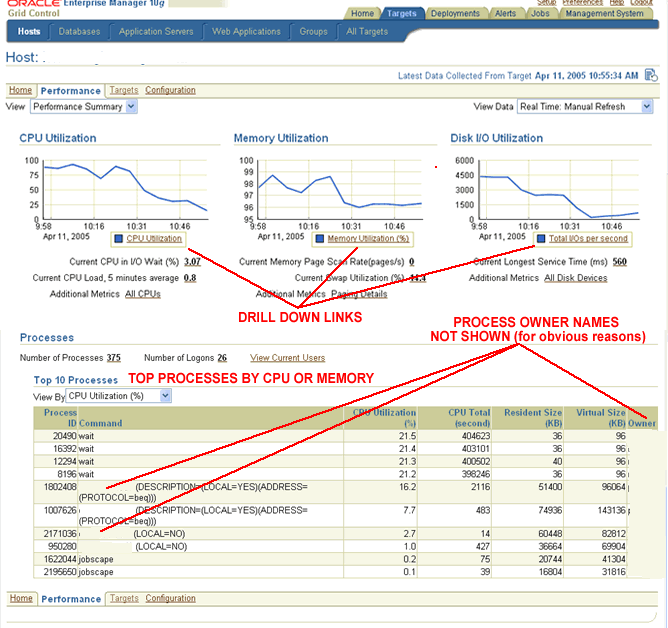
  going to do is review the host platform's key performance indicators. 10G Grid 
  Control's <a href="/blogs/blog_cf/chrisfoot/blogentry2005_04_193743394432/perf_home_page.gif">Host 
  Performance panel</a> provides me with exactly the information I'm looking for 
  - current CPU, memory and disk resource utilization. </font></p>
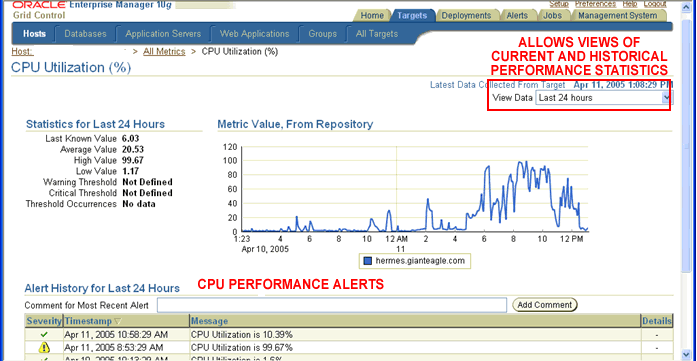
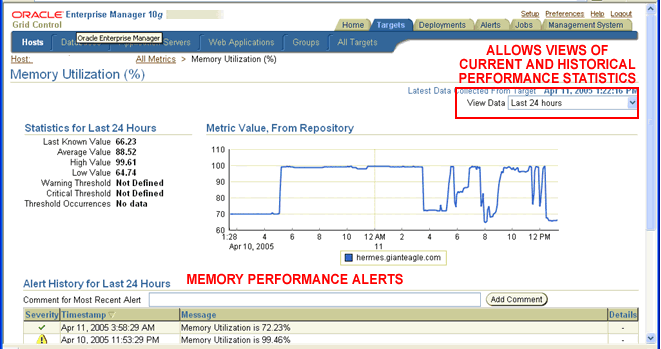
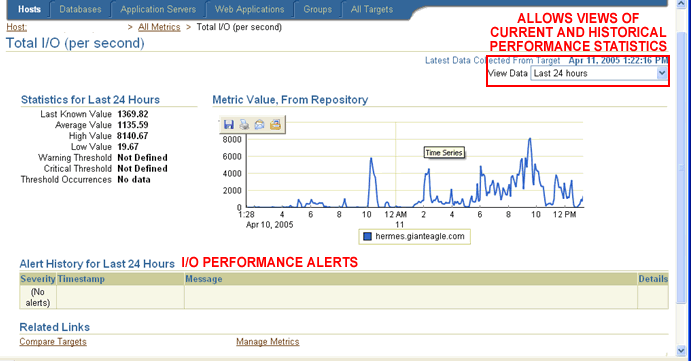
<p><font face="Verdana, Arial, Helvetica, sans-serif" size="2">Each resource's 
  graphical display contains links that allow me to view more detailed statistical 
  information. Each of the drill down panels for <a href="/blogs/blog_cf/chrisfoot/blogentry2005_04_193743394432/cpu_drilldown.gif">CPU</a>, 
  <a href="/blogs/blog_cf/chrisfoot/blogentry2005_04_193743394432/memory_drilldown.gif">Memory</a> 
  and <a href="/blogs/blog_cf/chrisfoot/blogentry2005_04_193743394432/disk_drilldown.gif">Disk</a> 
  contains a drop down menu list that I can use to view current as well as historical 
  performance statistics for the last 24 hours, 7 days and 31 days. The main performance 
  panel also displays information on the top resource consuming processes that 
  are currently running on the host. Once again, a drop down menu lets me switch 
  between top CPU and top memory consumption reports. </font></p>
<p><font face="Verdana, Arial, Helvetica, sans-serif" size="2">For a more in-depth 
  discussion on host performance tuning, please refer to my blog titled <a href="/blogs/blog_cf/chrisfoot/blogentry.2005_04_19.3743394432">&quot;Host 
  Performance Monitoring Using 10G Enterprise Manager Grid Control&quot;</a>. 
  </font></p>
<p><font face="Verdana, Arial, Helvetica, sans-serif" size="2"><b>10G Grid Control 
  Database Performance Home Page</b><br>
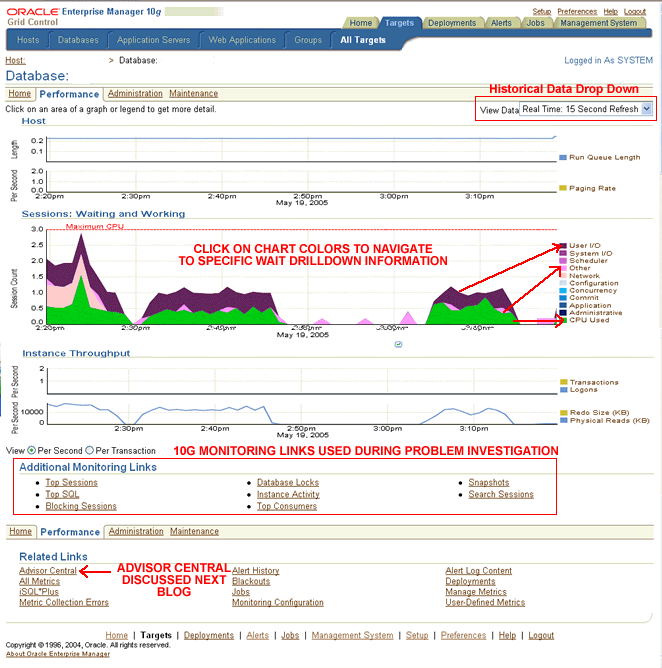
  If I want to review database performance, I will access the <a href="/blogs/blog_cf/chrisfoot/blogentry2005_05_223884573887/db_perf_home.gif">10G 
  Grid Control Database Performance Home Page</a>, which is available in both 
  10G Database Control and Grid Control.</font></p>
<p><font face="Verdana, Arial, Helvetica, sans-serif" size="2">The database performance 
  home page allows me to review performance historically, identify what sessions 
  are dominating &quot;finite system resources&quot;, activate advisors and drill 
  down into the top resource consumers.  I can then quickly review the SQL they are executing. 
  Does it get any better than that? </font></p>
<p><font face="Verdana, Arial, Helvetica, sans-serif" size="2">I challenge anyone 
  to tell me that they would be able to monitor database performance more efficiently 
  using archaic command line toolsets. By the time you have identified the problem, 
  I'll have already contacted the user running the SQL and created a profile to 
  improve its performance. If I have Grid Control's alerting system configured 
  (which I always do), Grid Control's database performance threshold alert would 
  have already notified me that a problem was occurring. By the time you got that 
  call from an irate user, I would have had it solved. If you want to learn how 
  to configure 10G Grid Control's performance alerting feature, please turn to 
  my blog titled <a href="/blogs/blog_cf/chrisfoot/blogentry.2005_05_14.9418191992">&quot;Configuring 
  10G OEM Grid Control's Automatic Alert Notification System&quot;.</a></font></p>
<p><font face="Verdana, Arial, Helvetica, sans-serif" size="2">To learn more about 
  10G Grid Control's database performance monitoring and analysis features, please 
  turn to my blog titled <a href="/blogs/blog_cf/chrisfoot/blogentry.2005_05_22.3884573887">&quot;Database 
  Performance Monitoring Using 10G OEM Grid Control&quot;</a>.</font></p>
<p><font face="Verdana, Arial, Helvetica, sans-serif" size="2"><b>10G Grid Control 
  Advisors</b><br>
  OK, I'll admit it. I'm hooked on the advisors. At first I was very wary of their 
  recommendations, but the longer I worked with them, the better I liked them. 
  I have lots of experience tuning Oracle, but if an advisor is going to make 
  my job easier (and let me spend less time debugging a performance problem), 
  I'm all for it.</font></p>
<p><font face="Verdana, Arial, Helvetica, sans-serif" size="2">For an overview 
  of 10G Grid Control's advisory features, please refer to my blog that is aptly 
  titled <a href="/blogs/blog_cf/chrisfoot/blogentry.2005_06_10.8609363343">&quot;An 
  Overview of 10G Advisors&quot;</a>. </font></p>
<p><font face="Verdana, Arial, Helvetica, sans-serif" size="2">Here's a listing 
  of blogs that provide more specific information on the individual advisors. 
  Please note that each title below also links to a blog on that advisor.</font></p>
<ul>
  <li><font face="Verdana, Arial, Helvetica, sans-serif" size="2"><a href="http://www.dbazine.com/blogs/blog-cf/chrisfoot/blogentry.2005-07-06.5201081269">10G 
    SQL Access Advisor</a> - The SQL Access Advisor recommends a set of materialized 
    views and indexes based on a supplied workload input. The tool can also help 
    administrators optimize materialized views to take advantage of fast refresh 
    and query rewrite capabilities. In addition, the SQL Access Advisor may recommend 
    dropping indexes and materialized views that aren't being used. The SQL Advisor 
    ranks and groups the recommendations based on the positive impact they will 
    have if implemented. <br>
    <br>
    </font></li>
  <li><font face="Verdana, Arial, Helvetica, sans-serif" size="2"><a href="/blogs/blog_cf/chrisfoot/blogentry.2005_08_11.0227938704">SQL 
    Tuning Advisor</a> - The SQL Tuning Advisor, as its name implies, provides 
    SQL tuning recommendations and includes information justifying why it generated 
    those recommendations. The recommendations may include collecting statistics 
    on objects, new index creation, restructuring the SQL statement or the creation 
    of a SQL profile to create a more optimal access path. I have a more detailed 
    blog the SQL Tuning Advisor titled <a href="/blogs/blog_cf/chrisfoot/blogentry.2006_05_05.3335525140">&quot;SQL 
    Access Advisor Revisited&quot;</a>.<br>
    <br>
    </font></li>
  <li><font face="Verdana, Arial, Helvetica, sans-serif" size="2"><a href="/blogs/blog_cf/chrisfoot/blogentry.2005_08_25.8847176467">Segment 
    Advisor</a> - Although I don't use this advisor as much as the SQL Tuning 
    and SQL Access advisors, I do use it on a regular basis. The 10G segment advisor 
    identifies segments that have become fragmented as a result of update and 
    delete operations. The <a href="http://www.dbazine.com/blogs/blog-cf/chrisfoot/blogentry.2005-07-16.1165649869">10G 
    R2 Segment Advisor</a> has been enhanced to identify tables that suffer from 
    excessive row chaining and row migrations. Oracle describes these objects 
    as being sparsely populated. Not only do sparsely populated objects waste 
    space but they can also contribute to SQL performance problems. </font></li>
</ul>
<p><font face="Verdana, Arial, Helvetica, sans-serif" size="2"><b>Automatic Database 
  Diagnostic Monitor (ADDM)</b><br>
  ADDM is a &quot;recommendation engine&quot; that uses performance information 
  stored in the Automatic Workload Repository (AWR) as input. Here's <a href="/blogs/blog_cf/chrisfoot/blogentry.2005_06_30.3614041361">a 
  blog</a> that provides a detailed description of the Automatic Database Diagnostic 
  Monitor. By default, AWR snapshots occur every 60 minutes. For more 
  information on the AWR snapshots, please turn to my blog titled <a href="/blogs/blog_cf/chrisfoot/blogentry.2005_10_29.7417919231">&quot;Working 
  with Automatic Workload Repository Performance Snapshots&quot;</a>. </font></p>
<p><font face="Verdana, Arial, Helvetica, sans-serif" size="2">To learn how to 
  tailor the 10G AWR snapshot environment to meet your specific needs, please 
  refer to my blog titled <a href="/blogs/blog_cf/chrisfoot/blogentry.2005_11_06.0481421080">&quot;Configuring 
  and Administering Automatic Workload Repository Performance Snapshots&quot;</a>. 
  </font></p>
<p><font face="Verdana, Arial, Helvetica, sans-serif" size="2">After the AWR information 
  snapshot is executed, the Automatic Database Diagnostic Monitor is triggered 
  to analyze the information contained in the AWR for the period pertaining to 
  the last two Snapshots.  ADDM's output includes a plethora of reports, charts, 
  graphs, heartbeats and related visual aids. In general, ADDM provides users 
  with a top-down analysis of performance bottlenecks and their associated resolutions. 
  But you can also <a href="/blogs/blog_cf/chrisfoot/blogentry2005_11_242858305991/04a_addm_task_output_page.gif">execute 
  ADDM manually</a> to generate recommendations for current, as well as historical, 
  time periods. </font></p>
<p><font face="Verdana, Arial, Helvetica, sans-serif" size="2">Statistical information, 
  by itself, is often useless. If you have nothing to compare a measurement to, 
  how will you know if its good or not so good? 10G Grid Control allows two sets 
  of snapshots to be compared to one another. The results of the comparison are 
  displayed graphically using horizontal bars to indicate differences between 
  the two measurements. To learn how to perform snapshot comparison, please refer 
  to my blog titled <a href="http://www.dbazine.com/blogs/blog-cf/chrisfoot/blogentry.2005-12-03.3566409131">&quot;You 
  Can't Improve What You Can't Compare&quot;</a>.</font></p>
<p><font face="Verdana, Arial, Helvetica, sans-serif" size="2"><b>Conclusion</b><br>
  Take some advice from your friendly ex-Oracle instructor. LEARN HOW TO USE THESE 
  TOOLS. I can't emphasis that statement strongly enough. As I stated, ADDM and 
  the intelligent advisors may not currently be a total replacement for DBA experience 
  and expertise, but sooner or later, they most definitely will be. Don't get 
  left behind - because its only a matter of time.</font></p>
<p><font face="Verdana, Arial, Helvetica, sans-serif" size="2"><br>
  </font></p> ]]>
</content:encoded>
<dc:publisher>No publisher</dc:publisher>
<dc:creator>cfoot</dc:creator>
<dc:rights></dc:rights>
<dc:date>2007-04-02T14:56+00:00</dc:date>
</item>


<item rdf:about="http://www.dbazine.com/blogs/blog-cf/chrisfoot/blogentry.2007-03-17.4269055673">
<title>Access Path Scientific Analysis</title>
<link>http://www.dbazine.com/blogs/blog-cf/chrisfoot/blogentry.2007-03-17.4269055673</link>
<description>We combine all of the knowledge we learned in previous blogs of this series to begin our scientific analysis on Oracle optimization.  We’ll review some of tools we can use to display access path information and look at some graphical displays that will assist us during the analysis process.  I’ll also provide you with some examples to jump-start your testing.</description>
<content:encoded><![CDATA[<p><font face="Verdana, Arial, Helvetica, sans-serif" size="2"><br>
  <b>Introduction</b><br>
  This information is intended to help you begin your quest to become a database 
  performance scientist. There's a difference between tuning and learning how 
  to tune. Tuning is what happens when you get that call at 3:00 on a Friday afternoon. 
  You have a concerned customer stating that something is running longer (usually 
  way longer) than they would like. Your first response is to consider your choice 
  of career paths, dreaming how nice it would be to sell wood carvings at a roadside 
  stand in Montana. You then perform your diagnostic analysis, come to some sort 
  of conclusion and implement your solution. </font></p>
<p><font face="Verdana, Arial, Helvetica, sans-serif" size="2">Learning how to 
  tune requires that you spend time with the optimizer experimenting with different 
  environmental settings and database objects that affect access paths. It also 
  requires that you have a general understanding of the basics of optimization. 
  </font></p>
<p><font face="Verdana, Arial, Helvetica, sans-serif" size="2">I dedicated <a href="http://www.dbazine.com/blogs/blog-cf/chrisfoot/blogentry.2007-01-19.1078911078">an 
  entire blog</a> on educational resources that will help you build a firm foundation 
  of Oracle optimization knowledge. </font><font face="Verdana, Arial, Helvetica, sans-serif" size="2">It's 
  critical that we understand as much as we can about optimization before we begin 
  our experimentation. But the key to success is to spend dedicated time experimenting. 
  I'm not professing that you spend the rest of your career becoming &quot;at 
  one&quot; with the optimizer. But if you don't want to be at a total loss each 
  time something runs long, you need to experiment to learn how to tune.</font></p>
<p><font face="Verdana, Arial, Helvetica, sans-serif" size="2"><b>Environmental 
  Documentation and SQL Statement Selection </b><br>
  Before we begin, we'll need to document some of the key parameters that affect 
  optimization and gather some information on the data objects we will be using 
  in our experimentation. Please refer to my blog titled <a href="/blogs/blog_cf/chrisfoot/blogentry.2007_02_15.420968196520">&quot;Access 
  Path Scientific Analysis Part I&quot;</a> for more information on the importance 
  of documentation as well as the documentation process itself. In a <a href="/blogs/blog_cf/chrisfoot/blogentry.2007_03_11.8660796218">previous 
  blog</a>, I provided a few hints and tips on identifying what types of statements 
  and access paths would be most beneficial to analyze. </font></p>
<p><font face="Verdana, Arial, Helvetica, sans-serif" size="2"><b>Access Path 
  Identification Tools</b><br>
  Here are the tools that I most often use to review Oracle access paths:</font></p>
<ul>
  <li><font face="Verdana, Arial, Helvetica, sans-serif" size="2">SQL Scratchpad 
    - I like to see graphical representations of access paths. Even though I have 
    lots of experience reading SQL Trace output and the multitude of variations 
    of access path displays, I like seeing a graphical representation. The problem 
    is that Scratchpad must be installed on your client (comes embedded with 9I 
    OEM) and it doesn't like accessing 10G databases. If I am tuning a 9I database 
    and I have access to SQL Scratchpad, that is the tool I am going to use to 
    display access path information. For more information on SQL Scratchpad and 
    other 9I OEM tools, please turn to my blog titled <a href="http://www.dbazine.com/blogs/blog-cf/chrisfoot/blogentry.2007-01-06.1280259716">&quot;Access 
    Path Identification Part V&quot;</a>.<br>
    <br>
    </font></li>
  <li><font face="Verdana, Arial, Helvetica, sans-serif" size="2">SQL*PLUS Autotrace 
    - If I want to quickly display the statement's access path and associated 
    run-time performance statistics, I will use SQL*PLUS Autotrace. Here's <a href="/blogs/blog_cf/chrisfoot/blogentry.2006_12_16.1691009429">a 
    blog</a> containing a few hints and tips on Autotrace. <br>
    <br>
    </font></li>
  <li><font face="Verdana, Arial, Helvetica, sans-serif" size="2">Explain Plan 
    - If I don't want to run the query, and I am not concerned about the access 
    path changing during SQL statement execution (read next bullet), I will used 
    the tried and true &quot;explain plan into&quot; clause to ask Oracle to dump 
    the access path information into a table. I'll run a statement to retrieve 
    the data from the plan table and format the output. Please read my blogs titled 
    <a href="http://www.dbazine.com/blogs/blog-cf/chrisfoot/blogentry.2006-12-01.4894880310">&quot;Access 
    Path Identification Part II&quot;</a> and <a href="http://www.dbazine.com/blogs/blog-cf/chrisfoot/blogentry.2006-12-09.4712027033">&quot;Access 
    Path Identification Part III&quot;</a> for more information. <br>
    <br>
    </font></li>
  <li><font face="Verdana, Arial, Helvetica, sans-serif" size="2">SQL Trace - 
    If I want to be absolutely sure that the access path the other tools are predicting 
    the statement will take matches what access path is chosen during runtime, 
    I'll run SQL Trace. It is one of the only tools you can use to determine the 
    path chosen during execution. How can the access path change during execution? 
    Read <a href="http://www.dbazine.com/blogs/blog-cf/chrisfoot/blogentry.2006-11-18.7319544765">this 
    blog</a> to find out! The blog contains an example of a production problem 
    that was caused by an access path changing during runtime. For lots of information 
    on activating SQL Trace, please turn to my blog titled <a href="/blogs/blog_cf/chrisfoot/blogentry.2006_12_16.1691009429">&quot;Access 
    Path Identification Part IV&quot;</a>. SQL Trace is the tool I will turn to 
    if I want to analyze a set of statements that belong to a specific online 
    transaction or batch job. The output quickly tells me what the top resource 
    consuming statements are.<br>
    <br>
    </font></li>
  <li><font face="Verdana, Arial, Helvetica, sans-serif" size="2">V$SQLPLAN - 
    V$SQLPLAN contains access path information the SQL statement takes during 
    execution. I'll run the statement, review the access path taken during execution, 
    make my tuning change, alter the text of the statement look different to the 
    optimizer, retrieve the access path information again and compare the before 
    and after results. My blog titled <a href="http://www.dbazine.com/blogs/blog-cf/chrisfoot/blogentry.2006-12-01.4894880310">&quot;Access 
    Path Identification Part II&quot;</a> provides all of the information you 
    need when you are using the V$SQLPLAN table to retrieve information on access 
    paths taken during execution.<br>
    <br>
    </font></li>
  <li><font face="Verdana, Arial, Helvetica, sans-serif" size="2">Regardless of 
    which tool I select, I will use the output to graphically display the statement's 
    access path. Although it is time consuming, graphically displaying a statement's 
    access path allows me to more clearly understand the access path and simplifies 
    the tuning process. <a href="http://www.dbazine.com/blogs/blog-cf/chrisfoot/blogentry.2006-12-09.4712027033">This 
    blog</a> will show you how to graphically display a statement's access path. 
    </font></li>
</ul>
<p><font face="Verdana, Arial, Helvetica, sans-serif" size="2"><b>Another Graphical 
  Display I find Useful</b><br>
  During my career as an Oracle instructor, I was often asked in the SQL tuning 
  classes how I personally documented a query I was attempting to tune. This is 
  <a href="/blogs/blog_cf/chrisfoot/blogentry2007_03_174269055673/worksheet.gif">the 
  display</a> that I showed them. Let's take a look at the contents, starting 
  from the top of the page:</font></p>
<ul>
  <li><font face="Verdana, Arial, Helvetica, sans-serif" size="2">SQL statement 
    text - the full text of the SQL statement.<br>
    <br>
    </font></li>
  <li><font face="Verdana, Arial, Helvetica, sans-serif" size="2">Columns in the 
    SELECT clause - a listing of the columns that are in the SELECT clause are 
    displayed under the table they belong to.<br>
    <br>
    </font></li>
  <li><font face="Verdana, Arial, Helvetica, sans-serif" size="2">Columns in the 
    WHERE clause - a listing of the columns used in the WHERE clause are displayed 
    under the table they belong to. If the columns are tables used in a join operation, 
    an arrow is used to designate which of the other table's columns they are 
    joined to. If I am interested in cardinality and data skew, I would document 
    that information directly below the column name. For more information on determining 
    column cardinality and data skew, please turn to <a href="/blogs/blog_cf/chrisfoot/blogentry.2007_02_15.420968196520">this 
    blog</a>. <br>
    <br>
    </font></li>
  <li><font face="Verdana, Arial, Helvetica, sans-serif" size="2"> I</font><font face="Verdana, Arial, Helvetica, sans-serif" size="2">ndexed 
    columns - The bottom of the page contains all of the indexes that are on columns 
    in the WHERE and SELECT clauses. This allows me to easily determine if I need 
    to create additional indexes are begin analyzing why an index isn't being 
    used.</font></li>
</ul>
<p><font face="Verdana, Arial, Helvetica, sans-serif" size="2"><b>Performing the 
  Scientific Analysis</b><br>
  Before we begin, we need to understand the effect that preloading the buffers 
  has on SQL statement performance. If you run the query and return the results, 
  you will be loading the buffer cache with data. As a result, subsequent runs 
  of the same statement could be faster. This is because your statement is retrieving 
  data from memory while the initial runs were forced to retrieve the data from 
  disk. You'll need to run the statement twice, make your change and run the statement 
  twice again to ensure that buffers don't impact your timings. You can then compare 
  the output of the second execution of each test. 10G provides a SQL statement 
  to flush the buffer cache. </font></p>
<p><font face="Verdana, Arial, Helvetica, sans-serif" size="2">If you are building 
  indexes during your testing, don't forget to generate statistics on the new 
  objects. You don't want the lack of object information to affect the optimization 
  process.</font></p>
<p><font face="Verdana, Arial, Helvetica, sans-serif" size="2">In the discussion 
  that follows, I'll be providing you with some examples of changes to make during 
  your scientific analysis. You will run the SQL statement, record the execution 
  time and statistics and document the access path. You will then make the suggested 
  alteration, review the access path to see if it has changed and run the statement 
  again to record the new performance statistics and execution time. Please note 
  that in the examples below, I'm not going to remind you each time to run the 
  query to evaluate the performance statistics and execution times. </font></p>
<p><font face="Verdana, Arial, Helvetica, sans-serif" size="2"><b>Index Testing</b><br>
  Let's use the same sample query I used in my graphical display in this discussion:</font></p>
<blockquote>
  <p><font face="Verdana, Arial, Helvetica, sans-serif" size="2">select a.employee_id, 
    a.last_name, b.department_id, b.department_name,<br>
    c.street_address, c.postal_code, c.city, c.state_province<br>
    from hr.employees a, hr.departments b, hr.locations c<br>
    where a.department_id=b.department_id <br>
    and b.location_id=c.location_id<br>
    and a.employee_id = 174<br>
    order by a.last_name;</font></p>
</blockquote>
<p><font face="Verdana, Arial, Helvetica, sans-serif" size="2">There is a myriad 
  of different changes we can make. Here's a couple of examples to get you started:</font></p>
<ul>
  <li><font face="Verdana, Arial, Helvetica, sans-serif" size="2">Drop all of 
    the indexes on the tables and review the access path. We know it will use 
    table scans, but what join method did it choose, how about the join order?<br>
    <br>
    </font></li>
  <li><font face="Verdana, Arial, Helvetica, sans-serif" size="2">Build an index 
    on one of the join columns (i.e. dept.department_id) and review the access 
    path. Determine if it chose the index, what join method was used and the order 
    in which the tables were joined.<br>
    <br>
    </font></li>
  <li><font face="Verdana, Arial, Helvetica, sans-serif" size="2">Drop that index 
    and build an index on the other column in the join. Identify if it used the 
    index, join method and join order.<br>
    <br>
    </font></li>
  <li><font face="Verdana, Arial, Helvetica, sans-serif" size="2"> Build an index 
    on employee_id, department_id and last_name. Identify if it used the index, 
    join method and join order. Did you get an index only access path? <br>
    <br>
    </font></li>
  <li><font face="Verdana, Arial, Helvetica, sans-serif" size="2">Drop the index 
    you just created and change the order putting employee_id between department_id 
    and last_name. What was the access path?<br>
    <br>
    </font></li>
  <li><font face="Verdana, Arial, Helvetica, sans-serif" size="2"> Change the 
    WHERE clause to look for rows based on the last_name and first_name columns. 
    Remove the a.employee_id = 174 clause. Build an index on the first_name and 
    last_name columns. What happened? <br>
    <br>
    </font></li>
  <li><font face="Verdana, Arial, Helvetica, sans-serif" size="2"> Drop the index 
    built on the first_name and last_name columns and build two indexes, one on 
    first_name and the other on last_name. Did the optimizer use both indexes? 
    Which one did it choose?<br>
    <br>
    </font></li>
  <li><font face="Verdana, Arial, Helvetica, sans-serif" size="2"> Add local predicates 
    to the other tables and identify the access path changes.<br>
    <br>
    </font></li>
  <li><font face="Verdana, Arial, Helvetica, sans-serif" size="2"> Identify a 
    column in one of the tables that has low cardinality. Change the WHERE clause 
    to access that low cardinality column. If you don't have a low cardinality 
    column available, its pretty simple to add a column and update it with a few 
    repeating values to create a low cardinality column. Build a bitmap index 
    on the low cardinality column. Did the optimizer choose the bitmap index? 
    What happens if you use a hint?<br>
    <br>
    </font></li>
  <li><font face="Verdana, Arial, Helvetica, sans-serif" size="2"> Build a bitmap 
    index on a column that has high cardinality (i.e. employee_id). If it doesn't 
    use the bitmap index, use a hint to influence the optimizer to choose it. 
    Drop the bitmap index and build a B-tree index. Does the optimizer use that 
    index without the hint? Compare before and after execution performance statistics 
    and timing.<br>
    <br>
    </font></li>
  <li><font face="Verdana, Arial, Helvetica, sans-serif" size="2"> Identify columns 
    that have skewed data. Build an index on the skewed column. Change the query 
    to search for a value that occurs many times. Compare that execution to a 
    search on a value that appears few times. Analyze the table and build a histogram. 
    Re-execute the tests and compare the results.</font></li>
</ul>
<p><font face="Verdana, Arial, Helvetica, sans-serif" size="2"><b>Parameters that 
  Affect Optimization</b><br>
  We also need to learn how different parameter settings affect optimization. 
  We can start by adjusting a few of the basic parameters that have the best chance 
  of changing the access path for a given statement. Most of the parameters can 
  be changed in your session by using the ALTER SESSION statement. Using the ALTER 
  SESSION statement will allow you to change the parameter for your session only. 
  You won't have to worry about affecting other folks executing statements in 
  the same database that you are using for your testing. </font></p>
<p><font face="Verdana, Arial, Helvetica, sans-serif" size="2">Here's <a href="http://www.dbazine.com/blogs/blog-cf/chrisfoot/blogentry.2007-02-24.7493837565">a 
  blog </a>that provides a listing of parameters we can use during our initial 
  testing. Please note that this is not an all inclusive list. It is a listing 
  of parameters that I feel have the greatest chance to influence the optimizer 
  to choose a different access path.</font></p>
<p><font face="Verdana, Arial, Helvetica, sans-serif" size="2">You need to execute 
  the statement, change a parameter and note its affects on the statement's access 
  path, performance statistics and runtimes. If you are going to test changing 
  values for different parameters, don't forget to change the one you just tested 
  back to its original setting. That way you won't have multiple changes impacting 
  your test results. You can also test combinations of changes. Just be aware 
  of the changes you are making.</font></p>
<p><font face="Verdana, Arial, Helvetica, sans-serif" size="2"><b>Hints</b><br>
  Administrators embed hints in a SQL statement to influence the optimizer to 
  choose a particular access path. Using hints will allow us to evaluate the affect 
  that different access paths have on SQL statement performance. We will run the 
  statement without any modification, review the access path and performance statistics, 
  use a hint to (hopefully) change the access path, run the statement again and 
  compare the before and after results. Since hints can be embedded in virtually 
  any SQL statement, they will provide us with an easy mechanism to learn more 
  about access paths. I have devoted <a href="http://www.dbazine.com/blogs/blog-cf/chrisfoot/blogentry.2007-02-14.3900730733">a 
  previous blog</a> to hints. The blog also contains a demo document that will 
  show you how to embed hints and the affects the hints have on access paths. 
  One of the key tests is to determine the impact that operation cardinality has 
  on SQL statement performance. You can test this by using the ORDERED hint to 
  ask the optimizer to change the join order for statements that join more than 
  two tables together.</font></p>
<p><font face="Verdana, Arial, Helvetica, sans-serif" size="2"><b>Conclusion</b><br>
  The tests above will hopefully stimulate your creativity and allow you to generate 
  your own test cases. As we become more experienced we'll need to review subselects, 
  views, complex selectivity issues (and the list goes on and on&#133;) Oracle 
  performance tuning is truly a wonderfully complex subject. The important thing 
  is that we start the process. That's the only way we'll become database performance 
  scientists!<br>
  </font></p><p><font face="Verdana, Arial, Helvetica, sans-serif" size="2">Thanks for Reading,</font></p>
<p><font face="Verdana, Arial, Helvetica, sans-serif" size="2">Chris Foot <br>
  Oracle Ace <img src="http://www.remotedbaexperts.com/ace_2.gif"></font></p> ]]>
</content:encoded>
<dc:publisher>No publisher</dc:publisher>
<dc:creator>cfoot</dc:creator>
<dc:rights></dc:rights>
<dc:date>2007-03-20T12:13+00:00</dc:date>
</item>


<item rdf:about="/blogs/blog_cf/chrisfoot/blogentry.2007_03_11.8660796218">
<title>Acces Path Scientific Analysis Part IV</title>
<link>http://www.dbazine.com/blogs/blog-cf/chrisfoot/blogentry.2007-03-11.8660796218</link>
<description>We continue our series on Oracle access path scientific analysis.  In this latest installment, we’ll do a quick review of some of the blogs that led us to this point.  We’ll also learn how to select a set of SQL statements that we will use in our test cases.</description>
<content:encoded><![CDATA[<p><font face="Verdana, Arial, Helvetica, sans-serif" size="2"> <B>Introduction</B><br>
  The latest installment in a series of blogs on Oracle access paths. Before we 
  begin,it is important for us to do a quick review of my previous blogs on SQL 
  performance. We'll be using this information </font><font face="Verdana, Arial, Helvetica, sans-serif" size="2">during 
  our scientific analysis phase. </font> </p>
<ul>
  <li><font face="Verdana, Arial, Helvetica, sans-serif" size="2"><a href="/blogs/blog_cf/chrisfoot/blogentry.2006_10_28.8698342650">Let's 
    Get Technical! - Using Deductive Reasoning and Communication Skills to Identify 
    and Solve Performance Problems<br>
    </a>The first blog of this series provides some helpful hints on what questions 
    to ask during the initial stages of application performance problem analysis.<br>
    <br>
    </font></li>
  <li><font face="Verdana, Arial, Helvetica, sans-serif" size="2"><a href="http://www.dbazine.com/blogs/blog-cf/chrisfoot/blogentry.2006-11-04.1538832230">System 
    Triage Part II - Host Performance Analysis Using Grid Control and Host Commands<br>
    </a>Using operating system commands and 10G Grid Control to monitor database 
    server performance.<br>
    <br>
    </font></li>
  <li><font face="Verdana, Arial, Helvetica, sans-serif" size="2"><a href="http://www.dbazine.com/blogs/blog-cf/chrisfoot/blogentry.2006-11-10.6780804300">System 
    Triage Part III - Finding the Top Resource Consumers<br>
    </a>We learned how to use 10G Grid Standalone to identify the top resource 
    consumers for a given instance.<br>
    <br>
    </font></li>
  <li><font face="Verdana, Arial, Helvetica, sans-serif" size="2"><a href="http://www.dbazine.com/blogs/blog-cf/chrisfoot/blogentry.2006-11-18.7319544765">System 
    Triage IV - Access Path Identification Part I</a> <br>
    A high-level overview of Oracle query optimization. Also discussed the difference 
    between estimated and runtime access paths.<br>
    <a href="http://www.dbazine.com/blogs/blog-cf/chrisfoot/blogentry.2006-12-01.4894880310"><br>
    </a></font></li>
  <li><a href="http://www.dbazine.com/blogs/blog-cf/chrisfoot/blogentry.2006-12-01.4894880310"><font face="Verdana, Arial, Helvetica, sans-serif" size="2">System 
    Triage V - Access Path Identification Part II</font></a><font face="Verdana, Arial, Helvetica, sans-serif" size="2"> 
    <br>
    We reviewed the two data objects that contain access path raw data - plan_table 
    and v$sql_plan. In addition, we discussed a few of the V$ dynamic performance 
    views that provide information pertaining to SQL statements executing in our 
    Oracle database environment.<br>
    <br>
    </font></li>
  <li><font face="Verdana, Arial, Helvetica, sans-serif" size="2"><a href="http://www.dbazine.com/blogs/blog-cf/chrisfoot/blogentry.2006-12-09.4712027033">Access 
    Path Identification - Part III</a> <br>
    A discussion on the tools we can use to display graphical and text versions 
    of explain plan data including the DBMS_XPLAN package, UTLXPLS.SQL, UTLXPLP.SQL 
    and Oracle 9I Scratchpad (graphical). We also learned how to create our own 
    graphical displays of Oracle access paths.<br>
    <br>
    </font></li>
  <li><font face="Verdana, Arial, Helvetica, sans-serif" size="2"><a href="/blogs/blog_cf/chrisfoot/blogentry.2006_12_16.1691009429">Access 
    Path Identification - Part IV</a> <br>
    An investigation of everyone's favorite performance analysis tools - SQL*PLUS 
    Autotrace and SQL Trace.<br>
    <br>
    </font></li>
  <li><font face="Verdana, Arial, Helvetica, sans-serif" size="2"><a href="http://www.dbazine.com/blogs/blog-cf/chrisfoot/blogentry.2007-01-06.1280259716">Access 
    Path Identification - Part V<br>
    </a>A discussion on a couple of 9I Oracle Enterprise Manager tools that we 
    can use to identify Oracle access paths. We also learned how we can use 9I 
    OEM's SQL Analyze and the Virtual Index Wizard to help us better understand 
    access paths, monitor database performance and tune statements running in 
    an Oracle 9I database environment.<br>
    <br>
    </font></li>
  <li><font face="Verdana, Arial, Helvetica, sans-serif" size="2"><a href="http://www.dbazine.com/blogs/blog-cf/chrisfoot/blogentry.2007-01-13.9166686138">Access 
    Paths VI - 10G Grid Control SQL Details Panels</a> <br>
    We turned our attention to the 10G Grid Control's access path display panel 
    - the SQL Details Panel. It seems like no matter where you start your investigation 
    in 10G Grid Control, sooner or later, you'll end up with a panel that contains 
    a link to the SQL Details Panels. We took a look at a few of the more popular 
    ways of finding our way to them.<br>
    <br>
    </font></li>
  <li><font face="Verdana, Arial, Helvetica, sans-serif" size="2"><a href="http://www.dbazine.com/blogs/blog-cf/chrisfoot/blogentry.2007-01-19.1078911078">Access 
    Paths VII - Access Path Education</a> <br>
    Focuses on the importance of Oracle access path education. The blog contains 
    links to resources and numerous Metalink Notes that provide access path educational 
    information.<br>
    <br>
    </font></li>
  <li><font face="Verdana, Arial, Helvetica, sans-serif" size="2"><a href="http://www.dbazine.com/blogs/blog-cf/chrisfoot/blogentry.2007-02-15.4209681965">Access 
    Path Scientific Analysis Part I</a> <br>
    An introduction to Oracle Access Path Scientific Analysis. We learn why it 
    is important for us to become &quot;database performance scientists&quot; 
    if we want to fully understand Oracle access paths and the affect they have 
    on SQL statement performance. We also learned how to select a test system 
    to use as well as document the parameters and database objects that play key 
    roles in the optimization process.<br>
    <br>
    </font></li>
  <li><font face="Verdana, Arial, Helvetica, sans-serif" size="2"><a href="http://www.dbazine.com/blogs/blog-cf/chrisfoot/blogentry.2007-02-14.3900730733">Access 
    Path Scientific Analysis Part II</a> <br>
    We learn how to use hints to influence access paths for testing purposes. 
    Using hints allows us to evaluate the affect that different access paths have 
    on SQL statement performance. When we finally begin our access path scientific 
    analysis, we will run the statement without any modification, review the access 
    path and performance statistics, use a hint to change the access path, run 
    the statement again and compare the before and after results. Contains a document 
    that provides a demo on using hints to influence access paths. The demo document 
    also contains a description of some of the basic access paths that Oracle 
    can choose from.<br>
    <br>
    </font></li>
  <li><font face="Verdana, Arial, Helvetica, sans-serif" size="2"><a href="http://www.dbazine.com/blogs/blog-cf/chrisfoot/blogentry.2007-02-24.7493837565">Access 
    Path Scientific Analysis Part III</a> <br>
    An overview of the various types of indexes as well as indexing strategies 
    that affect Oracle access path selection. Also includes a list of parameter 
    that can influence the optimizer to favor index access.</font></li>
</ul>
<p><font face="Verdana, Arial, Helvetica, sans-serif" size="2"><b>Selecting SQL 
  Statements to Analyze</b><br>
  We need to select a few SQL statements that we can use as input to our scientific 
  analysis. Let's take a look at the various tools we can use to select the SQL 
  statements we can use for testing.</font></p>
<ul>
  <li><font face="Verdana, Arial, Helvetica, sans-serif" size="2">Using 9I Oracle 
    Enterprise Manager - We can use the Session Details Panel to retrieve the 
    SQL text of statements that are currently executing in the database. The Session 
    Details Panel also provides the access path the statement is taking. The <a href="http://www.dbazine.com/blogs/blog-cf/chrisfoot/blogentry.2007-01-06.1280259716">blog 
    on 9I OEM</a> will show you how to drill down to find the text of the SQL 
    statement and the access path it is taking.<br>
    <br>
    </font></li>
  <li><font face="Verdana, Arial, Helvetica, sans-serif" size="2">10G Grid Control 
    - Grid Control' s Execution Plan Panel allows administrators to display the 
    entire text of a SQL statement and the access path it is taking. This <a href="http://www.dbazine.com/blogs/blog-cf/chrisfoot/blogentry.2007-01-13.9166686138">blog 
    on 10G Grid Control</a> will show you how to navigate through the various 
    panels to access the Execution Plan Panel. <br>
    <br>
    </font></li>
  <li><font face="Verdana, Arial, Helvetica, sans-serif" size="2">SQL Trace - 
    If we don't have access to the &quot;SGTs&quot; (Sissy GUI Tools), all is 
    not lost. We can also use the SQL Trace utility to capture the text of the 
    SQL statement as well as its access path. To use this method, we would contact 
    one of our friendly application developers and ask them to run a series of 
    batch jobs or online transactions in the environment we have selected as our 
    test bed. <br>
    <br>
    We can then activate SQL Trace, contact the developer to run the selected 
    workload, deactivate the trace and format the trace's output into an easily 
    readable format. SQL Trace provides the benefit of allowing us to capture 
    multiple SQL statement access paths in a single execution. The <a href="/blogs/blog_cf/chrisfoot/blogentry.2006_12_16.1691009429">blog 
    on Autotrace and SQL Trace</a> provides instructions on how to activate the 
    SQL Trace utility.</font></li>
</ul>
<p><font face="Verdana, Arial, Helvetica, sans-serif" size="2"><b>What Statements 
  Should I Choose?</b><br>
  We are looking for statements that utilize the different Oracle access paths. 
  Try and find statements that use:</font></p>
<ul>
  <li><font face="Verdana, Arial, Helvetica, sans-serif" size="2">Table scan and 
    index access paths: <br>
    <br>
    </font> 
    <ul>
      <li><font face="Verdana, Arial, Helvetica, sans-serif" size="2">Index only 
        - Oracle is able to read all of the data required to satisfy the query's 
        data needs from the index structure alone. <br>
        <br>
        </font></li>
      <li><font face="Verdana, Arial, Helvetica, sans-serif" size="2">Index to 
        table - Oracle uses a row identifier to probe the table to satisfy the 
        data request. <br>
        <br>
        </font></li>
      <li><font face="Verdana, Arial, Helvetica, sans-serif" size="2">Full table 
        scan - Oracle reads all rows from the table. Oracle will scan the table 
        to the last block used (as opposed to the last block that actually contains 
        data).<br>
        <br>
        </font></li>
    </ul>
  </li>
  <li><font face="Verdana, Arial, Helvetica, sans-serif" size="2">Join access 
    paths:<br>
    Used when the statement retrieves data based on matches between two tables 
    (i.e. retrieve all of the employees that have the department name of &quot;Welding&quot;). 
    The employee information is contained in the employee table and the department 
    information (including the department name) is in the department table.<br>
    <br>
    </font> 
    <ul>
      <li><font face="Verdana, Arial, Helvetica, sans-serif" size="2"> Nested 
        loop join - Good path when the join is accessing a small subset of rows. 
        <br>
        <br>
        </font></li>
      <li><font face="Verdana, Arial, Helvetica, sans-serif" size="2">Hash join 
        - Efficient access path for joins that access larger sets of data. <br>
        <br>
        </font></li>
      <li><font face="Verdana, Arial, Helvetica, sans-serif" size="2">Sort merge 
        join - Sorts rows to allow quicker access during the join. </font><br>
        <br>
      </li>
      <li><font face="Verdana, Arial, Helvetica, sans-serif" size="2">Outer joins 
        - An outer join returns all of the rows that satisfy the particular join 
        condition and returns additional rows from one table that do not satisfy 
        the join condition.</font></li>
    </ul>
  </li>
</ul>
<blockquote>
  <p><font face="Verdana, Arial, Helvetica, sans-serif" size="2">We don't have 
    to find each and every access path I outlined above. In addition, each statement 
    that does a join will also contain table scan and/or index access paths. Try 
    to find statements that access a single table and statements that join two, 
    three and four tables together. It should be relatively easy to find the nested 
    loop and hash join access paths. Sort merge and outer joins may be a little 
    harder to find. Try and stay away from SQL statements that use parallel processing, 
    are 13 pages long or join 5 or more tables together. We want to start with 
    the basics. We also don't want to use statements that have exorbitantly long 
    execution times. We'll be executing them on a fairly regular basis during 
    testing and waiting hours for the results will lengthen the testing process.</font></p>
</blockquote>
<p><font face="Verdana, Arial, Helvetica, sans-serif" size="2"><b>Next Up</b><br>
  We devise our scientific analysis testing process.</font></p>
<p><font face="Verdana, Arial, Helvetica, sans-serif" size="2"><b>Almost Forgot</b><br>
  How are the Daylight Savings Time changes treating you? I may break in one last 
  time to discuss their impact on our organization.<br>
  </font></p>
<p><font face="Verdana, Arial, Helvetica, sans-serif" size="2">Thanks for Reading,</font></p>
<p><font face="Verdana, Arial, Helvetica, sans-serif" size="2">Chris Foot <br>
  Oracle Ace <img src="http://www.remotedbaexperts.com/ace_2.gif"></font></p> ]]>
</content:encoded>
<dc:publisher>No publisher</dc:publisher>
<dc:creator>cfoot</dc:creator>
<dc:rights></dc:rights>
<dc:date>2007-03-12T06:18+00:00</dc:date>
</item>


<item rdf:about="http://www.dbazine.com/blogs/blog-cf/chrisfoot/blogentry.2007-03-04.1596857853">
<title>DST Deadline - One Week and Counting</title>
<link>http://www.dbazine.com/blogs/blog-cf/chrisfoot/blogentry.2007-03-04.1596857853</link>
<description>Although I didn’t want to break the flow of our series on access path scientific analysis, it is important for us to review the upcoming DST changes one last time.   We’ll return to our original discussion on access paths in my next blog.</description>
<content:encoded><![CDATA[<font face="Verdana, Arial, Helvetica, sans-serif" size="2"> We should all know 
by now that the DST changes will impact many of this systems we are charged with 
supporting. Since we administer a LOT of different environments here, I thought 
it may be helpful to discuss some of our findings.</font> 
<p><font face="Verdana, Arial, Helvetica, sans-serif" size="2"><b>The Problem</b><br>
  Before we begin, we need to understand exactly what the problem is. If you haven't 
  read my previous blogs on this topic, I highly suggest you do so before continuing.</font></p>
<p><font face="Verdana, Arial, Helvetica, sans-serif" size="2"><b>Metalink DST 
  Information</b><br>
  In my <a href="http://www.dbazine.com/blogs/blog-cf/chrisfoot/blogentry.2007-02-03.3876734950">first 
  blog on DST</a>, I provided you with numerous links to Metalink Notes that focused 
  on Daylight Saving Time. In <a href="http://www.dbazine.com/blogs/blog-cf/chrisfoot/blogentry.2007-02-03.3876734950">my 
  second blog</a>, I provided a link to Oracle's new Metalink support category 
  on DST. </font></p>
<p><font face="Verdana, Arial, Helvetica, sans-serif" size="2"><b>Updates</b><br>
  We have patched dozens of databases and operating systems since I wrote that 
  first blog on DST. I've compiled a a few notes on what we have found:</font></p>
<p><font face="Verdana, Arial, Helvetica, sans-serif" size="2"><b>Operating System 
  Patches</b><br>
  <br>
  <b>Windows<br>
  </b></font><font face="Verdana, Arial, Helvetica, sans-serif" size="2">We have 
  patched all of our customers database servers that we are responsible for providing 
  OS support for and have experienced no issues. But some of our customers have 
  notified us that they have experienced problems when they patched their mail 
  and application servers. </font></p>
<p><font face="Verdana, Arial, Helvetica, sans-serif" size="2">If one implementation 
  experiences a problem, you have a tendency to chalk that one up to that specific 
  environment. When multiple implementations experience problems, we decided to 
  inform our entire customer base of the potential for issues. Especially when 
  we know that several of the customers that reported problems have top-notch 
  Windows administrators on staff.</font></p>
<p><font face="Verdana, Arial, Helvetica, sans-serif" size="2">All of the environments 
  had test and production operating systems that were configured to mirror each 
  other as closely as possible. The test patches worked as advertised but a few 
  of their production environments failed. Either the patch wasn't applied successfully 
  or the environment refused to work after the patch was applied. In one case, 
  Microsoft support had the administrator apply the patch again using the exact 
  same steps and it worked the second time. Go figure. Several of the other customers 
  were asked by Microsoft support to make various changes to their O/S configuration 
  and attempt the patch a second time. </font></p>
<p><font face="Verdana, Arial, Helvetica, sans-serif" size="2">A few of our customers 
  experienced mail performance problems because the DST patch caused the mail 
  engine to generate dozens (upon dozens) of meeting time updates. The DST patch 
  forces the mail engine to change the meeting times for all meetings that were 
  sheduled between March 11 (new DST date) and April 1 (old DST date). </font></p>
<p><font face="Verdana, Arial, Helvetica, sans-serif" size="2">I do apologize 
  that I don't have specifics on the the other issues. I do know that each fix 
  was specific to that environment. I know that this may seem not very helpful 
  at this time but I think a general warning was warranted. <br>
  </font></p>
<p><font face="Verdana, Arial, Helvetica, sans-serif" size="2"><b>Recommendations<br>
  </b> Just because all of your test patches worked, don't assume that the production 
  environment will also be successful. When you patch the production environment, 
  be prepared for issues that did not occur during the test patches. You can't 
  blame Microsoft either; test and production environments that are configured 
  &quot;as closely to each other as possible&quot; aren't mirror images of each 
  other. Close doesn't count when it comes to operating system/hardware configurations. 
  Visit Microsoft's website regularly to ensure that there is no additional information 
  you need to be aware of.</font></p>
<p><font face="Verdana, Arial, Helvetica, sans-serif" size="2"><b><br>
  UNIX, LINUX</b><br>
  Our O/S admins experienced a few minor issues with UNIX and Linux. Please remember 
  - if the server has its own Java engine (and you run Java programs on the O/S), 
  your best bet is to patch both the operating system and the Java engine. We 
  did find that several O/S vendors were updating their DST patching instructions 
  on a regular basis.</font></p>
<p><font face="Verdana, Arial, Helvetica, sans-serif" size="2"><b>Recommendations</b><br>
  Don't forget to patch that Java engine too! Visit your O/S vendor's website 
  regularly to ensure that there is no additional information you need to be aware 
  of.</font></p>
<p><font face="Verdana, Arial, Helvetica, sans-serif" size="2"><br>
  <b>Oracle Database Patches</b><br>
  The biggest issue we had was with Oracle's updates to the DST patching documentation. 
  Since we were required to do a LOT of patching, it was important for us to get 
  a head start. In the middle of January, we download all of the DST documentation 
  and studied the information. We then created our plan of attack and began implementing 
  it.</font></p>
<p><font face="Verdana, Arial, Helvetica, sans-serif" size="2">We also checked 
  the DST area on Metalink every few days for updates. Here's where the problem 
  arose. Some of the database patching documentation (10G specifically) can be 
  described as &quot;somewhat fluid&quot; in nature. Our DST coordinator, Brian 
  &quot;Captain Patch&quot; Hays found that some of the changes forced him to 
  assemble his DST team to review their impact. </font></p>
<p><font face="Verdana, Arial, Helvetica, sans-serif" size="2">Although the updated 
  documentation did not force us to redo any patches, we did have to revisit several 
  of the environments that we already patched to ensure that we didn't have to 
  reapply them. In one case, the initial documentation did not provide a complete 
  listing of DST datatypes that could be used in table definitions. We reviewed 
  each of the environments looking for tables containing the additional DST datatypes 
  and were pleased to find that none were in use. I can state that when we did 
  apply the database patches (both for the database and the Oracle Java Engine), 
  they worked flawlessly. </font></p>
<p><font face="Verdana, Arial, Helvetica, sans-serif" size="2"><b>Recommendations<br>
  </b>We intend to check for updates to all Oracle DST documentation until March 
  11. I would highly suggest that you also do so.<br>
  <br>
  <br>
  <b>Oracle Application Server</b><br>
  Oracle's application server was the biggest challenge. Oracle recommended numerous 
  patches for the infrastructure database to ensure DST compliance. Many of the 
  patches required that the infrastructure database be at a specific release. 
  Oracle also recommended that we apply DST patches to all of the target databases 
  that could potentially be accessed by the application server. Once again, all 
  of the patches worked.</font></p>
<p><font face="Verdana, Arial, Helvetica, sans-serif" size="2"><b>Recommendations<br>
  </b></font><font face="Verdana, Arial, Helvetica, sans-serif" size="2">If you 
  haven't patched your application server yet, you had better get started! Review 
  the Metalink DST documentation for updates.</font></p>
<p><font face="Verdana, Arial, Helvetica, sans-serif" size="2"><br>
  <b>Oracle E-Business Suite Applications<br>
  </b>All of the patches worked flawlessly. <br>
  <br>
  <b>Recommendation<br>
  </b>Review the Metalink DST documentation for updates.<br>
  </font></p>
<p><font face="Verdana, Arial, Helvetica, sans-serif" size="2"> <br>
  <b>General Recommendations<br>
  </b>Visit Oracle's and your operating system vendor's websites regularly to 
  ensure that you have the most up-to-date information possible. Ensure that your 
  database and application support technicians are readily available during the 
  week of March 11th. The challenge is that some of the problems that could occur 
  may not become readily apparent. They could very well crop up days, weeks and 
  possibly months later. Be ready.</font></p>
<p><font face="Verdana, Arial, Helvetica, sans-serif" size="2">Thanks for reading 
  and good luck on DST. Let me know how it works out for you!</font></p>
<p><font face="Verdana, Arial, Helvetica, sans-serif" size="2">Thanks for Reading,</font></p>
<p><font face="Verdana, Arial, Helvetica, sans-serif" size="2">Chris Foot <br>
  Oracle Ace <img src="http://www.remotedbaexperts.com/ace_2.gif"></font></p>
<p><font face="Verdana, Arial, Helvetica, sans-serif" size="2"><br>
  </font></p> ]]>
</content:encoded>
<dc:publisher>No publisher</dc:publisher>
<dc:creator>cfoot</dc:creator>
<dc:rights></dc:rights>
<dc:date>2007-03-05T07:02+00:00</dc:date>
</item>


<item rdf:about="http://www.dbazine.com/blogs/blog-cf/chrisfoot/blogentry.2007-02-24.7493837565">
<title>Access Path Scientific Analysis Part III</title>
<link>http://www.dbazine.com/blogs/blog-cf/chrisfoot/blogentry.2007-02-24.7493837565</link>
<description>Now that we have an understanding of how we can influence access paths using hints and session parameter changes, let’s continue our discussion by reviewing the various types of indexes as well as indexing strategies that affect Oracle access path selection.  We’ll complete this series next week when we use all of the information we have learned to perform our own scientific analysis on Oracle optimization.</description>
<content:encoded><![CDATA[<font face="Verdana, Arial, Helvetica, sans-serif" size="2"> </font>
<p><font face="Verdana, Arial, Helvetica, sans-serif" size="2"><b>Introduction 
  to Oracle Indexes</b><br>
  Generally, the fastest way to access Oracle data is with an index. The Oracle 
  database contains several different indexing types that are designed to provide 
  complementary performance functionality. </font></p>
<p><font face="Verdana, Arial, Helvetica, sans-serif" size="2">While standard 
  B-tree indexes are most effective for columns containing a high number of different 
  values (high selectivity), bitmapped indexes are most appropriate for columns 
  with a relatively limited number (low selectivity) of different values. The 
  low selectivity statement above comes with several caveats. Instead of spending 
  this entire blog on the bitmap index/low selectivity issue, please turn to Jonathan 
  Lewis's DBAZine article titled <a href="/oracle/or_articles/jlewis3/index.html">&quot;Bitmap 
  Indexes Part 1&quot;</a>. </font><font face="Verdana, Arial, Helvetica, sans-serif" size="2">Oracle 
  also provides function-based indexes to allow index access using SQL that contains 
  column manipulations in the WHERE clause.</font></p>
<p><font face="Verdana, Arial, Helvetica, sans-serif" size="2">Administrators 
  supporting large data stores use partitioned indexes to decompose large index 
  structures into smaller, more manageable pieces called index partitions. Starting 
  with the 8i release, Oracle places index data in the separate index partitions 
  based on the index's partitioning key. </font></p>
<p><font face="Verdana, Arial, Helvetica, sans-serif" size="2">Before we begin 
  our reviewing some of the more popular Oracle index types, let me provide you 
  with a few thoughts on indexes in general.</font></p>
<p><font face="Verdana, Arial, Helvetica, sans-serif" size="2"><b>How Many Indexes 
  Can I Build?</b><br>
  This subject has always been a matter for great debate. The DBA must balance 
  the performance of SELECT statements with their DML (INSERT, UPDATE and DELETE) 
  counterparts. SELECT statements that return a limited number of rows from a 
  table yet access non-indexed columns will suffer from poor performance. Conversely, 
  if you have too many indexes on a particular table, DML statements may be adversely 
  affected. </font></p>
<p><font face="Verdana, Arial, Helvetica, sans-serif" size="2">The DBA must take 
  the business requirements, application processing workload and workload scheduling 
  into consideration when determining how many indexes to build. If you compare 
  the performance improvements an index makes on a SELECT statement to the negative 
  affect it has on DML statements, you will find that the benefits of building 
  the index usually far outweigh the performance drawbacks. </font></p>
<p><font face="Verdana, Arial, Helvetica, sans-serif" size="2">Indexes on columns 
  in the WHERE clause of SELECT statements can reduce query times by minutes and 
  even hours. The creation of additional indexes may add additional time to on-line 
  transactions that execute DML statements. Additional indexes will have the greatest 
  negative impact on DML statements that access a large number of rows. The more 
  rows that are inserted, deleted or changed, the greater the negative impact 
  will be. Traditionally, programs that process large volumes of rows are scheduled 
  to execute during off-hours. </font></p>
<p><font face="Verdana, Arial, Helvetica, sans-serif" size="2">The DBA must also 
  consider the needs of the business. What process is more important to the business 
  unit - getting the data in or getting the data out? Who complains the most? 
  Is it the business user that must wait minutes (or hours) for their transaction 
  or report to retrieve data or the business user that is waiting an extra few 
  seconds for their update transaction to complete? Is the nightly batch window 
  tight on time?</font></p>
<p><font face="Verdana, Arial, Helvetica, sans-serif" size="2">The DBA will need 
  to find out how much time the additional indexes add to programs that process 
  large volumes of rows. In addition, the DBA must determine when these programs 
  run. If they run at night or do not require high-performance, consider building 
  the index. </font></p>
<p><font face="Verdana, Arial, Helvetica, sans-serif" size="2">If the transaction 
  update performance requirements are excessive (dot com applications are one 
  example), keep the number of indexes to a minimum. A good recommendation is 
  to build a set of tables that have no indexes for lighting-fast update performance 
  and move the data to historical tables (with proper indexing) during off-hours 
  to improve retrieval performance. </font></p>
<p><font face="Verdana, Arial, Helvetica, sans-serif" size="2"><b>Index Monitoring</b><br>
  Determining if an index will increase performance is a pretty straightforward 
  process. The administrator is focusing their tuning efforts on a particular 
  query and is able to gather the specific information necessary to assist in 
  the decision making process. </font></p>
<p><font face="Verdana, Arial, Helvetica, sans-serif" size="2">Dropping unused 
  indexes is also an important part of application tuning. We learned previously 
  that indexes force Oracle to occur additional I/O every time a row is inserted 
  or deleted into the table they are built upon. Every update of the table's columns 
  incurs additional I/O to all indexes defined on those columns. Unused indexes 
  also waste space and add unnecessary administrative complexity. Since unused 
  indexes (excluding those used to enforce integrity constraints) do not add any 
  benefits to the environment, why keep them?</font></p>
<p><font face="Verdana, Arial, Helvetica, sans-serif" size="2">Determining if 
  indexes were being used in releases prior to Oracle9i was a time consuming and 
  error-prone process. EXPLAIN plan and trace output could be used but there was 
  no single mechanism that monitored index usage at the database level.</font></p>
<p><font face="Verdana, Arial, Helvetica, sans-serif" size="2">Starting with release 
  9i, the Oracle database simplifies the index usage monitoring process by providing 
  the ALTER INDEX&#133;&#133;&#133; MONITOR USAGE command. The statement below 
  turns monitoring on for the index SCOTT.EMPIDX while the second statement ends 
  the monitoring session:</font></p>
<p><font face="Verdana, Arial, Helvetica, sans-serif" size="2">ALTER INDEX scott.empidx 
  MONITORING USAGE;<br>
  ALTER INDEX scott.empidx NOMONITORING USAGE;</font></p>
<p><font face="Verdana, Arial, Helvetica, sans-serif" size="2">The V$OBJECT_USAGE 
  table can then be accessed to determine if the index was used during the monitoring 
  session. When the session is started, Oracle clears the information in V$OBJECT_USAGE 
  for the index being monitored and enters a new start time identifying when the 
  index monitoring session started. After the index monitoring session is concluded, 
  the USED column in the V$OBJECT_USAGE table will contain the value 'YES' if 
  the index was used during the monitoring session and the value 'NO' if it was 
  not.</font></p>
<p><font face="Verdana, Arial, Helvetica, sans-serif" size="2"><b>Parameters that 
  Impact Index Usage</b><br>
  The parameters listed below influence the Oracle cost-based optimizer to favor 
  or not favor index access. Please note that this is not an all inclusive list. 
  It is a listing of parameters that I feel have the greatest chance to influence 
  the optimizer to choose, or not choose, index access paths. We'll use these 
  parameters during our scientific analysis. </font></p>
<ul>
  <li><font face="Verdana, Arial, Helvetica, sans-serif" size="2">OPTIMIZER_MODE 
    = first_rows or first_rows_nnnn - The optimizer chooses the best plan for 
    fast delivery of the first few rows or the first nnnn rows. The first_rows_nnn 
    replaces the first_rows parameter in later Oracle releases. The first_rows 
    is available for backward compatibility. More often than not, that access 
    path will include an index. This optimizer mode tends to favor nested loop 
    joins over hash and merge scan. <br>
    <br>
    </font><font face="Verdana, Arial, Helvetica, sans-serif" size="2">It is important 
    to note that using this mode is not a switch. It won't change each and every 
    table scan and hash join to index access and the nested loop join method. 
    The optimizer, at times, will favor index access and nested loop joins. The 
    reverse goes for the all_rows optimization mode below.<br>
    <br>
    </font></li>
  <li><font face="Verdana, Arial, Helvetica, sans-serif" size="2">OPTIMIZER_MODE 
    = all_rows - The optimizer chooses the best plan for fast delivery of all 
    of the rows that queries return. The optimizer may decide to choose a full 
    table scan over index access and hash joins instead of nested loop.<br>
    <br>
    </font></li>
  <li><font face="Verdana, Arial, Helvetica, sans-serif" size="2">OPTIMIZER_INDEX_COST_ADJ 
    = xxxx - This parameter lets you tune the optimizer to be more or less index 
    &quot;friendly.&quot; It allows the administrators to influence the optimizer 
    to make it more or less prone to selecting an index access path over a full 
    table scan. <br>
    <br>
    </font><font face="Verdana, Arial, Helvetica, sans-serif" size="2">The default 
    for this parameter is 100. This setting tells the optimizer to evaluate index 
    access paths at the regular cost. Any other value makes the optimizer evaluate 
    the access path at that percentage of the regular cost. For example, a setting 
    of 50 makes the index access path look half as expensive as normal.<br>
    <br>
    </font></li>
  <li><font face="Verdana, Arial, Helvetica, sans-serif" size="2">OPTIMIZER_INDEX_CACHING 
    = xxxx - You set this parameter to a value between 0 and 100 to indicate the 
    percentage of the index blocks the optimizer should assume are in the cache. 
    Setting this parameter to a higher value makes the indexes on the inner table 
    of a nested loop joins look less expensive to the optimizer. The end result 
    is that the optimizer may for favor a nested loop join using an index.<br>
    </font></li>
</ul>
<p><font face="Verdana, Arial, Helvetica, sans-serif" size="2"><br>
  <b>Index Affects on Access Paths</b><br>
  If a table only contains a few hundred rows, queries may run faster if the optimizer 
  chooses to read all of the blocks in the table as opposed to using an index. 
  The I/O generated traversing the index blocks to get to the table row entries 
  would be higher than if Oracle read just the blocks allocated to the table being 
  accessed.</font></p>
<p><font face="Verdana, Arial, Helvetica, sans-serif" size="2">What if we access 
  a larger table using a column with poor selectivity? Selectivity describes the 
  number of different values stored in a column. Poor selectivity means that the 
  column has many values that are the same. If our statement contains a WHERE 
  clause that searches for a column value that is contained in 90% of the table's 
  rows, it is best that Oracle, once again, read each and every row in that table. 
  Conversely if a WHERE clause searches for a column value that appears in 1% 
  of the table rows, it would be beneficial for the optimizer to choose an index. 
  </font></p>
<p><font face="Verdana, Arial, Helvetica, sans-serif" size="2">Here are some examples 
  of index access paths that we will see during our testing:</font></p>
<ul>
  <li><font face="Verdana, Arial, Helvetica, sans-serif" size="2">Index only - 
    Oracle is able to read all of the data required to satisfy the query's data 
    needs from the index structure alone. <br>
    <br>
    </font></li>
  <li><font face="Verdana, Arial, Helvetica, sans-serif" size="2">Index to table 
    - Oracle searches through the index structure looking for the key value(s), 
    then uses row identifiers to probe the table to satisfy the data request. 
    <br>
    <br>
    </font></li>
  <li><font face="Verdana, Arial, Helvetica, sans-serif" size="2">Index unique 
    scans - The SQL statement accesses an index using a column (or columns) that 
    are defined in a unique or primary key index with an equality condition. <br>
    <br>
    </font></li>
  <li><font face="Verdana, Arial, Helvetica, sans-serif" size="2"> Index range 
    scans - Oracle scans a set of entries in the index to satisfy a query. <br>
    <br>
    </font></li>
  <li><font face="Verdana, Arial, Helvetica, sans-serif" size="2"> Index skip 
    scans - Oracle is able to break down a multi-column index and view them as 
    smaller subindexes. This is achieved by Oracle &quot;skipping&quot; the leading 
    columns in the index and using columns that appear later in the index's definition.<br>
    <br>
    </font></li>
  <li><font face="Verdana, Arial, Helvetica, sans-serif" size="2"> Full scans 
    - Oracle scans all of the index entries. Kind of like a tablescan on an index. 
    Oracle drops down to the leaf blocks and traverses the leaf blocks using the 
    leaf pointers.<br>
    <br>
    </font></li>
  <li><font face="Verdana, Arial, Helvetica, sans-serif" size="2"> Fast full scan 
    - Oracle uses multi-block reads to read both leaf and non-leaf blocks. Non-leaf 
    (branch blocks) are discarded.</font></li>
</ul>
<p><font face="Verdana, Arial, Helvetica, sans-serif" size="2">But indexes influence 
  more than just index-related access paths. Indexes can also impact the type 
  of join operations used. Here's an &quot;over the top&quot; example to clarify. 
  If you are joining two tables together in a SQL statement on join columns that 
  have good selectivity (returns relatively few rows compared to the table size), Oracle will favor index access paths and a nested loop join.  If you don't have indexes on the join columns, Oracle may choose table scans 
  using a hash join instead of the nested loop join method. </font></p>
<p><font face="Verdana, Arial, Helvetica, sans-serif" size="2"><b>Index Types</b><br>
  Let's continue our discussion by reviewing some of the more popular types of 
  indexes: B-Tree, Bitmap and Function.</font></p>
<p><font face="Verdana, Arial, Helvetica, sans-serif" size="2"><b>B-Tree Indexes</b><br>
  A traditional B-Tree index stores the key values and pointers in an inverted 
  tree structure. The key to good B-Tree index performance is to build the index 
  on columns having a lot of different values. Oracle describes this as &quot;good 
  selectivity&quot; Oracle is able to quickly bypass rows that do not meet the 
  search criteria when searching through indexes built on columns having a high 
  degree of selectivity.</font></p>
<p><font face="Verdana, Arial, Helvetica, sans-serif" size="2"><b>Bitmap Indexes</b><br>
  As I stated previously in this blog, there is a sense of confusion about bitmap 
  indexes and the benefits they provide to columns with low selectivity. Instead 
  of spending this entire blog on the bitmap index/low selectivity issue, please 
  turn to Jonathan Lewis's DBAZine article titled <a href="/oracle/or_articles/jlewis3/index.html">&quot;Bitmap 
  Indexes Part 1&quot;</a>. </font></p>
<p><font face="Verdana, Arial, Helvetica, sans-serif" size="2">The optimizer can 
  be stubborn at times. It can be particularly stubborn when you want it to choose 
  a single bitmapped index for an access path. A single bitmap index may not be 
  chosen at all. The optimizer will be more inclined to choose bitmapped indexes 
  as an access path if it can use multiple bitmapped indexes simultaneously. That's 
  where the benefits of bitmaps are realized. </font></p>
<p><font face="Verdana, Arial, Helvetica, sans-serif" size="2"><b>Bitmap Indexes 
  and Concurrency</b><br>
  Anyone accustomed to database programming understands the potential for concurrency 
  problems. When one application program tries to update data that is in the process 
  of being changed by another, the DBMS must sometimes forbid access until the 
  modification is complete in order to ensure data integrity.</font></p>
<p><font face="Verdana, Arial, Helvetica, sans-serif" size="2">Each entry in a 
  B-Tree index entry contains a single ROWID. When the index entry is locked during 
  an update, a single row is affected. A bitmap lock affects a range of entries 
  which could have a negative impact on other transactions attempting to update 
  rows already locked. </font></p>
<p><font face="Verdana, Arial, Helvetica, sans-serif" size="2">Locking issues 
  affect data manipulation operations in Oracle. As a result, bitmapped indexes 
  are not appropriate for OLTP applications that have a high level of concurrent 
  insert, update and delete operations. Concurrency is usually not an issue in 
  a data warehousing environment where the data is maintained by bulk loads, inserts 
  and updates.</font></p>
<p><font face="Verdana, Arial, Helvetica, sans-serif" size="2"><b>Function Based 
  Indexes</b><br>
  Oracle 8i solved an indexing problem that had been affecting database performance 
  for close to a decade. Before Oracle8i, any SQL statement that contained a function 
  or expression on the columns being searched on in the WHERE clause could not 
  use an index. </font></p>
<p><font face="Verdana, Arial, Helvetica, sans-serif" size="2">For example, the 
  statement:</font></p>
<blockquote> 
  <blockquote>
    <p><font face="Verdana, Arial, Helvetica, sans-serif" size="2">SELECT * FROM 
      employee_table<br>
      WHERE Upper(first_name) = 'CHRIS';</font></p>
  </blockquote>
</blockquote>
<p><font face="Verdana, Arial, Helvetica, sans-serif" size="2">
  would not use an index. A full table scan would be required to retrieve the 
  desired result set. We now know that we are able to use B-tree and bitmap indexes 
  to speed query performance.</font></p>
<p><font face="Verdana, Arial, Helvetica, sans-serif" size="2">In Oracle8i and 
  later releases, we are able to build both bitmap and B-tree indexes on columns 
  containing the aforementioned functions or expressions. The following index 
  could be used to increase performance of the query:<br>
  </font></p>
<blockquote> 
  <blockquote> 
    <p><font face="Verdana, Arial, Helvetica, sans-serif" size="2">CREATE INDEX 
      upper_first_name on employee_table (upper(first_name));</font></p>
  </blockquote>
</blockquote>
<p><font face="Verdana, Arial, Helvetica, sans-serif" size="2">Function based 
  indexes will affect the performance of DML statements that manipulate the columns 
  contained in the function based index. The more complex of the expression used, 
  the more time the database will require to update the index.</font></p>
<p><font face="Verdana, Arial, Helvetica, sans-serif" size="2"><b>Wrapup</b><br>
  The intent of this blog was not to provide you with an all-inclusive education 
  on Oracle indexes. There are folks that spend dozens of hours learning about 
  access paths and the affects that indexes, hints, statistics and parameters 
  have on Oracle optimization. We are laying the groundwork to begin our own scientific 
  analysis of Oracle access paths. As I stated previously, we need to begin experimenting 
  on our own to fully understand the Oracle optimization process. In my next blog, 
  we'll use the information we learned in this series to start our experimentation.</font></p>
<p><font face="Verdana, Arial, Helvetica, sans-serif" size="2"><br>
  </font></p> ]]>
</content:encoded>
<dc:publisher>No publisher</dc:publisher>
<dc:creator>cfoot</dc:creator>
<dc:rights></dc:rights>
<dc:date>2007-02-26T10:04+00:00</dc:date>
</item>


<item rdf:about="http://www.dbazine.com/blogs/blog-cf/chrisfoot/blogentry.2007-02-14.3900730733">
<title>Access Path Scientific Analysis Part II</title>
<link>http://www.dbazine.com/blogs/blog-cf/chrisfoot/blogentry.2007-02-14.3900730733</link>
<description>We continue to analyze the affects that initialization parameters, statistics and hints have on SQL statement access paths.  In this blog, we'll take a look at the hints we will be using to influence the optimizer to select an access path that is different from the one it would normally choose. We'll also review a few of the tools that we will be using to monitor and compare SQL statement access paths and performance for our upcoming tests.</description>
<content:encoded><![CDATA[<font face="Verdana, Arial, Helvetica, sans-serif" size="2"> In my last blog, 
we reviewed the parameters that we will be modifying to influence the access paths. 
In this blog, we'll review the hints that we will use to ask the optimizer to 
select an access path that is different that the one it would normally choose. 
</font> 
<p><font face="Verdana, Arial, Helvetica, sans-serif" size="2"><b>SQL Hints</b><br>
  Administrators embed hints in a SQL statement to influence the optimizer to 
  choose a particular access path. </font></p>
<p><font face="Verdana, Arial, Helvetica, sans-serif" size="2">By using hints, 
  you are telling Oracle that your access path is better than the one the optimizer 
  is choosing. It&#146;s a safe assumption that most of us aren&#146;t as smart 
  as the optimizer. Let it make the choice, unless you are certain the optimizer 
  is choosing the incorrect access path. <br><br>
  But what happens if the optimizer is making incorrect decisions? Before you 
  begin adding hints to SQL or freezing access paths using Optimizer Plan Stability 
  or 10G Profiles, consider taking the following steps first:</font></p>
<ul>
  <li><font face="Verdana, Arial, Helvetica, sans-serif" size="2">Determine if 
    it is actually an incorrect access path that is causing the performance problem. 
    It may be some external influence affecting the SQL (hardware, workload, and 
    so on). <br>
    <br>
    </font></li>
  <li><font face="Verdana, Arial, Helvetica, sans-serif" size="2">Identify and 
    review the SQL taking the bad access path for proper SQL coding techniques. 
    <br>
    <br>
    </font></li>
  <li><font face="Verdana, Arial, Helvetica, sans-serif" size="2">Verify that 
    statistics have been generated on the tables and indexed columns. The Oracle-supplied 
    utility DBMS_STATS is currently the preferred method of collecting statistics. 
    <br>
    <br>
    </font></li>
  <li><font face="Verdana, Arial, Helvetica, sans-serif" size="2">Review parameters 
    that affect SQL optimization (optimizer_mode, optimizer_index_cost_adj, optimizer_index_caching, 
    optimizer_dynamic_sampling, optimizer_features_enable, optimizer_max_permutations). 
    <br>
    <br>
    </font></li>
  <li><font face="Verdana, Arial, Helvetica, sans-serif" size="2">Investigate 
    system statistics. Is it activated? Is it configured correctly if it is activated? 
    Should it be activated? <br>
    <br>
    </font></li>
  <li><font face="Verdana, Arial, Helvetica, sans-serif" size="2">Does the application 
    use bind variables? If so, investigate bind peeking quirks. <br>
    <br>
    </font></li>
  <li><font face="Verdana, Arial, Helvetica, sans-serif" size="2">Check for skewed 
    data. Consider using histograms to compensate. <br>
    <br>
    </font></li>
  <li><font face="Verdana, Arial, Helvetica, sans-serif" size="2">Go to Metalink 
    and review optimization bugs for your release. Oracle could have already identified 
    your issue and fixed it.<br><br>
    OK, so you have performed all of the actions cited previously and you find 
    that the optimizer is actually making an incorrect decision. Regardless of 
    what some industry pundits may tell you, the optimizer is NOT infallible; 
    it can make mistakes. Oracle created hints for a reason, and wouldn&#146;t 
    have made them public if it didn&#146;t think we really needed them from time 
    to time. If you are forced to add hints to the query to improve its performance, 
    do so intelligently and judiciously. </font></li>
</ul>
<p><font face="Verdana, Arial, Helvetica, sans-serif" size="2"><b>Using Hints 
  to Compare Oracle Access Paths</b><br>
  OK, now that I have provided you with my standard warning on hints, the intent 
  of this blog is to learn how to use hints to influence access paths for testing 
  purposes. Using hints will allow us to evaluate the affect that different access 
  paths have on SQL statement performance. We will run the statement without any 
  modification, review the access path and performance statistics, use a hint 
  to (hopefully) change the access path, run the statement again and compare the 
  before and after results. Since hints can be embedded in virtually any SQL statement, 
  they will provide us with an easy mechanism to learn more about access paths. 
  We are on our way to becoming database performance scientists! </font></p>
<p><font face="Verdana, Arial, Helvetica, sans-serif" size="2">We'll begin our 
  access path scientific analysis by using a very basic set of hints to influence 
  the optimizer to choose a different access path. The hints I will be using in 
  my introductory demo are:</font></p>
<ul>
  <li><font face="Verdana, Arial, Helvetica, sans-serif" size="2"><b>Hints for 
    optimization mode</b> - We will be asking Oracle to optimize the statement 
    using different optimization goals. Since we are using Oracle9i for my demo, 
    we'll be asking it to use choose, first_rows, all_rows and rule. <br>
    <br>
    </font></li>
  <li><font face="Verdana, Arial, Helvetica, sans-serif" size="2"><b>Hints for 
    access paths</b> - Access path hints ask the optimizer to choose the access 
    path it recommends. We'll be asking Oracle to use an index that it didn't 
    choose in the original access path it generated. We'll also be asking the 
    optimizer to choose a full table scan instead of using an index. <br>
    <br>
    </font></li>
  <li><font face="Verdana, Arial, Helvetica, sans-serif" size="2"><b>Hints for 
    join operations</b> - Oracle provides several different join methods for statements 
    that join one, or more, tables together. We'll ask the optimizer to choose 
    nested loop, merge scan and hash joins.<br>
    <br>
    </font></li>
  <li><b><font face="Verdana, Arial, Helvetica, sans-serif" size="2">Hints for 
    join order</font></b><font face="Verdana, Arial, Helvetica, sans-serif" size="2"> 
    - Oracle only joins two tables at a time. If 
    multiple tables are joined, join order also describes the overall order of 
    the tables being accessed. Oracle will join two tables and create an intermediate 
    result set which is then used as input to the next join.<br>
    <br>
    </font><font face="Verdana, Arial, Helvetica, sans-serif" size="2">Join order 
    plays a significant role in query performance. Both in the outer and inner 
    tables selected and the overall join order. In general, you want to reduce 
    the number of rows processed as soon as you can during the processing of a 
    given SQL statement. The sooner you can reduce the number of rows being sent 
    to future operations, the faster the query will usually run. We'll ask the 
    optimizer to choose different join orders to determine the impact it has on 
    SQL performance.</font></li>
</ul>
<p><font face="Verdana, Arial, Helvetica, sans-serif" size="2">The bullets above 
  are just a subset of all of the hints that are available. For a complete listing 
  (and their definitions), please refer to the Oracle Database Performance and 
  Tuning Guide for your release. You'll find the documentation on <a href="http://technet.oracle.com">Oracle's 
  Technet website</a>. </font></p>
<p><font face="Verdana, Arial, Helvetica, sans-serif" size="2"><b>Recommended 
  Toolsets</b><br>
  The two tools that I most often use to review SQL performance during my own 
  scientific analysis is SQL*PLUS Autotrace and SQL Trace. Please refer to my 
  blog titled <a href="/blogs/blog_cf/chrisfoot/blogentry.2006_12_16.1691009429">&quot;Access Path Identification - Part IV&quot;</a> 
  to learn more about using SQL*PLUS Autotrace and SQL Trace utilities to evaluate 
  SQL access paths and SQL statement performance. </font></p>
<p><font face="Verdana, Arial, Helvetica, sans-serif" size="2"><b>Demo Document</b><br>
  The intent of this demo is not to train you to identify which access path is 
  most optimal for a given situation. Its intent is to help you gain experience 
  interacting with the Oracle optimizer. Take it from your friendly ex-Oracle 
  instructor, spending time experimenting with the optimizer and analyzing the 
  performance statistics that different access paths generate is critical to your 
  tuning education. There really is no substitute for time spent &quot;in the 
  seat&quot; performing your own scientific analysis on query optimization.</font></p>
<p><font face="Verdana, Arial, Helvetica, sans-serif" size="2">The demo will show 
  you how to use hints and the ALTER SESSION SQL statement to influence the optimizer 
  to take a different access path than it normally would. You can then compare 
  the the access paths and their associated performance statistics to obtain a 
  better understanding of what accces path is best for your test queries.</font></p>
<p><font face="Verdana, Arial, Helvetica, sans-serif" size="2">Here's a link to 
  <a href="http://www.dbazine.com/blogs/blog-cf/chrisfoot/blogentry.2007-02-14.3900730733/demo.doc">the 
  demo document</a>. It is in Word format for ease of reading. </font></p>
<p><font face="Verdana, Arial, Helvetica, sans-serif" size="2">In my next blog, 
  we'll discuss what SQL statements to use for your testing and what to look for 
  when you compare the results. </font></p>
<p><font face="Verdana, Arial, Helvetica, sans-serif" size="2">Thanks for reading.</font></p>
<p><font face="Verdana, Arial, Helvetica, sans-serif" size="2">Chris Foot<br>
  Oracle Ace <img src="http://www.remotedbaexperts.com/ace_2.gif"></font></p>
<p><font face="Verdana, Arial, Helvetica, sans-serif" size="2"><br>
  </font></p> ]]>
</content:encoded>
<dc:publisher>No publisher</dc:publisher>
<dc:creator>cfoot</dc:creator>
<dc:rights></dc:rights>
<dc:date>2007-02-19T07:30+00:00</dc:date>
</item>


<item rdf:about="http://www.dbazine.com/blogs/blog-cf/chrisfoot/blogentry.2007-02-15.4209681965">
<title>Access Path Scientific Analysis Part I</title>
<link>http://www.dbazine.com/blogs/blog-cf/chrisfoot/blogentry.2007-02-15.4209681965</link>
<description>If you want to become an access path guru, you’ll need to spend some time learning how optimization parameters, statistics and hints affect SQL access paths and statement performance.   This blog will provide you with a few hints and tips to help you begin your scientific analysis of the Oracle optimization process.  In upcoming blogs, I’ll provide you with some sample test cases.</description>
<content:encoded><![CDATA[<font face="Verdana, Arial, Helvetica, sans-serif" size="2"> <b>Introduction</b><br>
The objective we are trying to accomplish is to identify the affects that startup 
parameters, statistics and hints have on access paths, and ultimately, SQL performance. 
There really is no substitute for spending time &quot;in the seat&quot; learning 
how different environmental settings influence the optimization process. You also 
need to spend some time changing a statement's access path and noting the impact 
that different access path has on performance. </font> 
<p><font face="Verdana, Arial, Helvetica, sans-serif" size="2">I have found that most good tuners share a common set of traits. They are inquisitive 
  by nature, understand that there is no substitute for experience and dedicate 
  lots of time performing scientific analysis on SQL statement and database performance. 
  </font></p>
<p><font face="Verdana, Arial, Helvetica, sans-serif" size="2">One of my favorite 
  tuning gurus is Jonathan Lewis. Jonathan used terms like &quot;scientific analysis&quot; 
in his <a href="/podcasts/podcast_lewis/index.html">DBAZine 
  podcast</a>. It's really a very appropriate description of his activities. After 
  reading many of his works, I would describe him as a database performance 
  scientist. He identifies something he wants to learn more about, creates a test 
  environment, executes a series of tests, analyzes the data and provides documented 
  results to reienforce his theories.</font></p>
<p><font face="Verdana, Arial, Helvetica, sans-serif" size="2">That's what we 
  all MUST DO to expand our knowledge on the Oracle optimization process. We need 
  to become database performance scientists. We do that by creating a test environment, 
  running and documenting performance baselines, changing the environment to influence 
  the statement's access path and documenting the results.<br>
  <br>
  We'll begin this series by learning how to select a test environment and document 
  it. In upcoming blogs, we'll discuss the tools we will use to measure and compare 
  our results, select a set of SQL statements to use for our testing, create our 
  test cases, execute the tests and document the results.</font></p>
<p><font face="Verdana, Arial, Helvetica, sans-serif" size="2"><b>Setting up a 
  Test Environment</b><br>
  Running test cases to identify the affects that different database environmental 
  settings have on a statement's access path is not as monumental as it may seem. 
  </font></p>
<p><font face="Verdana, Arial, Helvetica, sans-serif" size="2">Most production 
  databases have a test counterpart. Select an environment that is actively used 
  by your application developers. Don't worry, if one of our test causes a statement 
  to &quot;run longer than anticipated&quot;, we can use the trusty ALTER command 
  to kill our session. We can also run our workloads during lull times. Lastly, 
  the majority of changes we will make to influence the statement's access path 
  will be done in our own session. We won't be making changes that affect the 
  entire database environment.</font></p>
<p><font face="Verdana, Arial, Helvetica, sans-serif" size="2">I prefer to use 
  an active test environment because it allows me to easily select SQL statements 
  to use as test cases, the data is usually more representative of what will be 
  found in production and the developers will most likely have a firm understanding 
  of the active workload being executed. </font></p>
<p><font face="Verdana, Arial, Helvetica, sans-serif" size="2">You need to talk 
  to the developers who are responsible for running workloads on that test environment 
  to ensure that the changes being made to the test data doesn't skew your results 
  from one test execution to the next. You can't run a test, have a load insert 
  another 100 thousand rows in the table, run another test and expect to have 
  a good comparison. You want your test bed to be active but not so active that 
  it complicates your testing process or causes your tests to generate incorrect 
  results. You'll need to use common sense when selecting the test environment 
  as well as determining the most optimal time to run your test cases.</font></p>
<p><font face="Verdana, Arial, Helvetica, sans-serif" size="2">We also want to 
  choose a test environment that is providing adequate performance for the workloads 
  being executed upon it. We really don't want to use an environment that isn't 
  performing well to begin with.</font></p>
<p><font face="Verdana, Arial, Helvetica, sans-serif" size="2">There's a myriad 
  of options available to you. If you don't want to impact any of your test environments, 
  create a test environment of your own. Clone one of your test databases to a 
  sand-box environment if you can. </font></p>
<p><font face="Verdana, Arial, Helvetica, sans-serif" size="2">You'll also want 
  to make sure that statistics are up to date on the database you will be using 
  as a test bed. If you are running 10G databases, the database will run statistics 
  jobs for you automatically (isn't 10G great?). If you don't have statistics 
  run automatically, it will be up to you to analyze the data objects to ensure 
  that the statistics optimally represent what is stored in the data structures.</font></p>
<p><font face="Verdana, Arial, Helvetica, sans-serif" size="2"><b>Documenting 
  the Parameters That Affect the Optimization Process </b><br>
  The next step is to document the environment. There are a couple of dozen parameters 
  that affect optimization and SQL statement performance. To begin, we are going 
  to choose the basic parameters that are easy to change and have the biggest 
  impact on optimization. These are not all of the parameters that can influence 
  the optimization process, just the ones that are easy to change and provide 
  the best chance of successfully achieving an access path change.</font></p>
<p><font face="Verdana, Arial, Helvetica, sans-serif" size="2"> It is important 
  that we read the documentation beforehand for these parameters for the specific 
  Oracle release that we are using as our test environment. We know that each 
  Oracle release may contain enhancements to these parameters that change the 
  affect they have on the optimization process and how we alter them to different 
  values. </font></p>
<p><font face="Verdana, Arial, Helvetica, sans-serif" size="2"> We'll want to 
  document the following parameters to begin our scientific analysis:</font></p>
<ul>
  <li><font face="Verdana, Arial, Helvetica, sans-serif" size="2">cursor_sharing 
    - For our first set of initial tests, we'll hardcode values in our selection 
    criteria to ensure that our statements aren't affected by cursor sharing. 
    To learn more about cursor sharing and the impact it has on statements using 
    bind variables, please turn to my blog titled <a href="http://www.dbazine.com/blogs/blog-cf/chrisfoot/blogentry.2006-11-18.7319544765">&quot;System 
    Triage IV - Access Path Identification Part I&quot;</a><br>
    <br>
    </font></li>
  <li><font face="Verdana, Arial, Helvetica, sans-serif" size="2">db_file_multiblock_read_count 
    - The number of blocks that Oracle will read in one I/O when performing a 
    sequential scan of data (i.e. table scan). We also need to note that if we 
    are using Oracle 10.2 as our test environment, the database itself may adjust 
    this parameter dynamically if it identifies that the buffer cache is being 
    flooded by blocks being retrieved using a table scan. <br>
    <br>
    </font></li>
  <li><font face="Verdana, Arial, Helvetica, sans-serif" size="2">optimizer_features_enable 
    - This parameter allows you to make the optimizer behave as it would for a 
    specific release of the Oracle database. You set the value to a release identifier 
    (the listing of the optimizer releases that you can set this parameter to is provided in the Reference Manual) and the optimizer will act 
    as it would if the database were at that release. <br>
    <br>
    </font></li>
  <li><font face="Verdana, Arial, Helvetica, sans-serif" size="2">optimizer_index_caching 
    - Administrators will often set this parameter in conjunction with optimizer_index_cost_adj 
    to influence the optimizer to use more indexes and Nested Loop joins. Setting 
    this parameter makes Nested Loop joins look less expensive when compared to 
    Hash or Sort-Merge joins. <br>
    <br>
    </font></li>
  <li><font face="Verdana, Arial, Helvetica, sans-serif" size="2">optimizer_index_cost_adj 
    - Allows the administrator to make index access more, or less, costly to the 
    optimizer. The default value of 100 tells the optimizer to evaluate the index 
    using the regular cost. The lower you set this value, the less costly the 
    indexes will look to the optimizer. Conversely, the higher you sent this parameter, 
    the more expensive the indexes will look.<br>
    <br>
    </font></li>
  <li><font face="Verdana, Arial, Helvetica, sans-serif" size="2">optimizer_mode 
    - Sets the approach the optimizer will use when analyzing queries. Since there 
    have been a few changes made between Oracle 9i and Oracle10g, I'll provide 
    information on both sets.<br>
    <br>
    </font> 
    <p><font face="Verdana, Arial, Helvetica, sans-serif" size="2">Oracle 9i provides 
      the following settings:<br>
      </font></p>
  </li>
  <li><font face="Verdana, Arial, Helvetica, sans-serif" size="2"> Rule - The 
    optimizer will use the rule based approach during analysis. The rule based 
    optimizer does not use data statistics as input when generating the access 
    path. Each access path is assigned a numerical ranking. The rule based optimizer 
    chooses the access path that has the most favorable numerical ranking. The 
    rule based optimizer has been superceded by the cost based approach. There 
    are a few cases where I have seen the rule based optimizer choose a better 
    access path than the cost based method - but not many.<br>
    <br>
    </font></li>
  <li><font face="Verdana, Arial, Helvetica, sans-serif" size="2"> Choose - If 
    optimizer_mode is set to choose, the optimizer is able to switch between rule 
    and cost-based optimizations. When optimizer_mode is set to CHOOSE, the optimizer 
    uses the all_rows cost-based approach for a SQL statement if there are statistics in 
    the dictionary for at least one table accessed in the statement. If you generate 
    statistics on one table, every query that accesses that table will use the 
    cost-based optimizer. What happens if other tables in the query do not have 
    statistics collected? The optimizer will make an educated guess on the statistics 
    for those tables. The problem is that Oracle isn't always a good statistics 
    guesser and the end-result is a &quot;less than optimal&quot; access path. 
    To learn more about the affect that statistics have on cost based optimization, 
    please refer to my blog titled <a href="http://www.dbazine.com/blogs/blog-cf/chrisfoot/blogentry.2006-11-18.7319544765">&quot;System 
    Triage IV - Access Path Identification Part I&quot;</a>. <br>
    <br>
    </font></li>
  <li><font face="Verdana, Arial, Helvetica, sans-serif" size="2"> first_rows 
    - Influences the optimizer to choose an access path that minimizes response 
    time. Most often used for online transaction processing systems that return 
    small result sets. The optimizer favors Nested Loop joins and index access.<br>
    <br>
    </font></li>
  <li><font face="Verdana, Arial, Helvetica, sans-serif" size="2"> all_rows - 
    Influences the optimizer to choose an access path that minimizes total execution 
    time. Most often used for decision support and data warehouse environments. 
    The optimizer tends to favor full table scans, Hash and Merge-Scan joins.<br>
    <br>
    </font> 
    <p><font face="Verdana, Arial, Helvetica, sans-serif" size="2">Oracle10g settings 
      for optimizer_mode:<br>
      </font></p>
  </li>
  <li><font face="Verdana, Arial, Helvetica, sans-serif" size="2"> first_rows 
    - The same influence on the optimizer as it did in Oracle9i.<br>
    <br>
    </font></li>
  <li><font face="Verdana, Arial, Helvetica, sans-serif" size="2"> first_rows_n 
    - Where &quot;n&quot; = 1, 10, 100, 1000. Influences the optimizer to optimize 
    queries to provide the fastest response when returning the &quot;n&quot; number 
    of rows. Acts as a throttle, which allows you to better balance the optimization 
    process.<br>
    <br>
    </font></li>
  <li><font face="Verdana, Arial, Helvetica, sans-serif" size="2"> all_rows - 
    The same influence on the optimizer as it did in Oracle9i.</font></li>
</ul>
<p><font face="Verdana, Arial, Helvetica, sans-serif" size="2">We will use the 
  ALTER SESSION SQL statement to alter these parameters during our scientific 
  analysis on the affects they have on the Oracle optimization process. </font></p>
<p><font face="Verdana, Arial, Helvetica, sans-serif" size="2"><b>Documenting 
  Our Test Tables</b><br>
  After we document some of the parameters that affect optimization, let's turn 
  our attention to documenting the tables we will be accessing. In my next blog, 
  I'll provide you with a few hints and tips on how to select or create SQL statements 
  to use in your test cases but let's continue our discussion on documentation. 
  </font></p>
<p><font face="Verdana, Arial, Helvetica, sans-serif" size="2">The following information 
  will provide you with a good base of information on the data objects our statments 
  will be accessing. Since we are just beginning our scientific analysis, we'll 
  use basic storage objects (tables and b-tree indexes). We'll discuss some of 
  the more complex objects (bitmap indexes, partitioning, etc.) in later blogs.</font></p>
<ul>
  <li><font face="Verdana, Arial, Helvetica, sans-serif" size="2">Row counts for 
    all tables that are accessed by our test queries. Can be found in the num_rows 
    column in dba_tables if we have statistics generated for our tables.<br>
    <br>
    </font></li>
  <li><font face="Verdana, Arial, Helvetica, sans-serif" size="2">Number of blocks 
    the table is using. Can be found in the blocks column in dba_tables if we 
    have statistics generated for our tables.<br>
    <br>
    </font></li>
  <li><font face="Verdana, Arial, Helvetica, sans-serif" size="2">Index listing 
    for all indexes on our tables. The query below will provide you with a listing 
    of indexes for a given table:<br>
    </font> 
    <blockquote> 
      <p><font face="Verdana, Arial, Helvetica, sans-serif" size="2">select b.index_name, b.column_name, a.uniqueness, b.column_position<br>
from sys.dba_indexes a, sys.dba_ind_columns b<br>
where a.index_name = b.index_name<br>
and a.table_owner='&amp;table_owner' and<br>
a.table_name = '&amp;table_name'<br>
order by b.index_name, b.column_position<br>
/ </font></p>
    </blockquote>
  </li>
  <li><font face="Verdana, Arial, Helvetica, sans-serif" size="2">Once we find 
    all of the indexes and columns in those indexes, let's check them for both 
    selectivity and data skew. Selectivity is the number of unique values for 
    a given column. Skew means that some values can occur a few times in a column 
    while other values can occur many, many times. Since data skew will affect 
    optimization, that information will also be important to us.<br>
    <br>
    We can easily find the selectivity for a single or multi-column index by accessing 
    the distinct_keys column in our dba_indexes table if we have statistics generated. 
    For multi-column indexes, we will want to check the individual selectivity 
    for each column in our multi-column index. We can do this with the following 
    query:</font> 
    <blockquote> 
      <p><font face="Verdana, Arial, Helvetica, sans-serif" size="2">select count 
        (distinct index_colname) from owner.table_name; <br>
        <br>
        Where index_colname is one of the columns in our multi-column index,owner 
        is the table owner and table_name is the name of our table. We'll need 
        to do this for all columns in our multi-column indexes.</font></p>
    </blockquote>
    <p><font face="Verdana, Arial, Helvetica, sans-serif" size="2">We'll use the 
      following queries to identify data skew and determine if any histograms 
      are on our tables. </font></p>
    <blockquote> 
      <p><font face="Verdana, Arial, Helvetica, sans-serif" size="2">select index_colname, 
        count(*) from owner.table_name<br>
        group by index_colname;</font></p>
      <p><font face="Verdana, Arial, Helvetica, sans-serif" size="2">Where index_colname 
        is the column name, owner is the table owner and table_name is the name 
        of our table. We'll need to do this for all columns in our indexes. We'll 
        do this for both single column and multi-column indexes.</font></p>
      <p><font face="Verdana, Arial, Helvetica, sans-serif" size="2">select * 
        from dba_tab_histograms where owner='&amp;owner' and table_name=</font><font face="Verdana, Arial, Helvetica, sans-serif" size="2">'&amp;table_name';<br>
        </font></p>
      <p><font face="Verdana, Arial, Helvetica, sans-serif" size="2">Where owner 
        is the table owner and table_name is the name of our tables. We'll need 
        to do this for all tables that our queries will be accessing.</font></p>
    </blockquote>
  </li>
</ul>
<p><font face="Verdana, Arial, Helvetica, sans-serif" size="2"><b>Coming Up Next</b><br>
  We'll continue our discussion in the next blog when we review the hints we will 
  be using to influence the optimizer's choice of access paths. In addition, we'll 
  discuss the various tools we will use to measure and compare our results.</font></p>
<p><font face="Verdana, Arial, Helvetica, sans-serif" size="2">Thanks for Reading,</font></p>
<p><font face="Verdana, Arial, Helvetica, sans-serif" size="2">Chris Foot <br>
  Oracle Ace <img src="http://www.remotedbaexperts.com/ace_2.gif"></font></p> ]]>
</content:encoded>
<dc:publisher>No publisher</dc:publisher>
<dc:creator>cfoot</dc:creator>
<dc:rights></dc:rights>
<dc:date>2007-02-15T11:32+00:00</dc:date>
</item>


<item rdf:about="http://www.dbazine.com/blogs/blog-cf/chrisfoot/blogentry.2007-02-03.3876734950">
<title>2007 Daylight Saving Time Changes Update</title>
<link>http://www.dbazine.com/blogs/blog-cf/chrisfoot/blogentry.2007-02-03.3876734950</link>
<description>A quick follow up on the 2007 Daylight Saving Time changes.  Since my last blog, I have found some important new information.   I’ll also challenge you in this blog with one question – “Are you ready for DST?”.</description>
<content:encoded><![CDATA[<font face="Verdana, Arial, Helvetica, sans-serif" size="2"> <b>The Problem</b><br>
Before we begin, we need to understand exactly what the problem is. If you haven't 
read my <a href="/blogs/blog_cf/chrisfoot/blogentry.2007_01_27.813482040320">last 
blog</a> on this topic, I highly suggest you do so before continuing. <br>
</font> 
<p><font face="Verdana, Arial, Helvetica, sans-serif" size="2"><b>Important New 
  Information</b><br>
  In that last blog, I provided you with numerous links to Metalink Notes that 
  focused on Daylight Saving Time. Since then, super-DBA Mark Shore informed me 
  that Oracle has created a new DST support category in Metalink's Knowledge Base.</font></p>
<p><font face="Verdana, Arial, Helvetica, sans-serif" size="2">It's pretty easy 
  to find the new DST support area. After you log on to <a href="http://metalink.oracle.com">Metalink</a>, 
  you'll notice that Oracle provides a list of <a href="/blogs/blog_cf/chrisfoot/blogentry2007_02_033876734950/knowledgebase.gif">navigation 
  tabs</a> at the top of each page.<br>
  </font></p>
<p><font face="Verdana, Arial, Helvetica, sans-serif" size="2">Click on the second 
  navigation tab from the left titled &quot;Knowledge&quot;. Metalink will respond 
  by displaying the Knowledge Browser home page. Scroll half-way down the page 
  until you find the section titled <a href="/blogs/blog_cf/chrisfoot/blogentry2007_02_033876734950/knowledgebase2.gif">&quot;New 
  in the Knowledge Base.&quot;</a></font></p>
<p><font face="Verdana, Arial, Helvetica, sans-serif" size="2">At the end of that 
  paragraph, there will be a link titled &quot;USA DST 2007 Category&quot;. If 
  you click on that link, Metalink will respond by displaying the <a href="/blogs/blog_cf/chrisfoot/blogentry2007_02_033876734950/knowledgebase3.gif">Daylight 
  Savings Time (DST) USA 2007 Support Category home page.</a></font></p>
<p><font face="Verdana, Arial, Helvetica, sans-serif" size="2"><b>Daylight Savings 
  Time (DST) USA 2007 Support Category</b><br>
  The new support category in Metalink's Knowledge Base contains links to ALL 
  of the notes on Daylight Saving Time. It is your one stop shop for DST information. 
  If you scroll down to the Topic Listing Table, you'll see that the first note 
  (Note:412789.1) provides information on Oracle DST Webcasts.</font></p>
<p><font face="Verdana, Arial, Helvetica, sans-serif" size="2"><b>Oracle DST Webcasts</b><br>
  We have already attended the DST Webcasts and have found them to be very informative. 
  Oracle provides DST Webcasts for all of their products that are affected by 
  the 2007 DST changes:</font></p>
<ul>
  <li><font face="Verdana, Arial, Helvetica, sans-serif" size="2">Webcast 1 - 
    Oracle Database and Client. Provides information on the Oracle database, Oracle 
    client software, Oracle Enterprise Manager and the Oracle JVM. <br>
    <br>
    </font></li>
  <li><font face="Verdana, Arial, Helvetica, sans-serif" size="2">Webcast 2 - 
    Oracle E-Business Suite Applications. Provides information on all of the components 
    affected by DST including the data server and the middle-tier services, such 
    as Forms, Concurrent Manager, Apache, JServ and the JVM. The presenter will 
    tell you which components are affected, which aren't, and what to do to prevent 
    the 2007 DST changes from becoming a problem.<br>
    <br>
    </font></li>
  <li><font face="Verdana, Arial, Helvetica, sans-serif" size="2">Webcast 3 - 
    Peoplesoft Application. Describes the changes to Peoplesoft that will be required 
    to support the 2007 DST changes.</font></li>
</ul>
<p><font face="Verdana, Arial, Helvetica, sans-serif" size="2">The remaining DST 
  Webcasts combine the Application and Database DST Webcasts into a single presentation. 
  All of the Webcasts begin with a presentation on DST and finish with a Q&amp;A 
  session. We found the Q&amp;A sessions to be just as helpful as the presentations. 
  </font></p>
<p><font face="Verdana, Arial, Helvetica, sans-serif" size="2">If you haven't 
  attended one of the DST Webcasts, all is not lost. There are  a few dates and times still available.  In addition, Note:412789.1 contains information 
  on how to replay prior DST Webcasts. Oracle also provides you with a couple 
  of different options to choose from. You can replay a prior DST Webcast by accessing 
  it straight from your browser or you can download it to your PC and replay it 
  at your leisure. I highly suggest that you replay the DST Webcasts or attend 
  one of the future sessions.</font></p>
<p><font face="Verdana, Arial, Helvetica, sans-serif" size="2"><b>Our Status</b><BR>
  I thought it may be beneficial to provide you with a status on our own internal 
  2007 DST project:</font></p>
<ul>
  <li><font face="Verdana, Arial, Helvetica, sans-serif" size="2">Since we support 
    both the database and E-Business Suite applications, we have created two teams 
    that focus on 2007 DST changes. Each team member is required to become an 
    expert on the impact that the changes will have on the components they are 
    responsible for. This includes identifying what needs to be patched, learning 
    the patching process and coordinating patching efforts with their fellow technicians 
    and our customers. <br>
    <br>
    </font></li>
  <li><font face="Verdana, Arial, Helvetica, sans-serif" size="2">All of our technicians 
    have read the Metalink Notes pertaining to DST and have attended one, or more, 
    of the DST Webcasts.<br>
    <br>
    </font></li>
  <li><font face="Verdana, Arial, Helvetica, sans-serif" size="2">We executed 
    the scripts provided in Metalink Note:412971.1 and have determined that none 
    of the databases we are responsible for supporting use the TIMESTAMP WITH 
    TIMEZONE datatypes. <br>
    <br>
    </font></li>
  <li><font face="Verdana, Arial, Helvetica, sans-serif" size="2">We executed 
    the scripts provided in Metalink Note: 397770.1 to identify all of the databases 
    that have the Oracle JVM installed. We will be applying the JVM patch to all 
    Oracle 8.1.7, 9x and 10x databases that support applications using Java programs.<br>
    <br>
    </font></li>
  <li><font face="Verdana, Arial, Helvetica, sans-serif" size="2">We will be applying 
    both the timezone and JVM patch to all 10G databases.<br>
    <br>
    </font></li>
  <li><font face="Verdana, Arial, Helvetica, sans-serif" size="2">We are patching 
    all Oracle E-Business Suite applications.<br>
    <br>
    </font></li>
  <li><font face="Verdana, Arial, Helvetica, sans-serif" size="2">All Grid Control 
    databases will have both the JVM and timezone patch applied.<br>
    <br>
    </font></li>
  <li><font face="Verdana, Arial, Helvetica, sans-serif" size="2">We have sent 
    notifications to all customers to review all third-party applications, middle-tier 
    products, operating system and external Java engines to ensure that they are 
    2007 DST compliant.</font></li>
</ul>
<p><b><font face="Verdana, Arial, Helvetica, sans-serif" size="2">Your Status?</font></b><font face="Verdana, Arial, Helvetica, sans-serif" size="2"><br>
  Twenty some years ago, Craig Mullins and I had the good fortune of being trained 
  and mentored by someone who I would describe as being one of the top managers 
  in the database profession.</font></p>
<p><font face="Verdana, Arial, Helvetica, sans-serif" size="2">We once had to 
  revert to a previous backup in DB2 because an operator had allowed one of the 
  current backup tapes to be overwritten. Since DB2 is intelligent enough to go 
  back to a prior version without problem, the impact on the recovery was minimal. 
  He called me to his office and asked &quot;Who is ultimately responsible for 
  the availability, reliability and recoverability of the databases here?&quot;. 
  I stated that I was. He then calmly declared &quot;Then you should understand 
  that since you are ultimately responsible, you are also responsible for ensuring 
  that there are no weak links in the chain.&quot; </font></p>
<p><font face="Verdana, Arial, Helvetica, sans-serif" size="2">I continue to live 
  by that rule. Its blatantly obvious that we need to ensure that our databases, 
  administration toolsets and applications are 2007 DST compliant. But we also 
  need to play a dominant role in our organizations to ensure that all of the 
  components (operating systems, third-party applications, middle-tier products, 
  external Java engines, etc.) that interact with our databases are also 2007 
  DST ready. I am confident that my organization has done everything we can to 
  ensure the transition is smooth. </font></p>
<p><font face="Verdana, Arial, Helvetica, sans-serif" size="2"><b>My challenge 
  to you is &quot;Is your shop ready for 2007 DST?.<br>
  </b></font></p>
<p><font face="Verdana, Arial, Helvetica, sans-serif" size="2">Thanks for Reading,</font></p>
<p><font face="Verdana, Arial, Helvetica, sans-serif" size="2">Chris Foot <br>
  Oracle Ace <img src="http://www.remotedbaexperts.com/ace_2.gif"></font></p> ]]>
</content:encoded>
<dc:publisher>No publisher</dc:publisher>
<dc:creator>cfoot</dc:creator>
<dc:rights></dc:rights>
<dc:date>2007-02-05T05:48+00:00</dc:date>
</item>


<item rdf:about="http://www.dbazine.com/blogs/blog-cf/chrisfoot/blogentry.2007-01-27.8134820403">
<title>2007 Daylight Saving Time Changes</title>
<link>http://www.dbazine.com/blogs/blog-cf/chrisfoot/blogentry.2007-01-27.8134820403</link>
<description>We are breaking in to our regularly scheduled blog with the following emergency message:  “Are you ready for the impact that the 2007 Daylight Saving Time Changes will have on your Oracle Ecosystems?”   I think that after reading this blog, you’ll agree that much work needs to be done to ensure that our systems are able to handle the new Daylight Saving Time dates for 2007.</description>
<content:encoded><![CDATA[<p><font face="Verdana, Arial, Helvetica, sans-serif" size="2"><br>
  <b>The Daylight Saving Time Changes for 2007</b><br>
  In previous years, daylight time began in the US on the first Sunday in April 
  and ended on the last Sunday in October. The clocks were set ahead one hour 
  at 2:00 AM to begin local daylight time. On the last Sunday on October, 
  the process was reversed. The clocks were set back one hour at 2:00 AM. </font></p>
<p><font face="Verdana, Arial, Helvetica, sans-serif" size="2">To improve energy 
  conservation, the Energy Policy Act of 2005, Pub. L. no. 109-58, 119 Stat 594 
  (2005) changed the start and end dates of Daylight Time. Starting in 2007, Daylight 
  Time begins on the second Sunday in March and ends on the first Sunday in November. 
  That means that in 2007, Daylight Time begins on March 11 and ends on November 
  4. In 2008, Daylight Time begins on March 9 and ends on November 2.</font></p>
<p><font face="Verdana, Arial, Helvetica, sans-serif" size="2"><b>Impact on the 
  Oracle Database Ecosystem</b><br>
  Most computer systems have been configured to accept the Daylight Time changes 
  that have been in effect since 1986. My personal desktop computer pops up a 
  box in April and October to let me know that it needs to change the date to 
  adhere to the Daylight Time policy.</font></p>
<p><font face="Verdana, Arial, Helvetica, sans-serif" size="2">If I don't apply 
  the recommended Microsoft fixes, my PC will have the incorrect time for the 
  duration of the new DST 2007 change periods (March 11, 2007 - April 1, 2007 
  and between October 28, 2007 and November 04, 2007). I'm assuming that if I 
  manually change the time and don't apply the fix, I'll wake up one morning to 
  find that my PC operating system made another change for me using the old Daylight 
  Saving Time dates. One way or another, my PC's date will be off.</font></p>
<p><font face="Verdana, Arial, Helvetica, sans-serif" size="2">You understand 
  how this could have a pretty dramatic effect on virtually every database ecosystem 
  that we support. </font></p>
<p><font face="Verdana, Arial, Helvetica, sans-serif" size="2"><b>Warnings and 
  Recommendations</b><br>
  I am by no means a 2007 DST impact expert. Personally, I find a lot of the documentation 
  provided by the vendors on this subject to be vague and confusing. I'm providing 
  you with links to assist you in your own education.</font></p>
<p><font face="Verdana, Arial, Helvetica, sans-serif" size="2">We are taking the 
  safe route. When in doubt, we are asking the vendor detailed questions to clarify 
  their statements. Our feeling is that this is what we pay support for - to get 
  answers to questions. Many of the vendors responses will tell you to &quot;play 
  it safe&quot; and patch the systems. </font></p>
<p><font face="Verdana, Arial, Helvetica, sans-serif" size="2"><b>Operating Systems 
  and Java Engines</b><br>
  If your organization does not apply the operating system patches to correct 
  the timezone change, the timestamps those systems use will probably be incorrect 
  by one hour for the duration of the new DST 2007 change periods (March 11, 2007 
  - April 1, 2007 and between October 28, 2007 and November 04, 2007). That means 
  any dates and times that the database pulls from the operating system for SYSDATE 
  and DATE will be incorrect. In addition, the operating system's Java engines 
  are also affected because they use their own embedded time zone information.</font></p>
<p><font face="Verdana, Arial, Helvetica, sans-serif" size="2" color="#0000FF"><b><font color="#000066">Recommendation 
  - Visit your operating system provider's website to determine what patches are 
  required for the operating system and the Java engine.</font></b></font></p>
<p><font face="Verdana, Arial, Helvetica, sans-serif" size="2"><b>Oracle Database 
  Impact</b><br>
  Oracle is providing two patches, one for the JVM and one for the time zone files. 
  Each patch has a different set of requirements on when to implement it.</font></p>
<p><font face="Verdana, Arial, Helvetica, sans-serif" size="2"><b>Oracle JVM</b><br>
  Like its operating system counterpart, Oracle's embedded Java engine uses embedded 
  time zone information and is impacted by the new Daylight Time start and stop 
  dates. </font></p>
<p><font face="Verdana, Arial, Helvetica, sans-serif" size="2">Here's a snippet 
  from one of Oracle's white papers:</font></p>
<blockquote>
  <p><font face="Verdana, Arial, Helvetica, sans-serif" size="2"><i>JVM patch 
    - for all Oracle versions 8.1.7, 9.x, 10.x (database only):<br>
    If you have the Oracle JVM installed you are advised to apply the JVM patch. 
    See section &quot;JVM Fixes&quot; below for more details.</i></font></p>
</blockquote>
<p><font face="Verdana, Arial, Helvetica, sans-serif" size="2">The problem is 
  that a lot of shops install the Oracle JVM when they install the database but 
  don't run Java programs in Oracle. I'll provide you with a Metalink Note that 
  will provide you with instructions on how to determine if the Oracle JVM is 
  installed and what to do if it is.</font></p>
<p><font face="Verdana, Arial, Helvetica, sans-serif" size="2"><b>Time Zone Files</b><br>
  Depending on the release, there are Oracle datatypes that will be affected by 
  the Daylight Time changes. Oracle states that the TIMESTAMP and DATE datatypes 
  do not have time zone knowledge. But the 10G TIMESTAMP WITH LOCAL TIME ZONE 
  (TSLTZ) and TIMESTAMP WITH TIME ZONE (TSTZ) datatypes and the TZ_OFFSET function 
  take their time zone information from Oracle's time zone files. These datatypes 
  can be used as column types or as PL/SQL types.</font></p>
<p><font face="Verdana, Arial, Helvetica, sans-serif" size="2">The time zone files 
  are installed during the database installation. Oracle states that the version 
  3 and higher time zone files include the 2007 Daylight Time changes. I'll provide 
  you with a Metalink Note that will show you how to determine what version you 
  have. <br>
  <br>
  Here's the killer, Oracle is stating that if you use the affected datatypes, 
  you will be required to patch the database and <i>all clients</i> that need 
  to access those datatypes. Once again, read the notes I am providing you and 
  make your own decision on what to do.</font></p>
<p><font face="Verdana, Arial, Helvetica, sans-serif" size="2"><b>Oracle Grid 
  Control and Agents</b><br>
  Oracle Grid Control agents must have their times synchronized with the operating 
  system. If not, the agents will not start. Both the O/S and agents must be patched 
  or not-patched in order for Grid Control Agents to work. Oracle has supplied 
  a manual work-around in case of emergency. The repository databases must also 
  be patched. We have asked Oracle to provide us with clarification on the 9i 
  OEM agents. We are patching all 9i OEM and 10G Grid Control repositories.</font></p>
<p><font face="Verdana, Arial, Helvetica, sans-serif" size="2"><b>Oracle E-Business 
  Suite Applications and Application Server</b><br>
  I have included an Oracle Metalink noted that discuss the impact the Daylight 
  Saving Time changes have on Oracle applications and the Oracle Application Server.</font></p>
<p><font face="Verdana, Arial, Helvetica, sans-serif" size="2" color="#000066"><b>Recommendation 
  for all Oracle products - Visit the Metalink website, use the Metalink notes 
  I provide as a starting point.</b></font></p>
<p><font face="Verdana, Arial, Helvetica, sans-serif" size="2">
  <b>Third-Party Applications</b><br>
  There are numerous applications that will require a patch in addition to the 
  required operating system patches. </font></p>
<p><font face="Verdana, Arial, Helvetica, sans-serif" size="2" color="#000066"><b>Recommendation- 
  Your organization will need to contact all third-party applications to determine 
  the impact that timezone changes have on your applications. </b></font></p>
<p><font face="Verdana, Arial, Helvetica, sans-serif" size="2"><b>Oracle Metalink 
  Notes</b><br>
  The following Metalink Notes will provide you with a good starting point to 
  begin your 2007 Daylight Time changes education. Good luck!</font></p>
<p><font face="Verdana, Arial, Helvetica, sans-serif" size="2"><b>Start your education 
  by reading these notes:</b><br>
  Note 359145.1 - Impact and overview of 2007 USA daylight saving changes on the 
  Oracle database.</font></p>
<p><font face="Verdana, Arial, Helvetica, sans-serif" size="2">Note 402742.1 - 
  USA 2007 DST Changes: Frequently Asked Questions for Oracle RDBMS. Probably 
  the most beneficial of all the overview documents.</font></p>
<p><font face="Verdana, Arial, Helvetica, sans-serif" size="2">Note 397281.1 - 
  USA 2007 Daylight Saving Time (DST) Compliance for Oracle Server Technologies 
  Products.</font></p>
<p><font face="Verdana, Arial, Helvetica, sans-serif" size="2"><b>Generic time 
  zone information:</b><br>
  Note 357056.1 - Impact of changes to daylight saving time (DST) rules on the 
  Oracle database.</font></p>
<p><font face="Verdana, Arial, Helvetica, sans-serif" size="2">Note 340512.1 - 
  Timestamps &amp; time zones - Frequently Asked Questions.</font></p>
<p><font face="Verdana, Arial, Helvetica, sans-serif" size="2">Note 396906.1 - 
  Patches to Update the Time Zone Transition Rules.</font></p>
<p><font face="Verdana, Arial, Helvetica, sans-serif" size="2">Note 412160.1 - 
  Updated Time Zones in Oracle Time Zone File patches.</font></p>
<p><font face="Verdana, Arial, Helvetica, sans-serif" size="2"><b>Installing and 
  using the utltzuv2.sql script:</b><br>
  Note 406410.1 - Dealing with existing Database time zone use when updating Oracle 
  TZ-files.</font></p>
<p><font face="Verdana, Arial, Helvetica, sans-serif" size="2">Note 396670.1 - 
  Usage of utltzuv2.sql before updating time zone files in Oracle 9.</font></p>
<p><font face="Verdana, Arial, Helvetica, sans-serif" size="2">Note 396671.1 - 
  Usage of utltzuv2.sql before updating time zone files in Oracle 10.</font></p>
<p><font face="Verdana, Arial, Helvetica, sans-serif" size="2">Note 397013.1 - 
  Advanced use of utltzuv2.sql.</font></p>
<p><font face="Verdana, Arial, Helvetica, sans-serif" size="2">Note 402614.1 - 
  Time Zone Data in the Data Dictionary During a Time Zone File Update.</font></p>
<p><font face="Verdana, Arial, Helvetica, sans-serif" size="2">Note 399832.1 - 
  Workarounds when utltzuv2.sql patches are not available for your patchset.</font></p>
<p><font face="Verdana, Arial, Helvetica, sans-serif" size="2"><b>Applying the 
  time zone file patch:</b><br>
  Note 359145.1 - Impact of 2007 USA daylight saving changes on the Oracle database.</font></p>
<p><font face="Verdana, Arial, Helvetica, sans-serif" size="2">Note 396387.1 - 
  Workarounds when Database time zone patches are not available for your patchset.</font></p>
<p><font face="Verdana, Arial, Helvetica, sans-serif" size="2">Note 396426.1 - 
  Effects on client and middle-tier of applying time zone patches on the Oracle 
  Database.</font></p>
<p><font face="Verdana, Arial, Helvetica, sans-serif" size="2">Note 402316.1 - 
  Database Time Zone Patching Strategy in the Enterprise.</font></p>
<p><font face="Verdana, Arial, Helvetica, sans-serif" size="2"><b>Platform specific 
  information for those platforms with some special patching issues:</b><br>
  Note 406196.1 - VMS: DST 2007: Information for OpenVMS platforms.</font></p>
<p><font face="Verdana, Arial, Helvetica, sans-serif" size="2"><b>JVM issues:</b><br>
  Note 359145.1 - Impact of 2007 USA daylight saving changes on the Oracle database.</font></p>
<p><font face="Verdana, Arial, Helvetica, sans-serif" size="2">Note 397770.1 - 
  How to check if Oracle JVM is installed in the Database.</font></p>
<p><font face="Verdana, Arial, Helvetica, sans-serif" size="2">Note:276554.1 - 
  How to Reload the JVM in 10.1.0.X and 10.2.0.X.</font></p>
<p><font face="Verdana, Arial, Helvetica, sans-serif" size="2">Note:209870.1 - 
  How to Reload the JVM in 9.2.0.X.</font></p>
<p><font face="Verdana, Arial, Helvetica, sans-serif" size="2"><b>Oracle Applications:</b><br>
  Note 403659.1 2007 - Daylight Saving Time Changes For Oracle Applications.</font></p>
<p><font face="Verdana, Arial, Helvetica, sans-serif" size="2">Note:403311.1 -Impact 
  of U.S. 2007 Timezone Changes on Oracle E-Business Suite, Release 11i Environments.</font></p>
<p><font face="Verdana, Arial, Helvetica, sans-serif" size="2"><b>Grid Control 
  Issues:</b><br>
  Note:401834.1 - EM Agent will not start - due to a Daylight Savings change - 
  (Workaround). Explains why it is impacted, how to fix it and the workaround.</font></p>
<p><font face="Verdana, Arial, Helvetica, sans-serif" size="2">Thanks for Reading,</font></p>
<p><font face="Verdana, Arial, Helvetica, sans-serif" size="2">Chris Foot <br>
  Oracle Ace <img src="http://www.remotedbaexperts.com/ace_2.gif"></font></p>
<p><font face="Verdana, Arial, Helvetica, sans-serif" size="2"><br>
  </font></p> ]]>
</content:encoded>
<dc:publisher>No publisher</dc:publisher>
<dc:creator>cfoot</dc:creator>
<dc:rights></dc:rights>
<dc:date>2007-01-29T06:53+00:00</dc:date>
</item>


<item rdf:about="http://www.dbazine.com/blogs/blog-cf/chrisfoot/blogentry.2007-01-19.1078911078">
<title>Access Paths VII – Access Path Education</title>
<link>http://www.dbazine.com/blogs/blog-cf/chrisfoot/blogentry.2007-01-19.1078911078</link>
<description>A few recommendations from your friendly ex-Oracle instructor on resources that will help you learn more about Oracle access paths.  These resources will benefit beginners and tuning gurus alike.</description>
<content:encoded><![CDATA[<p><font face="Verdana, Arial, Helvetica, sans-serif" size="2"><b>Introduction</b><br>
  This blog is not about the SQL tuning process, the last 6 blogs contain a plethora 
  of information on how to identify performance issues and drill down to find 
  the poorly performing SQL. It's intent is also to not teach you to tune, it's 
  focus is to help you begin, or brush up, on access paths and SQL tuning. Remember 
  the Foot Rule of Thumb &quot;The mark of being a good DBA is not knowing everything, 
  its knowing where to look when you don't&quot;.</font></p>
<p><font face="Verdana, Arial, Helvetica, sans-serif" size="2">Gaining a well-rounded 
  and deep understanding of Oracle access paths and SQL performance is a wonderfully 
  challenging task. One of the hurdles is the time required to learn how to tune 
  SQL. DBAs are being challenged with ever-increasing workloads, shrinking DBA 
  staffs and increasingly complex technologies to support. </font></p>
<p><font face="Verdana, Arial, Helvetica, sans-serif" size="2">In addition, the 
  majority of shops view database administrators as much more than just &quot;table 
  jockeys.&quot; The DBA is often seen as the go-to technician because of their 
  traditionally strong problem solving skills. The DBA is also viewed as the IT 
  staff's technical generalist because of the working knowledge they have in many 
  different facets of information technology. Those of us that have been working 
  in this profession for any time at all understand that the term &quot;database 
  administration&quot; is really a misnomer. We have to know everything from application 
  and data design to network communications and operating systems (and everything 
  in-between).</font></p>
<p><font face="Verdana, Arial, Helvetica, sans-serif" size="2">As a result, many 
  of us don't have enough time to dig deep into the many different facets of the 
  Oracle database environment. Oracle has recognized this issue and has created 
  the various advisors in 10G to assist us in the monitoring and tuning process. 
  I have written dozens of blogs on the toolsets provided in 10G that are designed 
  to reduce the amount of time we spend administering, troubleshooting and tuning 
  the Oracle Ecosystem (database, operating system, hardware server).</font></p>
<p><font face="Verdana, Arial, Helvetica, sans-serif" size="2"><b>The Importance 
  of Understanding Oracle Access Paths</b><br>
  That being said, all DBAs must have a firm understanding of Oracle access 
  paths and SQL tuning. During my career, I've learned that there is nothing that 
  can drag down an Oracle Ecosystem than poorly performing SQL statements. </font></p>
<p><font face="Verdana, Arial, Helvetica, sans-serif" size="2">That's when management 
  suddenly doesn't care about how much you know about RAC, standby databases and 
  data design. They want the database &quot;fixed&quot; and running smoothly again. 
  They suddenly have a single-minded purpose. They quickly begin the chant, the 
  chant that can only be described as the management mantra - &quot;is it fixed 
  yet, is it fixed yet, is it fixed yet, is it fixed yet, is it fixed yet&#133;..&quot; 
  </font></p>
<p><font face="Verdana, Arial, Helvetica, sans-serif" size="2">I've actually had 
  my entire chain of command stand behind me in order of where they fit into the 
  management food chain (team lead, project manager, section manager, division 
  manager, VP&#133;) while I was working on a database performance issue. I turned 
  around and chuckled when I saw the lineup of managers. Funny, they didn't share 
  my humor. </font></p>
<p><font face="Verdana, Arial, Helvetica, sans-serif" size="2">You need to get 
  the performance problem fixed, you're nervous and you have a 15 page SQL statement 
  on your screen. This is where a strong education in Oracle access paths becomes 
  &quot;somewhat handy.&quot; </font></p>
<p><font face="Verdana, Arial, Helvetica, sans-serif" size="2"><b>SQL Tuning Topics 
  You Must Understand</b><br>
  Here's a quick laundry list of topics you'll need to know. All of them are important. 
  I have tried to include resources later in this blog that will provide you with 
  information on all of them. You can use this listing to check off the topics 
  during the education process.</font></p>
<ul>
  <li><font face="Verdana, Arial, Helvetica, sans-serif" size="2">The Oracle release's 
    impact on optimization and SQL tuning. Each new release contains features 
    that affect access paths and SQL performance. Sometimes good and sometimes 
    not so good.<br>
    <br>
    </font></li>
  <li><font face="Verdana, Arial, Helvetica, sans-serif" size="2">Oracle parameters 
    that affect the optimizer. There are a handful or two of startup parameters 
    that can influence the SQL optimization process. I have provided several articles 
    below on this topic.<br>
    <br>
    </font></li>
  <li><font face="Verdana, Arial, Helvetica, sans-serif" size="2">Optimizer modes 
    - Rule, choose, first_rows, all_rows. Each of the modes influence the optimizer 
    to create access paths for the type of workload the database is responsible 
    for supporting. For example, the first_rows optimizer mode may be OK for online 
    transaction processing (read a record/write a record) but probably won't generate 
    efficient access paths for a data warehouse database where millions of records 
    are summarized. <br>
    <br>
    </font></li>
  <li><font face="Verdana, Arial, Helvetica, sans-serif" size="2">Oracle data 
    statistics - How the optimizer uses them, how they affect access paths.<br>
    <br>
    </font></li>
  <li><font face="Verdana, Arial, Helvetica, sans-serif" size="2">Oracle system 
    statistics - Later releases of Oracle can also incorporate the system load 
    information during optimization. <br>
    <br>
    </font></li>
  <li><font face="Verdana, Arial, Helvetica, sans-serif" size="2">Basic access 
    paths</font> 
    <ul>
      <li><font face="Verdana, Arial, Helvetica, sans-serif" size="2">Index only 
        - Oracle is able to read all of the data required to satisfy the query's 
        data needs from the index structure alone.</font></li>
      <li><font face="Verdana, Arial, Helvetica, sans-serif" size="2">Index to 
        table - Oracle uses a row identifier to probe the table to satisfy the 
        data request. Why read all of the rows in a table if you can use an index 
        structure to retrieve just the rows you need?</font></li>
      <li><font face="Verdana, Arial, Helvetica, sans-serif" size="2">Full table 
        scan - Oracle reads all rows from the table. If the statement is going 
        to read the majority of a table's rows, why would you want it to needlessly 
        traverse an index to get the data? You are reading extra index blocks 
        for no reason. You also need to learn the impact that the high-water mark 
        has on full table scans. Oracle will scan the table to the last block 
        used (as opposed to the last block that actually contains data).<br>
        <br>
        </font></li>
    </ul>
  </li>
  <li><font face="Verdana, Arial, Helvetica, sans-serif" size="2">Join access 
    paths - Used when the statement retrieves data based on matches between two 
    tables (i.e. retrieve all of the employees that have the department name of 
    &quot;Welding&quot;). The employee information is contained in the employee 
    table and the department information (including the department name) is in 
    the department table.</font> 
    <ul>
      <li><font face="Verdana, Arial, Helvetica, sans-serif" size="2"> Nested 
        loop join - Good path when the join is accessing a small subset of rows.</font></li>
      <li><font face="Verdana, Arial, Helvetica, sans-serif" size="2"> Hash join 
        - Efficient access path for joins that access larger sets of data.</font></li>
      <li><font face="Verdana, Arial, Helvetica, sans-serif" size="2">Sort merge 
        join - Sorts rows to allow quicker access during the join.</font></li>
      <li><font face="Verdana, Arial, Helvetica, sans-serif" size="2">Cartesian 
        join - The tables being joined do not have join clauses that relate the 
        two tables together.</font></li>
      <li><font face="Verdana, Arial, Helvetica, sans-serif" size="2">Outer joins 
        - An outer join returns all of the rows that satisfy the particular join 
        condition and returns additional rows from one table that do not satisfy 
        the join condition.<br>
        <br>
        </font></li>
    </ul>
  </li>
  <li><font face="Verdana, Arial, Helvetica, sans-serif" size="2">Join order - 
    Oracle only joins two tables at a time.  If multiple 
    tables are joined, join order also describes the overall order of the tables 
    being accessed. Oracle will join two tables and create an intermediate result 
    set which is then used as input to the next join.<br>
    <br>
    Join order plays a significant role in query performance.   In general, you want 
    to reduce the number of rows processed as soon as you can during the processing 
    of a given SQL statement. The sooner you can reduce the number of rows being 
    sent to future operations, the faster the query will usually run.</font><br>
    <br>
  </li>
  <li> <font face="Verdana, Arial, Helvetica, sans-serif" size="2">Subqueries 
    - A select within a select statement. Can be one of the trickier statements 
    to tune, especially when you have multiple subqueries embedded within each 
    other.</font><br>
    <br>
  </li>
  <li> <font face="Verdana, Arial, Helvetica, sans-serif" size="2">Indexes and 
    selectivity </font> 
    <ul>
      <li><font face="Verdana, Arial, Helvetica, sans-serif" size="2">B-tree indexes 
        are good for column(s) that have many unique values (high selectivity)</font></li>
      <li><font face="Verdana, Arial, Helvetica, sans-serif" size="2">Bitmap indexes 
        are used for column(s) that do not have many unique values (low selectivity)</font></li>
      <li><font face="Verdana, Arial, Helvetica, sans-serif" size="2">How SQL 
        statement predicates can determine if an index can be used. There are 
        times when the way a statement is coded prevents Oracle from choosing 
        an index as the access path. A common problem that often leads to poor 
        performance. You do get a chance to flog the application developer responsible, 
        though.<br>
        <br>
        </font></li>
    </ul>
  </li>
  <li><font face="Verdana, Arial, Helvetica, sans-serif" size="2">Types of index 
    access paths</font> 
    <ul>
      <li><font face="Verdana, Arial, Helvetica, sans-serif" size="2">Index unique 
        scans - The SQL statement accesses an index using a column (or columns) 
        that are defined in a unique or primary key index with an equality condition.</font></li>
      <li><font face="Verdana, Arial, Helvetica, sans-serif" size="2">Index range 
        scans - Oracle scans a set of entries in the index to satisfy a query.</font></li>
      <li><font face="Verdana, Arial, Helvetica, sans-serif" size="2">Index skip 
        scans - Oracle is able to break down a multi-column index and view them 
        as smaller subindexes. This is achieved by Oracle &quot;skipping&quot; 
        the leading columns in the index and using columns that appear later in 
        the index's definition.</font></li>
      <li><font face="Verdana, Arial, Helvetica, sans-serif" size="2">Full scans 
        - Oracle scans all of the index entries. Kind of like a tablescan on an 
        index.</font></li>
      <li><font face="Verdana, Arial, Helvetica, sans-serif" size="2">Fast full 
        scan - Oracle uses multi-block reads to retrieve the index blocks.<br>
        <br>
        </font></li>
    </ul>
  </li>
  <li><font face="Verdana, Arial, Helvetica, sans-serif" size="2">Sorting - Many 
    operations require the database to sort a result set. It could be that the 
    query wants to return the data in a particular order (ORDER BY, GROUP BY). 
    In addition, some joins require that the data be sorted during the operation's 
    execution. You'll need to understand why sorts are performed and the impact 
    they have on performance.<br>
    <br>
    </font></li>
  <li><font face="Verdana, Arial, Helvetica, sans-serif" size="2">Views - Views 
    can really complicate the tuning process. You think you are accessing a few 
    tables in a query and then find that you are actually joining views together 
    that also contain join operations.<br>
    <br>
    </font></li>
  <li><font face="Verdana, Arial, Helvetica, sans-serif" size="2"> Hints - My 
    next blog will show you how to use hints to influence access paths and how 
    hints can be used to educate yourself on the performance of a particular access 
    path operation.<br>
    <br>
    </font></li>
  <li><font face="Verdana, Arial, Helvetica, sans-serif" size="2">Bind variables 
    and bind peeking - In the first and second blogs of this series, I described 
    the impact that bind peeking can have on SQL statement optimization. Bind 
    peeking may lead to the predicted access path not matching the access path 
    taken during execution.<br>
    <br>
    </font></li>
  <li><font face="Verdana, Arial, Helvetica, sans-serif" size="2">Query transformation 
    - Oracle can rewrite a query during the optimization process. Learn how Oracle 
    uses view merging, predicate pushing, OR expansion and subquery unnesting 
    to attempt to improve execution performance. This will occur on a regular 
    basis and you need to understand how query transformation works and how it 
    affects SQL performance. <br>
    <br>
    </font></li>
  <li><font face="Verdana, Arial, Helvetica, sans-serif" size="2"> Local predicates 
    vs join predicates - A local predicate accesses a bind or hardcoded variable 
    (i.e. emp_id = :empid, emp_id = 13344) while a join predicate is used to join 
    two tables together (i.e. emp.dept_id = dept.dept_id)<br>
    <br>
    </font></li>
  <li><font face="Verdana, Arial, Helvetica, sans-serif" size="2">Predicate usage 
    - You need to understand how predicate usage affects indexes and access path 
    generation. I have provided information below that discusses predicate conditions 
    (=, &gt;, &lt;, etc) as well as how predicates affect index utilization and 
    access paths.<br>
    <br>
    </font></li>
  <li><font face="Verdana, Arial, Helvetica, sans-serif" size="2">Operation cardinality 
    - The number of rows returned by a particular access path operation. Importance 
    of operation cardinality is magnified as the number of tables accessed in 
    the query increases. As stated previously, the sooner you can reduce the rows 
    sent to future operations, the better your query will perform.<br>
    <br>
    </font></li>
  <li><font face="Verdana, Arial, Helvetica, sans-serif" size="2">Skewed data 
    and histograms - What happens when you have an index built upon a column in 
    a million row table that has twenty occurrences of the value &quot;OUT OF 
    STOCK&quot; and the rest of the column values contain the value &quot;IN STOCK&quot;. 
    This is an extreme case, but the impact is that even though you may access 
    the table looking for an &quot;OUT OF STOCK&quot; value, Oracle will most 
    likely perform a table scan. You'll be searching close to a million values, 
    while you need to retrieve only twenty of them. An index would be a much better 
    access path, but Oracle sees that the column has such poor selectivity that 
    it won't choose it. A histogram identifies skewed data and is able to provide 
    the optimizer with the information it needs to make a more educated decision when choosing between a table scan 
    and index access.<br>
    <br>
    </font></li>
  <li><font face="Verdana, Arial, Helvetica, sans-serif" size="2">Parallel processing 
    and partitioning - A best practice for large data stores is to partition data 
    into smaller subsets of data. Partitioning allows data to be broken down into 
    these smaller subsets yet still be viewed as a single-entity by the application. 
    Parallel processing breaks a single request for data into one or more processes 
    that access the data in parallel and return the data to the calling application.<br>
    <br>
    </font></li>
  <li><font face="Verdana, Arial, Helvetica, sans-serif" size="2">Parsing - Learn 
    the differences between hard parses vs soft parses. When the application sends 
    a statement to the database for processing, one of the first steps in the 
    execution process is called a parse. Oracle will check the statement's syntax, 
    check security, generate the access path, etc.. Like most operations the less 
    steps it needs to perform the better. You will need to understand the impact 
    that bind variables have on the parsing process and how the hard parse/soft 
    parse ratio affects query and database performance.</font></li>
</ul>
<p><font face="Verdana, Arial, Helvetica, sans-serif" size="2"> <b>Access Path 
  Education</b><br>
  You can start your education on the different access paths that are available 
  to the optimizer by reading Oracle's Database Performance Tuning Guide that 
  is provided in each Oracle release's documentation. Before you buy third-party 
  books on any topic, I highly suggest that you read Oracle's documentation first. 
  The importance of this suggestion bears repeating - READ ORACLE's DOCUMENTATION 
  FIRST. <a href="http://download-east.oracle.com/docs/cd/B19306_01/server.102/b14211/optimops.htm#i21299" target="_blank">Here's 
  a link</a> to the 10G Database Performance Tuning Guide.</font></p>
<p><font face="Verdana, Arial, Helvetica, sans-serif" size="2">You'll need to 
  create an account, but its free to register and the process is painless. Virtually 
  every topic that I described above is covered in the Database Performance Tuning 
  Guide. It is very important that you read the guide that pertains to the release 
  that you are working with. Each release contains enhancements to the optimizer 
  as well as new features that affect the optimization process.</font></p>
<p><font face="Verdana, Arial, Helvetica, sans-serif" size="2"><b>Oracle Classroom 
  Education</b><br>
  OK, since I'm an ex-Oracle Instructor, you could have predicted that my next 
  recommendation was to sign-up for an Oracle class on SQL performance tuning. 
  Here's a <a href="/blogs/blog_cf/chrisfoot/blogentry.2006_10_14.0635922648">previous 
  blog</a> that provides you with a few hints and tips to obtain the most from 
  your classroom experience.</font></p>
<p><font face="Verdana, Arial, Helvetica, sans-serif" size="2">Oracle Education 
  offers a class that focuses on SQL tuning. Here's an excerpt from the class 
  description provided on the <a href="http://education.oracle.com" target="_blank">Oracle 
  Education Website</a>:</font></p>
<p><font face="Verdana, Arial, Helvetica, sans-serif" size="2">What you will learn: 
  <br>
  --------------------------------------------------------------------------------<br>
  This course is designed to give the experienced SQL Developer or DBA a firm 
  foundation in SQL tuning techniques. The participant learns the necessary knowledge 
  and skills to effectively tune SQL in the Oracle Database 10g. They learn about 
  tuning methodology as well proactive tuning and reactive tuning methods. Students 
  are introduced to the benefits of the new automatic tuning mechanisms available 
  in Oracle Database 10g. On completion of the course they are able to compare 
  and contrast the steps involved to tune manually as in prior releases as well 
  as use the automatic SQL tuning features provided in the current release. Students 
  gain a thorough conceptual understanding of the Oracle Optimizer, and reinforce 
  instructor-led learning with structured hands-on practices. The course uses 
  a series of challenge-level workshops, allowing students to &quot;play, discover, 
  and learn&quot; at their own level and pace. The students learn to use the Oracle 
  diagnostic tools and facilities: Automatic SQL Tuning components, EXPLAIN, SQL 
  Trace and TKPROF, SQL*Plus AUTOTRACE. Students also learn to influence the behavior 
  of the Optimizer by changing the physical schema and modifying SQL statement 
  syntax.</font></p>
<p><font face="Verdana, Arial, Helvetica, sans-serif" size="2"><b>Metalink Notes</b><br>
  Oracle's premier web support service is available to all customers who have 
  current support service contracts. Oracle MetaLink allows customers to log and 
  track service requests. Metalink also allows users to search Oracle's support 
  and bug databases. The website contains a patch and patchset download area, 
  product availability, product life-cycle information and technical libraries 
  containing whitepapers and informational documents. A few of the white papers 
  and notes that pertain to SQL tuning, optimization and access paths are provided 
  below (do a search using the note number on the main page in Metalink to retrieve 
  the note):</font></p>
<ul>
  <li><font face="Verdana, Arial, Helvetica, sans-serif" size="2">199083.1 - Query 
    Tuning Overview - Lots of good links to other articles.</font></li>
  <li><font face="Verdana, Arial, Helvetica, sans-serif" size="2">398838.1 Frequently 
    Asked Questions. Very good discussion on the optimizer. Discusses queries 
    not using indexes. </font></li>
  <li><font face="Verdana, Arial, Helvetica, sans-serif" size="2">248971.1 - Query 
    tuning best practices. LOTS of links to other notes. Links discuss a wide 
    range of topics. From parameters that affect optimization to system statistics 
    impact on optimization.</font></li>
  <li><font face="Verdana, Arial, Helvetica, sans-serif" size="2">35934.1 - Common 
    Issues and Misconceptions about the cost based optimizer.</font></li>
  <li><font face="Verdana, Arial, Helvetica, sans-serif" size="2">68735.1 Diagnostics 
    for Query tuning.</font></li>
  <li><font face="Verdana, Arial, Helvetica, sans-serif" size="2">67522.1 - Diagnosing 
    why a query doesn't use an index. Very helpful.</font></li>
  <li><font face="Verdana, Arial, Helvetica, sans-serif" size="2">207434.1 - Tuning 
    Queries - Quick and Dirty Solution.</font></li>
  <li><font face="Verdana, Arial, Helvetica, sans-serif" size="2">372431.1 - Troubleshooting 
    a new queries.</font></li>
  <li><font face="Verdana, Arial, Helvetica, sans-serif" size="2">154354.1 - Using 
    the FIRST_ROWS for fast query response.</font></li>
  <li><font face="Verdana, Arial, Helvetica, sans-serif" size="2">100229.1 - Measuring 
    Index Selectivity.</font></li>
  <li><font face="Verdana, Arial, Helvetica, sans-serif" size="2">41954.1 - Hash 
    join operations - a little dated but still valid.</font></li>
</ul>
<p><font face="Verdana, Arial, Helvetica, sans-serif" size="2"><b><br>
  Third Party Books</b><br>
  If you want to learn how the optimizer works, I highly suggest that you read 
  Jonathan Lewis's book titled Cost-Based Oracle Fundamentals. It is one of the 
  most educational and informative books I have ever read on the cost-based optimizer. 
  Here's my <a href="/oracle/or_articles/foot14/index.html">review 
  of the book</a> for DBAZine. If I could only recommend one book on the Oracle 
  optimizer, Jonathan's book would be it. Jonathan also maintains a <a href="http://jonathanlewis.wordpress.com/%20-%20blog">blog</a> 
  that focuses on a wide range of topics but does include a lot of discussions 
  on Oracle tuning.</font></p>
<p><font face="Verdana, Arial, Helvetica, sans-serif" size="2">Tom Kyte's <a href="http://asktom.oracle.com">Ask 
  Tom Website</a> also provides a lot of information on SQL tuning, access paths 
  and proper coding techniques. One of Tom's trademarks is to use a snippet of 
  code to reinforce the information he is conveying. I'm a big fan of using examples 
  and a big fan of Tom's website. </font></p>
<p><font face="Verdana, Arial, Helvetica, sans-serif" size="2"><b>Articles and 
  Presentations</b><br>
  <a href="http://www.oracle.com/technology/oramag/webcolumns/2003/techarticles/burleson_cbo_pt1.html">Article 
  by Don Burleson</a> on cost based optimization. Discusses parameters that affect 
  the cost based optimizer. Statistics, helpful hints and tips.<br>
  <br>
  Advanced CBO <a href="http://www.centrexcc.com/Tuning%20by%20Cardinality%20Feedback.pdf">Article</a> 
  and <a href="http://www.centrexcc.com/Tuning%20by%20Cardinality%20Feedback.ppt.pdf">Presentation</a>. 
  Advanced discussion on how statistics influence the optimizer, why the optimizer 
  doesn't always take the correct access path. Written By Wolfgang Breitling. 
  <br>
  <br>
  <a href="http://www.oracle.com/technology/oramag/oracle/05-jan/o15tech_tuning.html">Article</a> 
  on the Oracle 10G Costing model changes and how they influence access paths. 
  Listing of parameters that affect optimization. Author is Kimberly Floss.<br>
  <br>
  <a href="http://www.oracle.com/technology/pub/articles/lewis_cbo.html">Oracle 
  Statistics Article</a> - System statistics affects on the optimizer. Very good 
  article that provides lots of details. Written by Jonathan Lewis<br>
  </font></p>
<p><font face="Verdana, Arial, Helvetica, sans-serif" size="2"><a href="/oracle/or_articles/jlewis12/index.html">Article</a> 
  on why Oracle won't use an index (when you think it should). Excellent article 
  written by Jonathan Lewis. <br>
  <br>
  <b>Test, Test, Test</b><br>
  Experience pays. You need to spend time &quot;in the seat&quot; learning how 
  to tune. Read the above information and find a database that you can use as 
  a test environment. You need to work with tables that have small numbers of 
  rows and queries that return small result sets. You also need to run queries 
  that access tables with high numbers of rows and return large result sets. </font></p>
<p><font face="Verdana, Arial, Helvetica, sans-serif" size="2">I'll show you how 
  to use hints to change access paths in then next blog. Change the access path 
  with a hint and run the query. Influence the optimizer to take a different access 
  path and join order and keep a tuning record of the changes and runtimes.</font></p>
<p><font face="Verdana, Arial, Helvetica, sans-serif" size="2">Don't' fall into 
  the trap of favoring one access path or join method for all situations. I once 
  overheard a conversation between a developer that just moved from an online 
  transaction system to the data warehouse team and the data warehouse DBA. The 
  developer was looking at an access path and stated &quot;I hate hash joins.&quot; 
  The warehouse DBA stated &quot;Not in this en</font><font face="Verdana, Arial, Helvetica, sans-serif" size="2">vironment 
  you won't&quot;. All access paths and join methods have a place in Oracle optimization. 
  Its up to you to learn which ones apply for a given situation.</font></p>
<p><font face="Verdana, Arial, Helvetica, sans-serif" size="2">Thanks for Reading,</font></p>
<p><font face="Verdana, Arial, Helvetica, sans-serif" size="2">Chris Foot <br>
  Oracle Ace <img src="http://www.remotedbaexperts.com/ace_2.gif"></font></p> ]]>
</content:encoded>
<dc:publisher>No publisher</dc:publisher>
<dc:creator>cfoot</dc:creator>
<dc:rights></dc:rights>
<dc:date>2007-01-22T06:13+00:00</dc:date>
</item>


<item rdf:about="http://www.dbazine.com/blogs/blog-cf/chrisfoot/blogentry.2007-01-13.9166686138">
<title>Access Paths VI – 10G Grid Control SQL Details Panels</title>
<link>http://www.dbazine.com/blogs/blog-cf/chrisfoot/blogentry.2007-01-13.9166686138</link>
<description>We continue our discussion on Oracle access path identification.  This blog takes an in-depth look at 10G Grid Control’s SQL Details Panels. </description>
<content:encoded><![CDATA[<p><font face="Verdana, Arial, Helvetica, sans-serif" size="2"><b>Introduction</b><br>
  The intent of this first series of blogs is educate ourselves in the various 
  tools we can use to identify Oracle access paths. In my next series, I'll provide 
  you with links to information provided by various Oracle experts on access paths. 
  Finally, we'll discuss how we can influence access paths when we think our choice 
  of access path is better than Oracle's.</font></p>
<p><font face="Verdana, Arial, Helvetica, sans-serif" size="2"><b>All Roads in 
  10G Grid Control Lead to the SQL Details Panels</b><br>
  10G Grid Control's primary display tool for providing information on specific 
  SQL statements is the SQL Details Panels. It seems like no matter where you 
  start your investigation in 10G Grid Control, sooner or later, you'll end up 
  with a panel that contains a link to the SQL Details Panels. Let's take a look 
  at a few of the more popular ways of finding our way to them.</font></p>
<p><font face="Verdana, Arial, Helvetica, sans-serif" size="2"><b>Database Performance 
  Home Page</b><br>
  The <a href="/blogs/blog_cf/chrisfoot/blogentry2007_01_139166686138/1_perf_home_combined.gif">Database 
  Performance Home page</a> provides a couple of links that lead to the SQL Details 
  Panels. If we start from the top, we'll see the Sessions: Waiting and Working 
  Chart in the middle of the screen. This display allows us to determine exactly 
  what resource our disgruntled users are waiting for. </font></p>
<p><font face="Verdana, Arial, Helvetica, sans-serif" size="2">Clicking on one 
  of the colored areas of the Sessions: Waiting and Working Chart allows us to 
  drill down to the specific resource being waited on. Clicking on any of the 
  colored areas will display a drill down panel that provides details on that 
  specific resource. For example, if we click on the purple I/O color on our chart, 
  we'll navigate to the <a href="/blogs/blog_cf/chrisfoot/blogentry2005_05_223884573887/io_drilldown.gif">I/O 
  drill down page</a>. </font></p>
<p><font face="Verdana, Arial, Helvetica, sans-serif" size="2">No matter what 
  resource you drill down into, they all have the same look and feel. All of the 
  resource panels display the particular resource's historical utilization and 
  two pie charts on the bottom of the screen that allow administrators to drill 
  down into the top sessions and SQL statements utilizing that resource. If we 
  click on the links listed under the Top Waiting SQL: User I/O heading, 10G Grid 
  Control will respond by displaying the SQL Details Panels. If we click on the 
  links under the Top Waiting Sessions: User I/O heading, 10G Grid Control will 
  display the Session Information panel. The Session Information panel contains 
  a link to the current SQL being executed which is displayed using the SQL Details 
  Panels.</font></p>
<p><font face="Verdana, Arial, Helvetica, sans-serif" size="2">If you are interested 
  in learning more about the Database Performance Home Page, please turn to my 
  blog titled <a href="/blogs/blog_cf/chrisfoot/blogentry.2005_05_22.3884573887">&quot;Database 
  Tuning Using Oracle 10G Grid Control&quot;</a>. </font></p>
<p><font face="Verdana, Arial, Helvetica, sans-serif" size="2"><b>Top Sessions 
  Panel</b><br>
  If we return to our <a href="/blogs/blog_cf/chrisfoot/blogentry2007_01_139166686138/1_perf_home_combined.gif">Database 
  Performance Home Page</a>, we need to scroll down to see the Top Sessions and 
  Top SQL links. When we click on the Top Sessions link, 10G Grid Control will 
  respond by displaying the <a href="/blogs/blog_cf/chrisfoot/blogentry2007_01_139166686138/2a_top_sessions.gif">Top 
  Session display panel</a>. If you look at the red box, you'll see that the Top 
  Sessions panel is actually part of the Top Consumers set of display panels. 
  </font></p>
<p><font face="Verdana, Arial, Helvetica, sans-serif" size="2">We navigate to 
  the <a href="/blogs/blog_cf/chrisfoot/blogentry2007_01_139166686138/3_session_details.gif">Session 
  Details Panels</a> for each session in our report by clicking on the link under 
  the SID column heading. The Session Details Panel provides a link to the current 
  SQL being executed which 10G Grid control displays using the SQL Details Panels.</font></p>
<p><font face="Verdana, Arial, Helvetica, sans-serif" size="2"><b>Top SQL Panel</b><br>
  Let's return to our <a href="/blogs/blog_cf/chrisfoot/blogentry2007_01_139166686138/1_perf_home_combined.gif">Database 
  Performance Home Page</a>. The link below Top Sessions is the Top SQL. Clicking 
  on the link displays the <a href="/blogs/blog_cf/chrisfoot/blogentry2007_01_139166686138/5_top_sql.gif">Top 
  SQL panel</a>. The Top SQL panel has to be one of my favorite display panels 
  in 10G Grid Control because it allows us to view SQL performance historically. 
  The Top SQL panel provides a listing of SQL Details links that provide us with 
  access to the SQL Details Panel.</font></p>
<p><font face="Verdana, Arial, Helvetica, sans-serif" size="2"><b>Viewing Performance 
  Historically</b><br>
  10G Grid Control allows us to take the database &quot;back in time&quot; and 
  review performance historically. This screenshot shows the Database Performance 
  Home Page in <a href="/blogs/blog_cf/chrisfoot/blogentry2007_01_139166686138/10_perf_historical.gif">historical 
  mode</a>. Historical mode is activated by the drop down menu (red box) that 
  is displayed in the upper right hand corner of the page.</font></p>
<p><font face="Verdana, Arial, Helvetica, sans-serif" size="2">The historical 
  mode display provides a slider that allows us to go back in time and view performance 
  statistics captured during a specific time period. When I drag the slider to 
  a time in the past, 10G Grid control displays the Database Performance Home 
  page statistics for the chosen time period. If we click on the Top SQL link 
  at the bottom of the page, 10G Grid Control responds by displaying the <a href="/blogs/blog_cf/chrisfoot/blogentry2007_01_139166686138/12a_period_sql.gif">Top 
  SQL Period display panel</a>. This panel provides links to the SQL Details panels 
  for the top SQL statements that were active during the chosen time period.</font></p>
<p><font face="Verdana, Arial, Helvetica, sans-serif" size="2"><b>SQL Details 
  Panels</b><br>
  Now that we have learned how to navigate to the SQL Details Panels, let's take 
  a look at the information they provide. The first screen displayed is the Execution 
  Plan panel.</font></p>
<p><font face="Verdana, Arial, Helvetica, sans-serif" size="2"><b>Execution Plan</b><br>
  The <a href="/blogs/blog_cf/chrisfoot/blogentry2007_01_139166686138/6_sql_details_combined.gif">Execution 
  Plan panel</a> provides us with the SQL statement's access path taken during 
  execution. The top section will display the entire text of the SQL statement. 
  The next section displays where the panel retrieved this information from (cursor 
  cache), the optimizer mode, data capture time, plan hash value and optimizer 
  mode. </font></p>
<p><font face="Verdana, Arial, Helvetica, sans-serif" size="2">The bottom section 
  provides us with all of the basic information we need to identify the access 
  path this query is taking. It also includes key performance indicators including 
  the number of rows that were used in each step, the time to perform the step 
  and CPU and I/O cost indicators.</font></p>
<p><font face="Verdana, Arial, Helvetica, sans-serif" size="2"><b>Current Statistics</b><br>
  Let's take a look at the <a href="/blogs/blog_cf/chrisfoot/blogentry2007_01_139166686138/7_sql_details_stats.gif">Current 
  Statistics Panel</a> and the wealth of tuning information it provides. The panel 
  will tell us if this SQL statement is being influenced by a SQL Profile. We'll 
  have an entire discussion on SQL Profiles in an upcoming blog. But for the sake 
  of this discussion, a SQL Profile is a stored access path that we can generate 
  using the <a href="/blogs/blog_cf/chrisfoot/blogentry.2005_08_11.022793870420">SQL 
  Tuning Advisor</a>.</font></p>
<p><font face="Verdana, Arial, Helvetica, sans-serif" size="2">Time Model information 
  provides key performance indicators including elapsed time per execution, CPU 
  time per execution and the statement's wait ratio. The Execution Statistics 
  includes the number of executions, parse calls, rows per fetch, rows per execution 
  and executions per parse call.</font></p>
<p><font face="Verdana, Arial, Helvetica, sans-serif" size="2"><b>Execution History</b><br>
  The <a href="/blogs/blog_cf/chrisfoot/blogentry2007_01_139166686138/8_sql_details_exec_hist_combined.gif">Execution 
  History panel</a> provides us with another key set of performance indicators. 
  It shows us the statement's performance historically. The top chart displays 
  the number of seconds the statement took to execute. This allows us to quickly 
  determine if a statement's spike in elapsed and CPU times can be attributed 
  to an event that occurred during a specific time in the past.</font></p>
<p><font face="Verdana, Arial, Helvetica, sans-serif" size="2">The Executions 
  chart shows us how many times a statement was executed historically. This allows 
  us to determine if an overall degradation in database performance can be attributed 
  to an increase in the number of executions of this statement. I have used this 
  panel to find a problem in a program that was causing it to loop and execute 
  a particular statement millions of times. </font></p>
<p><font face="Verdana, Arial, Helvetica, sans-serif" size="2"><b>Tuning History</b><br>
  The <a href="/blogs/blog_cf/chrisfoot/blogentry2007_01_139166686138/9_sql_details_tuning_hist.gif">Tuning 
  History Panel</a> displays information on past tuning exercises for this statement. 
  If you have generated any SQL Profiles, this panel will display information 
  on each SQL Profile generated. It will also provide information on which SQL 
  Profile is currently being used. The panel allows users to activate and deactivate 
  each of the SQL Profiles that were generated for this statement. As I stated, 
  we'll focus on SQL Profiles in an upcoming blog and I'll show you how to use 
  this panel to switch between the different SQL Profiles created for a given 
  statement.</font></p>
<p><font face="Verdana, Arial, Helvetica, sans-serif" size="2"><b>Wrapup</b><br>
  I hope you enjoyed this blog on the SQL Details panels. I think you'll agree 
  that it provides us with a good set of information to begin our SQL performance 
  tuning activities.</font></p>
<p><font face="Verdana, Arial, Helvetica, sans-serif" size="2">Thanks for Reading,</font></p>
<p><font face="Verdana, Arial, Helvetica, sans-serif" size="2">Chris Foot <br>
  Oracle Ace <img src="http://www.remotedbaexperts.com/ace_2.gif"></font></p>
<p><font face="Verdana, Arial, Helvetica, sans-serif" size="2"><br>
  </font></p> ]]>
</content:encoded>
<dc:publisher>No publisher</dc:publisher>
<dc:creator>cfoot</dc:creator>
<dc:rights></dc:rights>
<dc:date>2007-01-15T05:33+00:00</dc:date>
</item>


</rdf:RDF>